





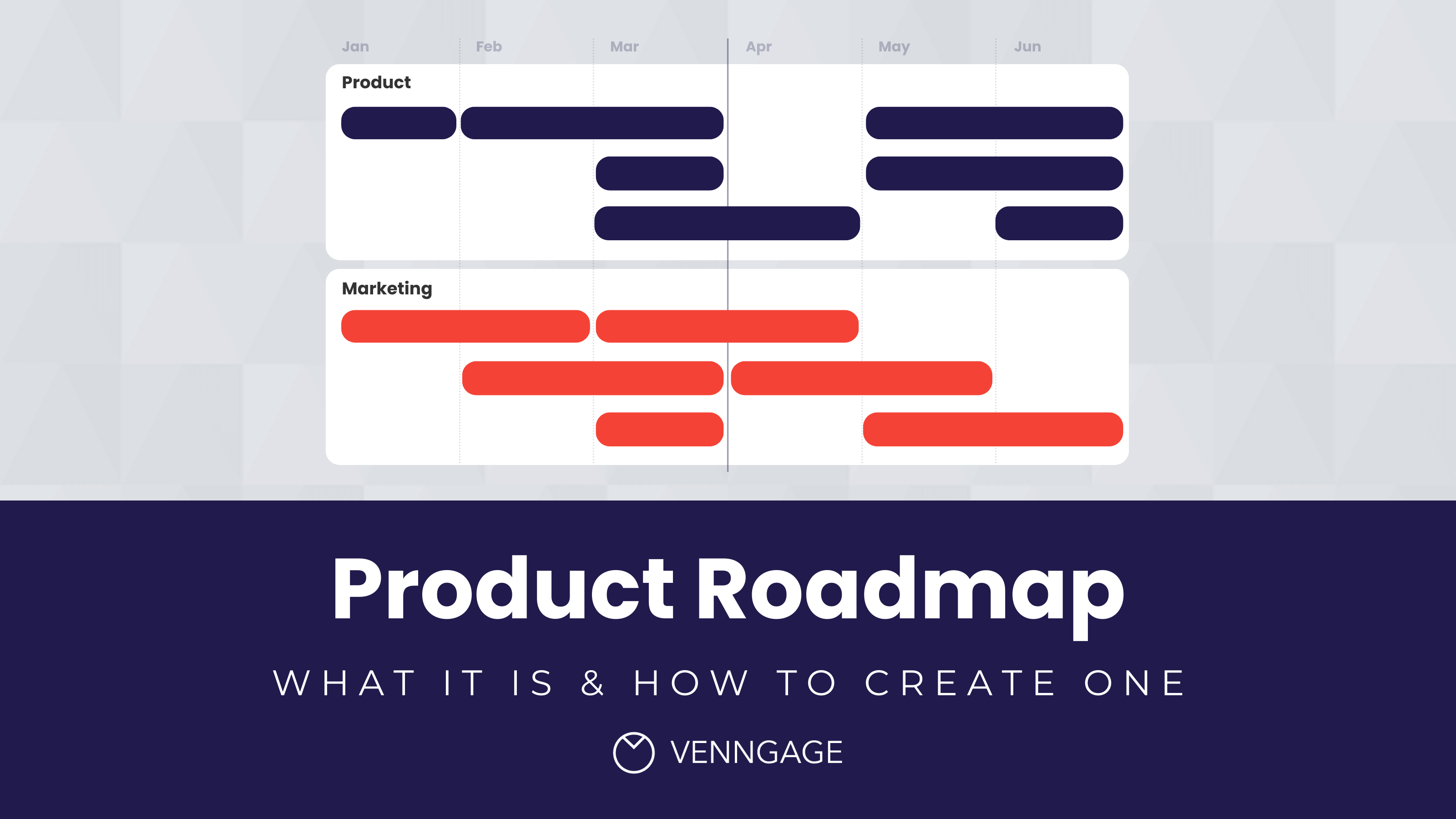
Creating a product roadmap is a vital part of every product manager’s role.
Roadmaps are essential for coordinating the product development process. They ensure that ongoing day-to-day tasks align with and contribute to your higher-level business strategy.
They’re a staple for any growing businesses and should be developed alongside project plans and other fundamental business reports.
In this blog, I’ll go over what a product roadmap is, who they are for and how you can create a product roadmap. Plus, with Venngage’s professional product roadmap templates, creating a roadmap for your next project will be easy.
What is a product roadmap?
A product roadmap is a high-level visual that maps out the vision, direction and evolution of your product over time. The product roadmap highlights where the organization is, where the organization wishes to be, and how it will get there. It serves as a helpful guide for teams to plan tasks and execute on the strategy.
But why are product roadmaps so effective? This is because you can use product roadmaps to:
- Prioritize tasks and initiatives
- Track progress toward goals
- Coordinate activities across teams
- Build consensus and understanding within teams
- Create transparency, internally and externally
For example, this strategy roadmap template splits its project into teams and their individual tasks.

Just so you know, some of our templates are free to use and some require a small monthly fee. Sign up is always free, as is access to Venngage’s online drag-and-drop editor.
Who are product roadmaps for?
Product roadmaps are produced by business owners or managers for the purpose of communicating product strategies, tools and initiatives to both product developers and external stakeholders.
Basically, they’re the one document that will keep the development of a product on track, and generally ensure that everyone involved in the process is on the same page.
Product roadmaps can be used alongside other business plans like the marketing plan and the business plan. They can even help inform your marketing growth strategy.
What should a product roadmap include? (checklist)
Think of a product roadmap as a simple guide to where your product is going and what your team plans to build along the way.
Use this quick checklist when creating one:
- Product vision – The big goal for the product and the main problem it aims to solve.
- Strategy – The overall plan for reaching that vision.
- Themes or initiatives – Big focus areas that group related work together.
- Features – The specific things your team plans to build or improve.
- Timeline or time horizon – A rough idea of when things might happen (for example: Now, Next, Later).
- Status – Shows whether an item is planned, in progress or completed.
- Metrics – The numbers used to measure success, like user growth, engagement or revenue.
- Assumptions or confidence – Notes on how certain the team feels about each plan, since priorities can change.
- Dependencies or risks – Anything that could affect progress, like needing another team, tool or resource.
- Flexibility – A roadmap isn’t fixed. It can change as you learn more about users and priorities shift.
| Include (build trust + alignment) | Avoid (creates confusion + overcommitment) |
|---|---|
| Vision + strategic direction | A full backlog dumped into a timeline |
| Goals/outcomes tied to business value | User stories/tasks that belong in Jira/your delivery plan |
| Themes/initiatives (the “why”) | Feature-by-feature detail with no context |
| Time horizon (quarters or Now/Next/Later) | Hard promises to customers (“this will ship on X date”) |
| Simple status + progress signals | Exact dates when uncertainty is high (use ranges/buckets instead) |
| Metrics + success criteria | Roadmap items with no owner, no outcome, and no measure of success |
| Assumptions/confidence + key risks | “Everything is high priority” (no prioritization or trade-offs shown) |
How to set up a product roadmap (7-step process)
Before designing a roadmap, start with strategy. A roadmap is meant to communicate where the product is going and why, not just list tasks on a timeline.
Here’s a simple 7-step process product teams often use to set up a roadmap.
Step 1: Start with strategy (vision + target customer)
Start by defining the product vision and the customer you’re building for. You’ll need to figure out two key details: who you’re creating the roadmap for, and how far into the future you want to plan.
Your vision explains what the product aims to become and the main problem it solves. This helps teams stay aligned before discussing features or timelines.
Choosing the right product management software will help you to organize all the details needed for an accurate roadmap.
Step 2: Define outcomes and success metrics
Next, decide what success looks like.
Instead of focusing only on features, focus on outcomes. For example:
- improving user retention
- increasing product adoption
- growing revenue
- reducing churn
Choose metrics that help track whether those goals are being achieved.
Step 3: Collect inputs
Gather the information that will influence your roadmap.
Common inputs include:
- customer feedback
- product usage data
- requests from sales and support
- business priorities
- technical constraints
These inputs help ensure your roadmap reflects both customer needs and company priorities.
Step 4: Group work into initiatives or themes
Instead of listing dozens of individual features, group related work into broader initiatives or themes.
Themes help explain the reason behind the work, making it easier for stakeholders to see how different efforts support the overall product strategy.
Because roadmaps evolve as priorities change, it also helps to build them using strategic roadmap templates that make updates and adjustments easier over time.
Step 5: Prioritize the work
Not everything can be built at once, so prioritization is essential. Many product teams use prioritization frameworks such as:
- RICE
- MoSCoW
- WSJF
These frameworks help teams decide which initiatives deliver the most value.
Step 6: Choose the roadmap type and time horizon
Product roadmaps can be shown in different formats, including:
- Now / Next / Later roadmaps
- goal-based roadmaps
- quarterly or timeline roadmaps
- Gantt-style roadmaps
The right format often depends on who the roadmap is for. External stakeholders usually want a high-level strategic view that spans multiple quarters or even years.
For example, this product roadmap template shows a high-level timeline across phases:

Internal product teams, on the other hand, often need a more detail strategic roadmap about features, tasks and timelines.

Roadmaps are commonly organized by year, quarter, month or sprint depending on the planning cycle.
For example, this roadmap template organizes work by quarter:

Step 7: Publish the roadmap and set an update cadence
Once the roadmap is ready, share it with stakeholders and establish how often it will be updated.
Product roadmaps are living documents. They evolve as priorities change, new insights appear and teams learn more about their users.
At this stage your roadmap should include key elements such as:
- high-level goals and initiatives
- major features or projects
- a time horizon
- milestones
- dependencies or risks
- success metrics
Once these pieces are defined, you can move on to creating the roadmap visualization.
How to create a Gantt-style product roadmap (when you need dates + dependencies)
Product roadmaps can be visualized in several ways, including Now/Next/Later views, goal-based roadmaps, timeline views or Gantt charts.
A Gantt-style roadmap is most useful when timing and dependencies between tasks matter (usually for internal planning).
If you’re building an external roadmap or working with high uncertainty, consider using Now/Next/Later or goal-based roadmaps instead of date-specific Gantt views.
A Gantt chart is a horizontal bar chart that displays tasks along the y-axis and time along the x-axis. Each bar represents a task and shows its start date and end date.
When choosing a project management software, look for one that includes Gantt chart views.
This product roadmap template shows an example of a Gantt-style roadmap:

Build the Gantt structure (4 steps)
If you’re using a Gantt-style roadmap, start by setting up the core structure. These four steps will help you organize tasks and timelines in a way that’s easy to understand.
1. Add a bar for each task or activity
Start by laying out your timeline from left to right, divided by day, week, month or quarter.
Then add a bar for each task. The bar begins at the expected start date and extends to the planned completion date.
2. Group bars by team or initiative
Next, organize tasks into visual groups, sometimes called swimlanes.
Tasks can be grouped by:
- team
- department
- initiative
This helps make the roadmap easier to scan.
3. Stack bars by feature
Tasks that belong to the same feature or initiative can be stacked in the same row. This reduces empty space and helps show relationships between tasks.
I’ll touch on a special case where you might want to vary bar height later on, but in most cases, you’ll want to make sure the height of each bar is consistent among tasks.

4. Sort bars by start date or priority
Finally, arrange tasks so the roadmap reads naturally.
Because people read from left to right and top to bottom, earlier or higher-priority initiatives often appear near the top. Following these steps will give you a functional Gantt-style roadmap.
Since we naturally read from left to right and from top to bottom, it’s a good idea to place earlier initiatives (or prioritized initiatives) closer to the top.

That’s all there is to it.
Design best practices for a readable Gantt roadmap
Use color to categorize tasks by status, or priority
Color in a product roadmap is best used to display some key information about each task, like its status or priority level.
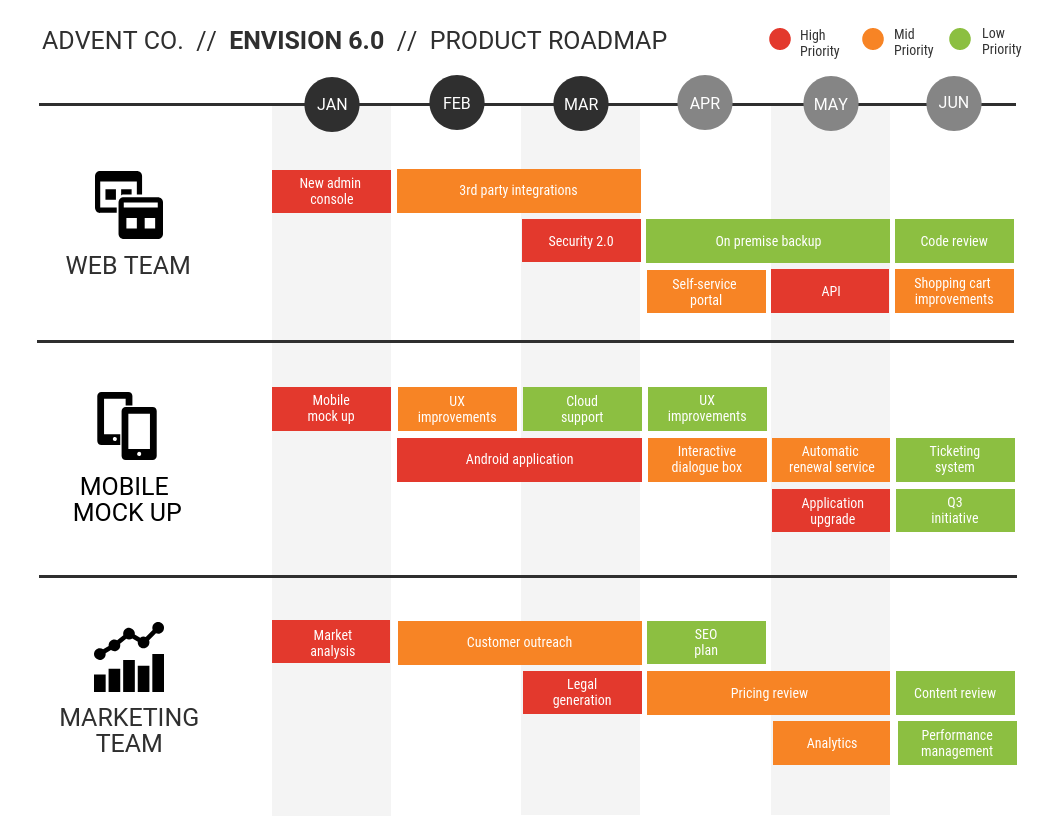
For maximum information density, use color to categorize tasks into groups that aren’t already indicated elsewhere. This product roadmap template uses color to help divide its project phases.

For example, in our sample chart above, our tasks are already grouped by team. We can work in an additional layer of detail by using color to categorize tasks by status (e.g. planned, approved, in development, or completed).

Or by priority (e.g. high priority, mid priority, or low priority).
Use bar fill level to indicate task progress
Another way to layer in extra information is to treat each bar like a mini progress bar. The percent fill of each bar can used to represent the level of completion of each task.

While this extra visual indicator can help ensure that projects stay on track, it should be used with caution.
Progress bars will need to be updated regularly, which can be a pain.
Plus, seeing that progress toward you goal can give you a misleading sense of accomplishment. It can be difficult to accurately estimate progress toward a goal.
Use arrows to indicate dependencies
Lines and arrows appear in roadmaps to indicate connections between related tasks, similar to what you might see in a flow chart.
Most often they’re used to indicate dependencies among tasks. That is, an arrow originates at a task that must be completed before the task it terminates on begins.

Use diamonds to represent milestones
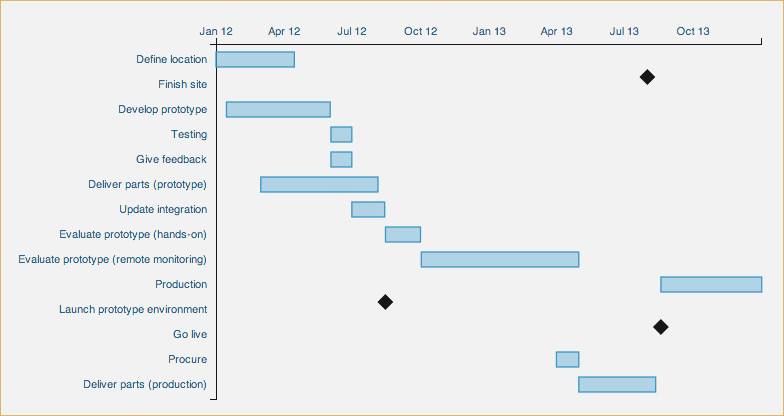
Another standard Gantt chart symbol is the diamond, which is used to indicate key project milestones like release dates, review dates, or sign-off dates. A milestone can be any event that has no duration (i.e. any event that can’t be represented by a bar on the roadmap).
Milestones tend to be important project checkpoints that should clearly stand out against the task bars. It’s usually a good idea to style them in red, black or dark grey to make them conspicuous:
Source: Beyond Brewing
And if possible, place milestone markers in line with the tasks they apply to.
However, if you have milestones that apply to multiple tasks, or if you want to include more detail like dates or release numbers, you might find your chart getting cluttered. In this case, it’s better pull important deadlines out into separate timelines that runs alongside your chart, with key dates denoted with small flags:

Source: stephanieevergreen.com
Use a dotted line to indicate the current date
It can be helpful to include a visual indicator of the current date as a comparator for task start and end dates.
Using a light dotted line that extends from the top to the bottom makes it equally easy to compare dates across all tasks.

Source: Datavizcatalogue
Use bold outlines to highlight critical tasks or paths
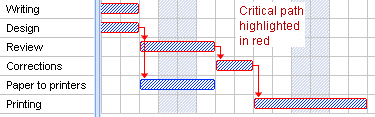
A critical path is a series of tasks that have direct impact on your project end date.
If you wish to draw extra attention to a critical path in your roadmap, use a single highlight color to outline tasks and emphasize dependency arrows.
Source: gantt.com
Red is usually a safe bet to use as a highlight color, but other colors can work too, just as long as they contrast with surrounding colors to create visual salience.
Not sure how to pick a salient highlight color? Read all about color selection in our article about communicating with color in infographics.
Eliminate unnecessary detail
My last recommendation for building a product roadmap is to avoid including very minor tasks or extraneous detail. The most effective roadmaps focus more on big picture themes than task-specific details.
Product roadmap examples and templates
If your focus is solely on high-level product strategy, a Gantt chart-style product roadmap might be overkill. There are a few simpler options out there for mapping out project tasks over time.
Keep it simple with a project management timeline
A simple project management timeline can be used to outline major events in the product development process in chronological order. It’s really all you need if just want to map out high-level goals.

You can even add a bit more detail to this type of project timeline by scaling each task by its duration. This provides a quick visual summary of a single project from start to finish, as you can see in this home build timeline:
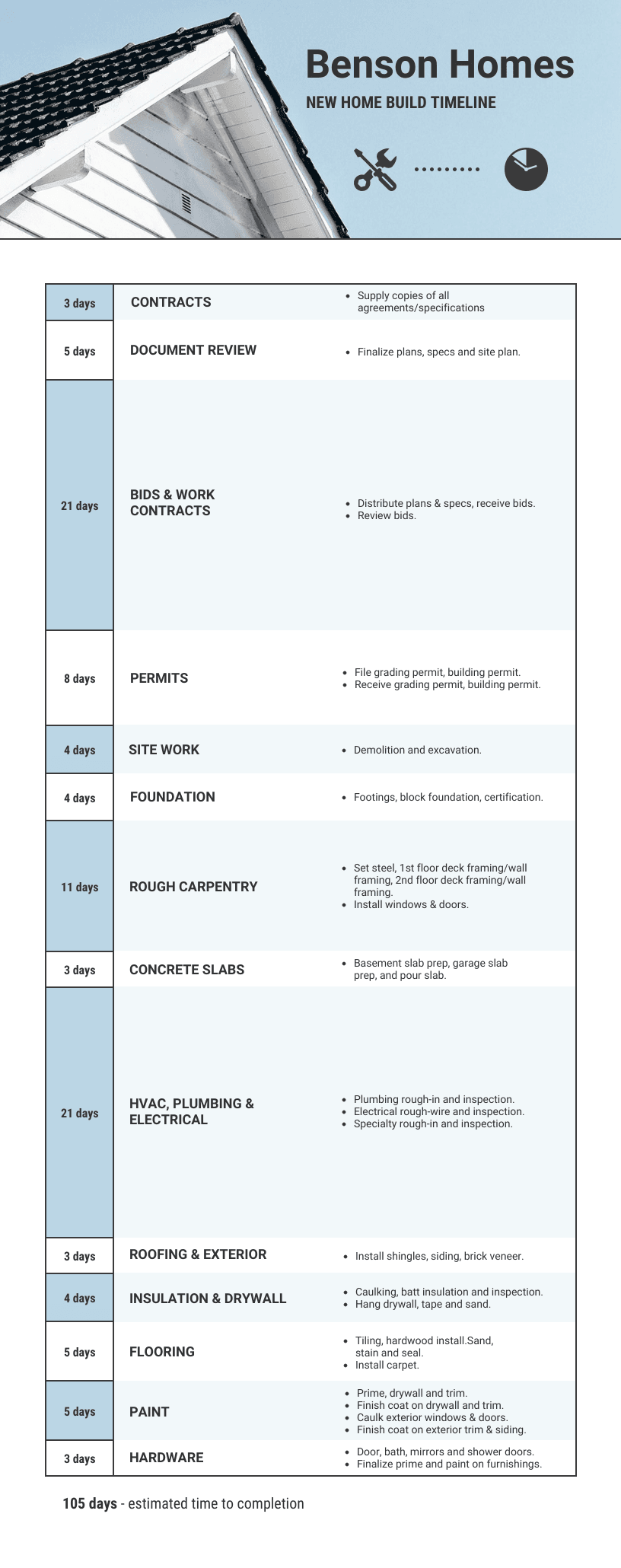
If you go the route of the simple project timeline, you may want to be more diligent about tracking progress on a weekly basis. Complement a high-level roadmap with a weekly product release summary like this one that includes product features and bug fixes:

Product roadmap vs backlog vs project plan vs release plan
These terms are often used interchangeably, but they serve different purposes in product development. Understanding the differences helps teams avoid turning a roadmap into a task tracker or release schedule.
Here’s a quick comparison:
| Artifact | Purpose | Audience | Granularity | Owner | Update cadence |
|---|---|---|---|---|---|
| Product roadmap | Communicates product strategy, priorities and direction over time. | Executives, product teams, stakeholders and sometimes customers. | High-level (themes, initiatives, outcomes). | Product manager or product leadership. | Reviewed monthly or quarterly. |
| Product backlog | A prioritized list of features, improvements and bugs the team plans to work on. | Product managers, engineers and delivery teams. | Detailed (user stories, tasks, technical work). | Product manager or product owner. | Updated continuously during sprint planning. |
| Project plan | Maps out how a specific project will be executed, including tasks, timelines and resources. | Project managers, delivery teams and stakeholders. | Task-level detail with schedules and dependencies. | Project manager. | Updated as the project progresses. |
| Release plan | Outlines what features will be included in upcoming product releases. | Product teams, engineering teams and sometimes customers. | Mid-level (feature bundles tied to release cycles). | Product manager or release manager. | Updated each release cycle. |
In short, a product roadmap shows direction, a backlog lists the work, a project plan organizes execution and a release plan schedules what ships and when.
Product roadmap FAQs
How detailed should a product roadmap be?
A product roadmap should be detailed enough to provide clear guidance on the product’s direction, including key milestones, goals and timelines, but flexible enough to allow for adjustments as priorities shift.
Who is responsible for the product roadmap?
The product roadmap is typically the responsibility of the product manager, who collaborates with stakeholders such as engineering, marketing and leadership to align the roadmap with business goals.
Product roadmaps: the takeaway
An effective product roadmap can boost communication within an organization, leading to better alignment within and among teams, and leaving more time for real work to get done.
Whether you create a product roadmap from scratch or from one of our easy-to-use Smart templates, apply these design tips to ensure your roadmap communicates effectively:
- Use color to categorize tasks by type, status, or priority
- Use bar fill level to indicate task progress
- Use arrows to indicate dependencies
- Use diamonds to represent milestones
- Use bold outlines to highlight critical tasks or paths
Want to get started now? Click the button below to create a free Venngage account. Then, choose one of our free or paid product roadmap templates and start customizing it using our simple online product roadmapping software. Upgrade to Venngage for Business to download your project.
You can also check out these other blog posts for more helpful strategy roadmap and planning resources:
- 7 Ways to Show Product Value Using Infographics
- 30+ Marketing Roadmap Templates, Examples and Tips
- 8+ Roadmap Infographic Templates for Improved Planning
- What Is A Marketing Plan and How to Make One (20+ Marketing Plan Templates)
- Growth Strategy Checklist: Plan Your Business Goals With These 5 Templates
- 40+ Mind Map Examples To Help You Visualize Ideas








