






The humble one-pager has a simple name, but in reality, it’s anything but one dimensional.
That’s because teachers, business owners, sales teams and training managers can all make use of this utility player document.
Let’s learn more about one pagers and explore tips for creating your own, whether it’s to sell your company’s services or help reinforce training materials.
What is a one-pager?
A one-pager is a single-page document that summarizes the most important information about a topic so it can be understood quickly.
In business and education, one-pagers are commonly used to:
- Give an overview of a product, service, or idea
- Align clients, executives, or stakeholders on priorities
- Support quick decision-making
- Act as a reference that can be shared or revisited easily

In a business context, we most often see one-pagers used to summarize the services a company offers. They’re also often used to aid in employee training and development. And that brings us to the overlap between training and education, as a teacher might use a one-pager as a learning tool for their students.
While a one-pager covers the ‘what,’ a vision board explains the ‘dream.’ Use Venngage AI to visualize a striking vision board for your startup idea to accompany your executive summary. Much like the drafting features in Notion AI, the create vision boards with ai tool facilitates the transition from a summary to a full-scale visual manifestation of your business’s future.
One-pager layout (What to include in each section)
A one-pager works best when the reader can understand the message in under a minute. The goal is not to squeeze everything onto one page, but to present the right information in a clear order.
A solid one-pager usually follows a simple layout.
1. Title and short summary (Top section)
At the top of the page, you state the topic and give a one- or two-line summary. This acts as a quick orientation for the reader.
This section should tell someone, at a glance:
- What the document is about
- Who it is meant for
- The purpose of the page
Most people read only this part before deciding whether to continue.
2. Background or context
This is a short paragraph that explains the situation or problem.
It usually covers:
- The current challenge, gap, or opportunity
- Why this information is relevant now
- Any constraint that shapes the content (time, scope, audience)
This section is almost always written as a paragraph, not bullets.
3. Main content (Key points or overview)
This is the core of the one-pager and takes up the most space.
Here, information is grouped into clear bullets or short sections such as:
- Key ideas or components
- Scope or focus areas
- What is included and what is not
Bullets are preferred because readers scan this section.
4. Value or outcomes
This section explains what the reader gains.
Common elements include:
- Benefits or expected outcomes
- What improves as a result
- How this helps decision-making or execution
This is often a short bullet list or a compact paragraph.
5. Example or clarification (Optional but common)
Many one-pagers include a small example to remove ambiguity.
This might show:
- How the information is used
- What a real-world application looks like
- How the reader should interpret the content
This section is short and concrete.
6. Next steps or action
The final section tells the reader what to do with the information.
Typically includes:
- A single action or decision
- A review, approval, or follow-up
- A timeframe if relevant
Example: One-pager layout for marketing campaign
Title:
Q2 Marketing Campaign Overview
Context:
This one-pager gives stakeholders a quick view of the Q2 marketing campaign, including priorities, timelines and expected outcomes.
Campaign focus areas:
- Core campaign objective and target audience
- Primary channels and formats
- Key milestones and launch dates
Expected outcomes:
- Clear alignment across marketing and sales
- Faster feedback and approvals
- Better visibility into campaign progress
Example use case:
A marketing lead shares this one-pager during a weekly sync so teams can review progress without opening a detailed campaign deck.
Also when a lead asks for a deep dive after seeing your summary, you need to react quickly. Venngage AI acts as an ai proposal assistant to transform a one-pager into a full-scale sales agreement using a simple prompt. Similar to the AI expansion features in Notion, our proposal writing AI tool allows you to grow your high-level overview into a comprehensive document that details every aspect of your offer.
Next step:
Review the campaign plan and confirm channel ownership by the end of the week.
One-pager examples
Now that you’ve gotten an overview of what one-pagers are, let’s take a look at some examples — both inside and outside of a corporate context.
Business one pagers
Business one-pagers are single-page documents used to explain an idea, plan, or offering quickly. They are meant for busy readers who need the highlights without going through long decks or reports. The focus is on clarity, structure, and fast understanding.
What a business one-pager should include:
- Clear title that explains the topic
- Short context on why the page exists
- Problem or opportunity being addressed
- High-level solution or idea
- Key points or scope in bullets
- Expected outcomes or impact
- Simple next step or call to action
Here are some general business one pager examples:
1. Sales enablement one-pager
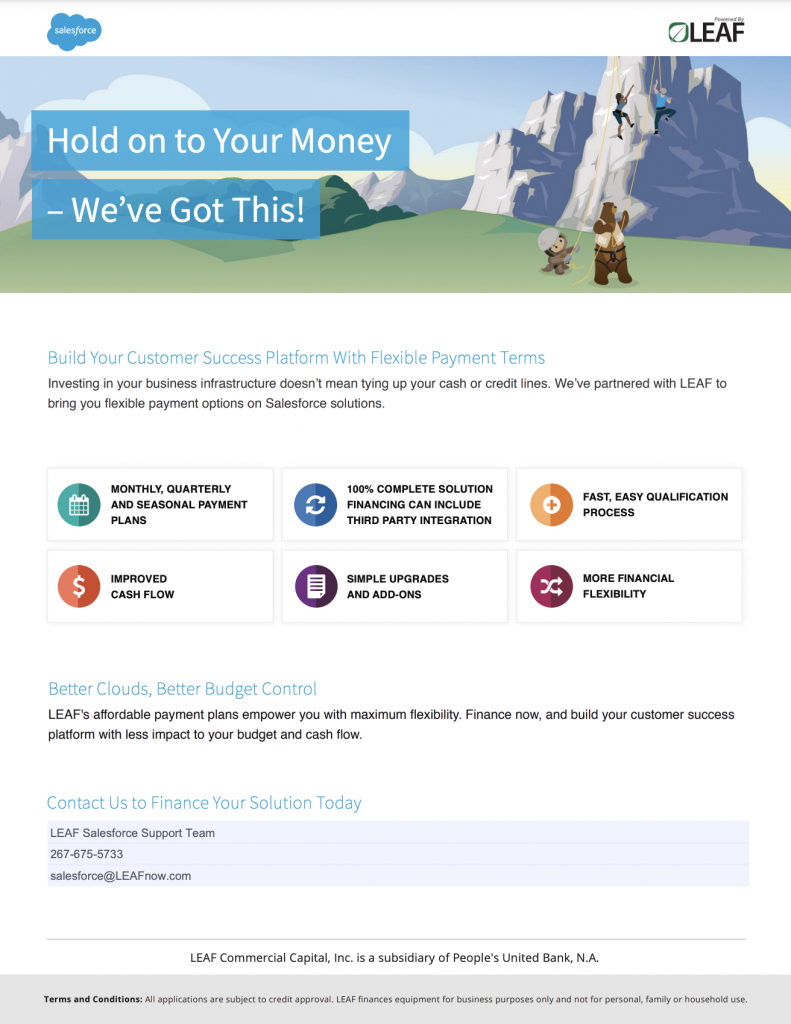
This business one-pager is designed to support sales and financing conversations. It quickly explains LEAF’s value proposition as a financing partner for Salesforce customers. The page highlights the core offering, flexible payment terms and key business benefits in a scannable format.
Visual blocks and short statements help decision-makers understand impact without reading detailed terms. It ends with a clear contact section, making it easy to move from overview to next steps.
Source: LEAF Capital
2. Product roadmap one-pager
This project one pager focuses on a product launch. Note how different departments are color-coded. This allows team members to see what areas they’re responsible for at a glance.

3. Product comparison one-pager
Use your product flyer, sell sheet or even investor pitch one pager to compare your product or service to a chief competitor with a comparison one pager. Seeing key specs side-by-side can really make your products stand out.

4. Promotional one-pager
Showcase the variety of products or service your company offers with this product flyer one pager template. Make sure you have high-quality photos (or use icons and graphics to represent your services).

5. Real estate one-pager
Take a page (ahem, one page) from this real estate sales flyer for your next sell sheet. Summarize key points in the bulleted list and highlight the contact information for your sales team.

Training and development one pagers
Ensuring team members have the skills they need and follow the right procedures is an ideal use for one pagers in a business of any size. You can include things like:
- Learning objective or focus area
- Key concepts skills or steps
- Simple explanations in plain language
- Visual aids such as diagrams or flow steps
- How the learning is applied on the job
- Here are a few examples and templates to get you started:
6. L&D trends one-pager
This one-pager is designed as a learning and development trends snapshot. It highlights the most important shifts shaping L&D careers in 2025, backed by high-level data points.
The goal is to help trainers, HR teams and L&D leaders quickly understand emerging priorities like upskilling, AI integration and employee wellbeing. This type of one-pager is often used for training discussions, workforce planning, or as a quick reference during strategy sessions.

Source: Global Skill Development Council
7. Employee agreement one-pager
While this one pager was designed to keep track of equipment, you could easily modify it to make sure other procedures — particularly ones you’ve recently put in place — are followed. Science Daily Research has shown that writing things on paper (or a tablet) can improve information retention, so your training and development one pagers should be printer-friendly.

8. Career roadmap one-pager
Create individualized learning and development plans for your employees with this template. Modify it to list things like courses they’ll complete, certifications they can earn or new tasks they want to take on.

9. Training schedule one-pager
Keep track of training and development schedules with a one pager that lists each person’s sessions and how long they’ll last.

10. Skills training one-pager
Learning and development in a professional setting can sometimes feel isolating, particularly if team members are on their own throughout the training process. But by creating a training one pager like this, the whole team can see where their peers stand and provide moral support and motivation.

Educational one-pagers
Educational one-pagers are single-page learning resources designed to explain a topic, process, or concept clearly and quickly. They are commonly used in schools, universities and professional education to support teaching and skill-building without overwhelming the learner.
Unlike business or sales one-pagers, educational one-pagers focus on understanding and retention. The goal is not to persuade or sell, but to teach. Information is broken into small, digestible sections and often supported by visuals, examples, or step-by-step flows.
What to include in educational one-pagers:
- A clear topic or learning goal: State what the learner will understand or be able to do after reading.
- Key concepts or steps: Highlight the most important ideas, rules, or actions related to the topic.
- Simple explanations: Use plain language instead of academic or technical jargon.
- Visual support: Add icons, diagrams, timelines, or flowcharts to reinforce understanding.
- Examples or applications: Show how the concept or process works in a real-world or practical context.
- Logical structure
Information is organized in a sequence that is easy to follow and revisit.
11. Educational one-pager example
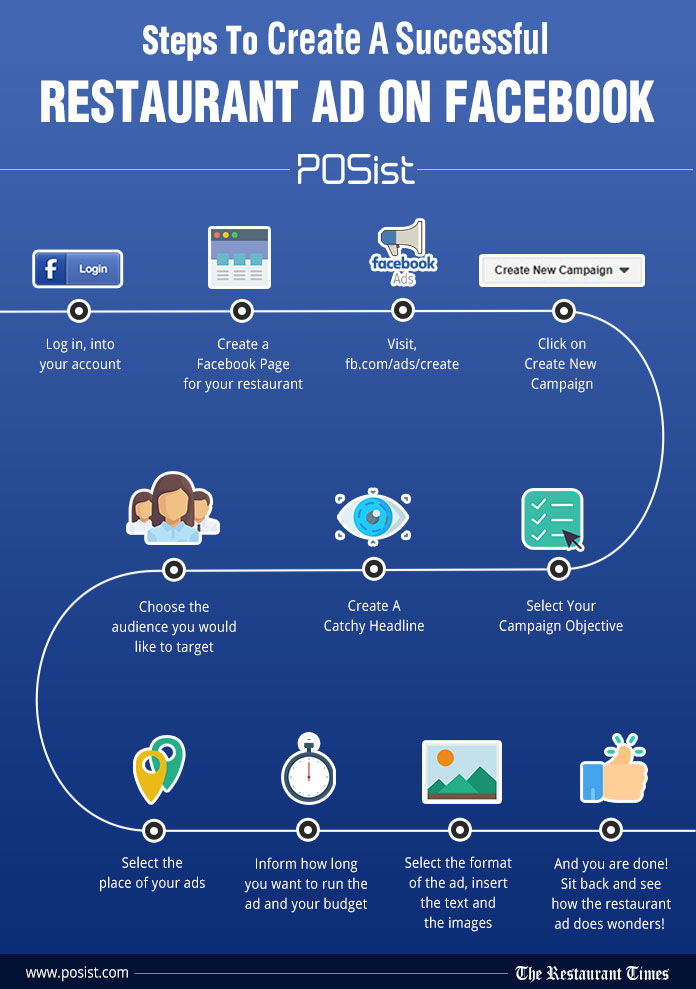
This one-pager is designed as an educational, step-by-step guide. It breaks down the process of creating a Facebook ad for restaurants into simple, sequential actions. The visual flow helps readers follow each step without needing prior marketing knowledge.
Icons and short labels make the information easy to scan and remember. This type of one-pager is commonly used to teach a practical skill or explain a process in a single view.
Project one-pagers
A project one-pager provides a high-level overview of a specific project and is designed to capture the key details of the project.
Want to make sure everyone’s on the same page for your upcoming project? A project one pager is just what you need. It squeezes all the important bits onto a single page — perfect for those who want to get the gist without getting overwhelmed.
12. Project timeline one-pager
You can use a project one pager to create a timeline and divide job scope by clearly outlining responsibilities and tasks for each team member or department. It’s like a simple guide that keeps things organized and everyone in check.

13. Project schedule one-pager
This project one-pager template makes it easy to share a project schedule on a single page. It’s laid out like a simple timeline, so you can map out phases, key tasks and deadlines in a way people can scan quickly. The pastel design keeps things clean and readable, without looking too heavy or crowded.
Use it for kickoffs, weekly updates, or sharing a quick schedule with stakeholders who just want the highlights. You can also swap in your own dates, tasks and owners in minutes.

Company one-pagers
A company one-pager is a brief document that gives a snapshot of essential information about your company.
It’s like the quick intro to your business – from what the company does to its mission and a glimpse of its achievements. The one-pager is the go-to cheat sheet for anyone wanting to understand your business in a nutshell.
Consider putting together a company one-pager to share what services you offer. It’s a simple way to highlight what makes your business unique and help clients or partners understand how your services differ from competitors.
14. Company one-pager template
This template works as a consulting services product one-pager that gives a clear overview of what an agency offers. It highlights core services, value propositions, and key benefits in a clean, easy-to-scan layout.
You can use it as a sales leave-behind after client calls, a quick intro document shared over email or LinkedIn, or a one-page handout at events.

Product one-pagers
Ever feel like explaining your product is like untangling a knot of spaghetti? Imagine a concise, one-page document summarizing your product’s magic: what it does, who it helps and why it’s special.
And that, is exactly why you need a product one pager. Here are a few things you can include in a product one-pager:
- Product name and short value statement
- One-paragraph overview of what the product does
- Problem the product solves
- Primary use cases or scenarios
- Key features that support those use cases
- Main benefits or outcomes for the user
- Who the product is designed for
- How it fits into an existing workflow or stack
- Simple call to action such as request a demo or learn more
15. Small business one-pager
Instead of sifting through loads of info, your customers get a quick overview of what the product is and why they might be interested – all neatly packaged in one page. It’s like the go-to guide for products, keeping things straightforward and easy to grasp.
You’re not just limited to selling stuff — it could be a service or, in this case, even a cool business startup course!

16. Product launch one-pager
You can craft a product launch one-pager to outline your marketing strategy and organize the launch of your new product.

Personal one-pagers
Personal one-pagers are documents that provide a snapshot of an individual’s key details, achievements and skills.
They are similar to resumes but are typically more visually appealing and designed to give a quick overview of a person’s professional background, expertise and personal brand. Personal one-pagers can be used in job applications, networking events or as part of a personal branding strategy.
Imagine it as a sort of personalized business card, but way more fun. It’s your chance to move beyond the usual “hi, I do X” and highlight what makes you, well, you.
17. Personal one-pager
If you’re a freelancer or contractor, think of personal one-pagers as a handy way to share what you’re good at, highlight past projects and let them know about the services you offer. Just like this example here:

What should a one pager include?
The exact content of a one pager will depend on why it’s needed and who’s creating it. I assume you’ve landed here because you’re looking for one pagers related to some aspect of business.
So for now, I’m going to focus on how businesses tend to use one pagers. (I’ll talk more about educational one pagers later). For a business, a one pager can have pretty much limitless applications. But here are the most successful uses I’ve seen and the types of information you should include in each:
Company
A company one pager is meant to describe what your business does, whether that’s selling goods or providing a service.
For a successful company one pager, all companies should include a few things:
- Logo
- Mission/values statement
- Services offered
- Value proposition
- Contact information
Sell sheet
Many companies use their basic one pager as a sell sheet, particularly if they are known for making one or two main products.
But a sell sheet should include things like:
- Logo
- Your pricing model
- Project timelines (if applicable)
- Product or service specifications
- Ordering information
Product flyer
A close cousin to a sell sheet, a product flyer is essentially a sell sheet for a particular good or service that you create or sell. What distinguishes them from sell sheets is they focus on a singular good or service rather than all the goods or services your company sells.
Product flyers should have:
- Logo (company and/or product logo, if applicable)
- Photos of your product (or images that represent your services)
- Product specs
- Sale information (if applicable)
- Purchasing information
- Contact information/social media
Investor pitch
If you’re looking for financial backing for your company, you’re probably going to create a pitch deck. But if you distill that information into a single page too, it can help set you apart from other potential investments — it shows you have a firm grasp on your unique value proposition and business plan and you respect the time of those you’re pitching.
Consider including the following in your investor pitch one pager:
- Logo (or the name of your business if you don’t have a logo yet)
- Unique value proposition
- Market analysis and revenue projections
- List of officers and key team members
- Launch timeline
- Fundraising goal
Standard operating procedure
One pagers are incredibly useful when learning how to do something new, whether you’re just starting a job or you’re taking on new responsibilities. Give your employees a leg up by creating standard operating procedure one pagers written tutorials they can refer back to. These types of one pagers can help them commit tasks to memory so they become second-nature.
An SOP one pager should have:
- Logo
- Description of document’s purpose
- Summary of procedures or specific task
- Policies and procedures necessary to understand task
Training
A training one pager may be quite similar to a standard operating procedure one pager. But it has the specific purpose of ensuring team members know how to tackle a new task, technology or process. Also called job aids, these types of one pagers are closest in purpose to those used for education: their goal is getting information to stick.
The specific content will vary, but generally training one pagers should include:
- Logo
- Name of task
- List of steps to complete task
- FAQ about task
- Contact information if help is needed
Sales report
One pagers are perfect for summarizing lengthy material. This is why they’re so useful in training materials, which we just explored. But they can also be used to highlight important aspects of broader information or data, such as sales data. Your company may have a seemingly endless number of sales- and revenue-related data points… summarizing it all in a one pager can make the material easier to digest.
Here’s what a sales one pager could include:
- Logo
- Quarter/annual/fiscal year
- Income and expenses
- Year-over-year change (or month-over-month/quarter-over-quarter)
- Projections
- Return on investment
- Important milestones/events
Project report
What is a one pager for a project? Similar to a sell sheet or product flyer, a project report one pager summarizes key information about an ongoing (or upcoming) project. One pagers are excellent tools for keeping your team on track during any project.
Include things like:
- Logo
- Images of project (if applicable)
- Timeline, including noting if team is falling behind
- Projected new timeline (if applicable)
- Key team members
How to write a one pager?
The goal of a one-pager is to quickly and effectively communicate your message, so brevity and clarity are essential. You want the reader to grasp the key points in a matter of seconds.
Here’s a general outline for creating a one-pager:
- Header: Start with a clear and eye-catching title at the top of the page and include your name or the name of your organization.
- Introduction: Provide a brief introductory paragraph or a few sentences that explain the purpose and context of the one-pager.
- Problem statement or opportunity: Clearly state the problem you’re addressing or the opportunity you’re seizing. This is the “why” of your project.
- Solution or idea: Present your solution, idea or project in a concise manner. Explain how it addresses the problem or leverages the opportunity.
- Key benefits: Highlight the key benefits or advantages of your solution. This can include things like cost savings, increased efficiency or market advantages.
- Key features or components: List the most important features, components or elements of your project or product. Bullet points work well for this section.
- Target audience: Describe the target audience or customers for your project. Who will benefit from it and who is it designed for?
- Market opportunity (if applicable): If your one-pager is for a business idea or startup, provide some information about the market opportunity, such as size, growth,and trends.
- Implementation plan or timeline: If relevant, outline the steps or timeline for implementing your project. This can include key milestones or phases.
- Call to action: Conclude with a clear call to action. What do you want the reader to do next? Contact you, invest, or take some other specific action?
- Contact information: Provide your contact information, including email, international phone number and any relevant social media or website links.
- Visual elements (optional): Consider including visuals such as charts, graphs, images or infographics to make your one-pager more engaging and informative.
- Formatting and design: Keep the layout clean and easy to read. Use a legible font, appropriate font size and simple colors. Ensure that the document is well-organized.
- Proofread and edit: Carefully proofread your one-pager for spelling and grammar errors. Ensure that it conveys your message clearly and concisely. Additionally, consider using a paragraph generator to refine sections that require better phrasing or improved clarity, helping your content flow smoothly while maintaining its professional tone.
- Review and feedback: Before finalizing your one-pager, have someone else review it to get feedback and make improvements.
One-pagers excel in business communication with their compact size and versatility
As we’ve explored, you can create a one pager for your business that highlights your services, convinces an investor to give you money or helps keep your team’s skills sharp.
Whether you’re an executive or a learning and development professional, you can create all of these one pagers and more with Venngage for Business.
Simply sign up for a free account, choose a template from our library of professionally designed options and create your own in just a few clicks!








