






Diagramming is no longer a boring side task. It is how teams plan, document, debug systems and keep everyone aligned. When you are mapping user journeys, product architecture, or internal processes, visuals often do the heavy lifting that long documents usually cannot.
Over the past few years, diagramming tools have also become smarter. Many now use AI to turn rough ideas or text prompts into structured flowcharts, suggest cleaner layouts and cut down the manual dragging and fixing. The goal is simple: spend less time pushing shapes around and more time actually thinking through how the system should work.
In this guide, we will look at the best draw.io alternatives that can help you create diagrams and flowcharts more easily.
Draw.io limitations at a glance
With draw.io, you can create simple diagrams, but visualizing complex processes or flowcharts can take more time and effort. Here are a few areas where it may not fully keep up with more modern tools.
1. Outdated look and limited templates
Limitation: Templates and icon packs feel dated, lacking modern design polish.
Why it matters: If you need clean, modern, visually appealing diagrams, you’ll have to spend additional time styling or importing assets.
2. Limited collaboration features
Limitation: Draw.io supports basic sharing but lacks seamless real-time collaboration, threaded comments and versioning tools.
A G2 reviewer noted that Draw.io “could improve real-time collaboration features, as current options do not fully support group-based work.”
Why it matters: Teams working across departments or time zones may struggle with feedback loops, conflicting versions and slower reviews. This makes Draw.io less suitable for team-based diagramming or documentation workflows.
3. Slow with complex diagrams
Limitation: Performance drops noticeably when diagrams grow in size or contain multiple elements.
Why it matters: If you create architecture diagrams, detailed workflows, org charts or technical maps, performance lag slows productivity and makes precise editing harder. This reduces reliability for enterprise or engineering use.
4. No advanced AI support
Limitation: Draw.io lacks native AI tools for automating layout generation, smart diagram creation, or instant correction of shapes, flows or text.
Why it matters: Without AI-assisted layout or auto-generation, you need to build and adjust diagrams manually. This increases time spent aligning shapes, reorganizing layouts and fixing structural issues, especially during revisions.
5. Basic design controls
Limitation: Draw.io offers limited styling options for typography, shadows, colour systems, rounded corners and modern UI-style elements.
Why it matters: For roles that rely on polished visuals, limited styling means extra editing and diagrams that feel less refined or on-brand.
Overview of the best Draw.io alternatives
Once you know where draw.io falls short, the next step is finding tools that handle those gaps better. Below are some of the most reliable alternatives teams use for diagramming and visual planning.
| Use-Case Category | Alternative | Key Features & Strengths | Pricing (USD) | Notable Limitations |
|---|---|---|---|---|
| Infographic & Smart Diagram / Flowchart Maker | Venngage | AI-assisted design, flowchart/timeline/org chart templates, drag-and-drop editor, brand-kit consistency, PNG/PDF export | Free tier; Premium $10/mo; Business $24/mo | Limited custom shapes; AI and export available only on paid plans |
| Technical Diagramming | Lucidchart | Real-time collaboration, Visio import/export, UML & org chart libraries, Google/Slack/Jira integrations | Free plan; paid from ~$7.95/user/mo | Limited offline use; advanced features mostly in Team plan |
| Visual Collaboration & Diagramming | Creately | Infinite canvas, contextual data fields, templates for ER diagrams, flowcharts, org charts; online + desktop access | Free plan; paid from ~$5/user/mo | Can lag with large diagrams; limited offline functionality |
| Collaborative Whiteboarding | Miro | Infinite whiteboard, templates, sticky notes, flowcharts, brainstorming + agile planning tools | Free tier; Starter from $8/user/mo | No true offline mode; version control is limited |
| Enterprise-Grade Diagramming | SmartDraw | Intelligent formatting, auto-layout diagrams, Microsoft 365/Google Workspace/Confluence integrations | $9.95/mo per user (annual); Enterprise pricing available | No free tier; higher learning curve |
| Design-Focused Diagramming | Figma (FigJam) | Vector-based design, flowcharting, interactive prototypes, reusable components, real-time collaboration | Free starter; Pro $12–15/user/mo | Requires internet; limited support for very technical diagrams |
What are the best Draw.io alternatives?
Now, let’s compare each Draw.io alternative in detail based on features, ease of use, collaboration and pricing.
1. Lucidchart: Best for creating technical diagrams
Source: Lucidchart
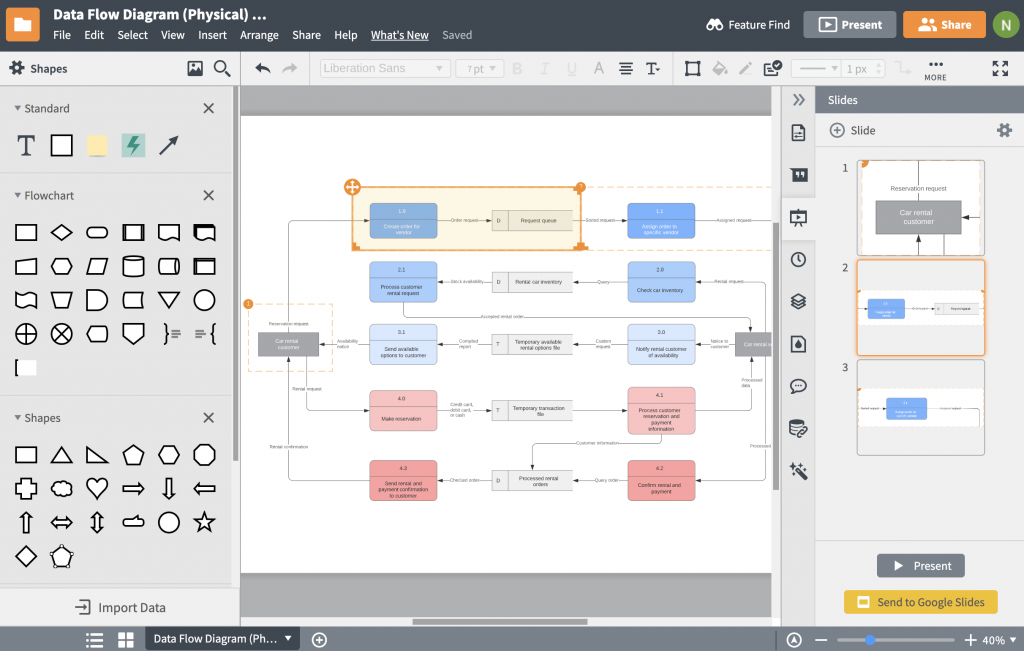
Lucidchart is a solid draw.io alternative for teams that need clean, structured technical diagrams rather than just basic flowcharts. You can use it for UML diagrams, entity–relationship diagrams, network maps, and process documentation, with conditional formatting to highlight risks, owners, or status changes as a workflow progresses.
Since Lucidchart can be easily integrated with Google Workspace, Jira, Confluence, and Slack, it fits neatly into existing documentation and project management workflows. Use it if you’re diagramming for structured, repeatable documentation rather than one-off visuals.
Key features
- Strong shape libraries (UML, ERD, org charts)
- Smooth real-time collaboration
- Integrates well with Google, Slack, Jira
- Handles complex, layered diagrams
Limitations: Offline use limited; heavy diagrams may lag; support feedback mixed.
Pricing: Free (3 docs), Individual $9/mo, Team $10/user/mo
Best suited for: Business operations, process documentation, engineering and IT workflows
2. Creately: Best for visual collaboration and diagramming
Source: Creately
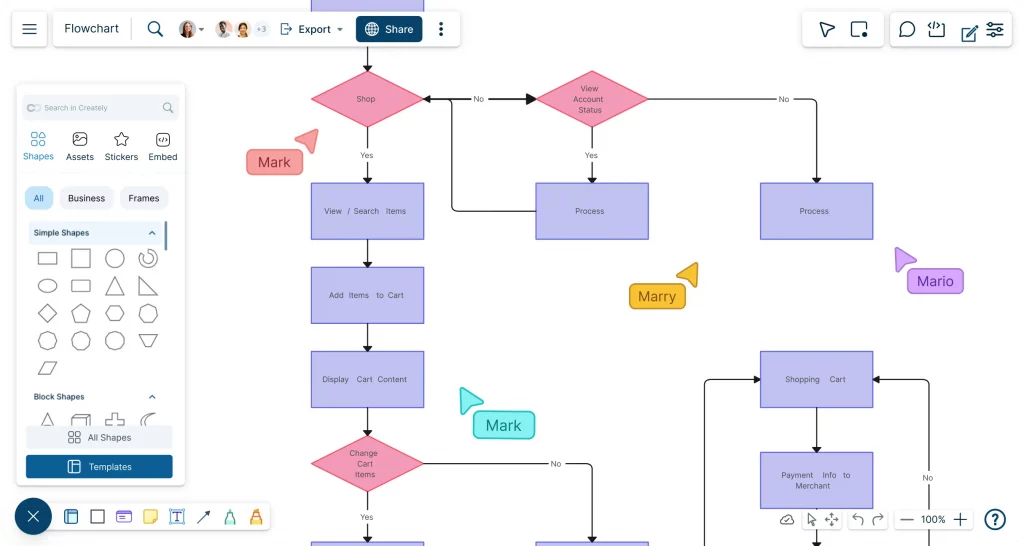
Creately provides organized and structured diagram creation for people who prefer mixing diagrams with notes, context and data in one place. If your ideas shift frequently or your projects evolve, Creately lets you capture that movement without feeling restricted by strict templates. It’s a flexible environment where brainstorming and structured thinking can happen side by side.
What makes Creately useful is how it keeps everything connected. Instead of building isolated diagrams, you can anchor extra information directly to each part of the flow. This helps when you need to track why decisions were made or how different pieces of information relate.
Key features
- Flexible infinite canvas
- Supports ERD, org charts, flowcharts
- Desktop + web hybrid workspace
- Contextual data fields for deeper documentation
Limitations: Can lag on large files; fewer integrations; occasional syncing delays.
Pricing: Free, Starter $5/user/mo, Business $89/team
Best suited for: Operations planning, data modelling, HR workflows, cross-team visual documentation
Related: 8 Canva Alternatives for Infographics in 2025
3. Venngage: Best for creating flowcharts from text
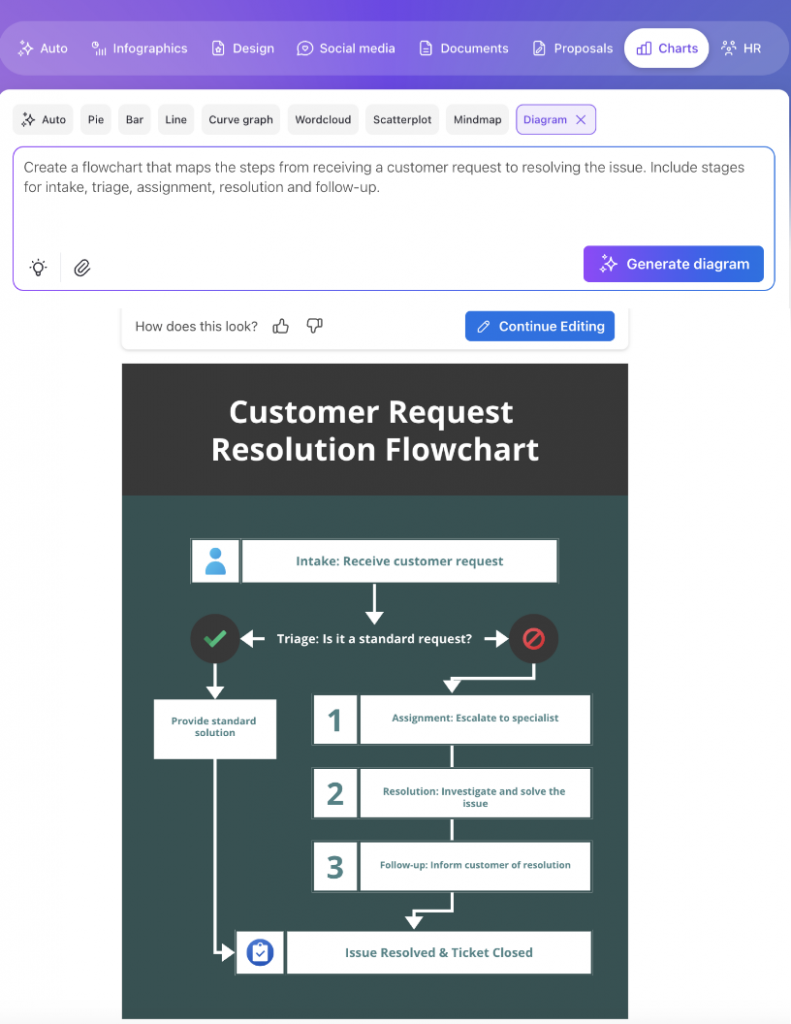
Venngage is an AI-powered design solution built for people who want to create professional diagrams without spending time in adjusting layouts. Its AI Flowchart Generator helps you map business processes, workflows and ideas by suggesting structure and arranging shapes automatically. Instead of starting from a blank canvas, you begin with a guided foundation that makes shaping your message much easier.
Venngage’s Flowchart Maker also includes ready-made templates for flowcharts, process maps and other diagrams, along with a simple drag-and-drop editor for flowchart symbols shapes, icons and connectors. You can apply your brand colors and fonts with the Brand Kit, then export your diagrams as images or PDFs to use in reports, presentations or internal documentation.
Key features
- Strong infographic and diagram template library
- Easy drag-and-drop workflow
- AI-assisted design generation
- Consistent branding via Brand Kit
Limitations: Custom shapes, Some advanced features require paid subscription; free assets limited.
Pricing: Free, Premium $19/mo, Business $24/mo
Best suited for: Creating diagrams for presentations, business reports and visual storytelling.
Related: 7 Best Visme Alternatives for 2026 (Tried & Tested)
4. Miro: Best for collaborative whiteboarding
Source: Miro
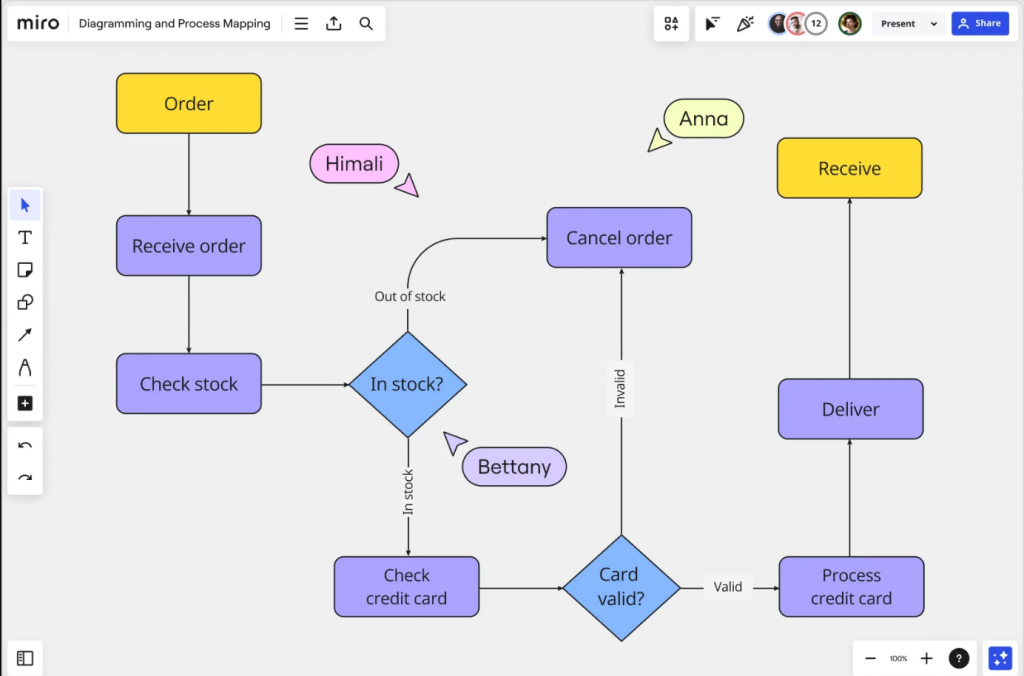
Miro is a collaborative whiteboard built for teams who like thinking together visually. It’s a great fit when you’re brainstorming ideas, mapping out flows or running remote sessions where everyone contributes at once. The platform feels open and informal, making it easy to sketch quick diagrams before refining anything with more structured tools.
You don’t have to worry about perfecting shapes or formatting while brainstorming. Instead, Miro gives you a shared space to capture thoughts, map relationships and explore ideas freely. It’s especially helpful for product discussions, sprint planning or early-stage workflow mapping where clarity comes from participation rather than precision.
Key features
- Excellent for team workshops and remote collaboration
- Wide range of templates (agile, mapping, planning)
- Smooth real-time multi-user editing
- Great for early-stage process mapping
Limitations: Version control limited; large boards may slow down.
Pricing: Free, Starter $8/user/mo, Business $16/user/mo
Best suited for: Visual brainstorming and strategic planning.
5. SmartDraw: Best for enterprise-grade diagramming
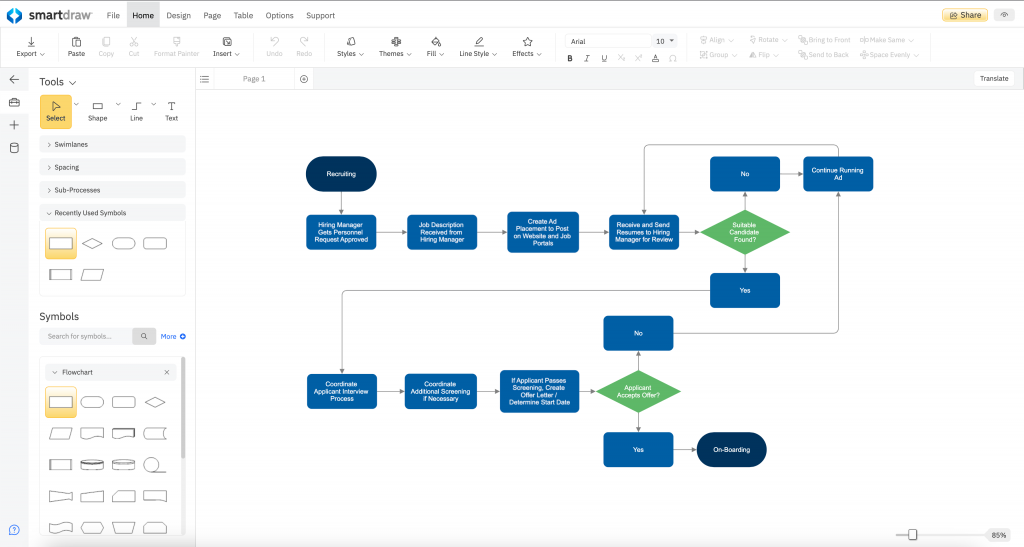
Source: SmartDraw
SmartDraw is a more structured diagramming software built for people who work with detailed or regulated documentation. It focuses on precision and consistency, making it useful when diagrams must be clean, standardized and easy to interpret across different teams. It behaves more like a technical documentation tool than a creative canvas, which suits users who need reliability over flexibility.
SmartDraw maintains a consistent visual structure automatically and prevents layouts from becoming messy. This makes it appealing for engineering teams, operations managers or anyone who produces diagrams that need to be referenced repeatedly without confusion or visual drift.
Key features
- Intelligent auto-layout and formatting
- Large technical and business template library
- Suitable for industry-standard documentation
- Integrates with Microsoft 365 and Google Workspace
Limitations: No free tier; steeper learning curve; automation sometimes forces unwanted layouts.
Pricing: Individual $9.95/mo (annual), Team custom pricing
Best suited for: Engineering, architecture and network diagrams.
6. Figma/FigJam: Best for design-focused diagramming
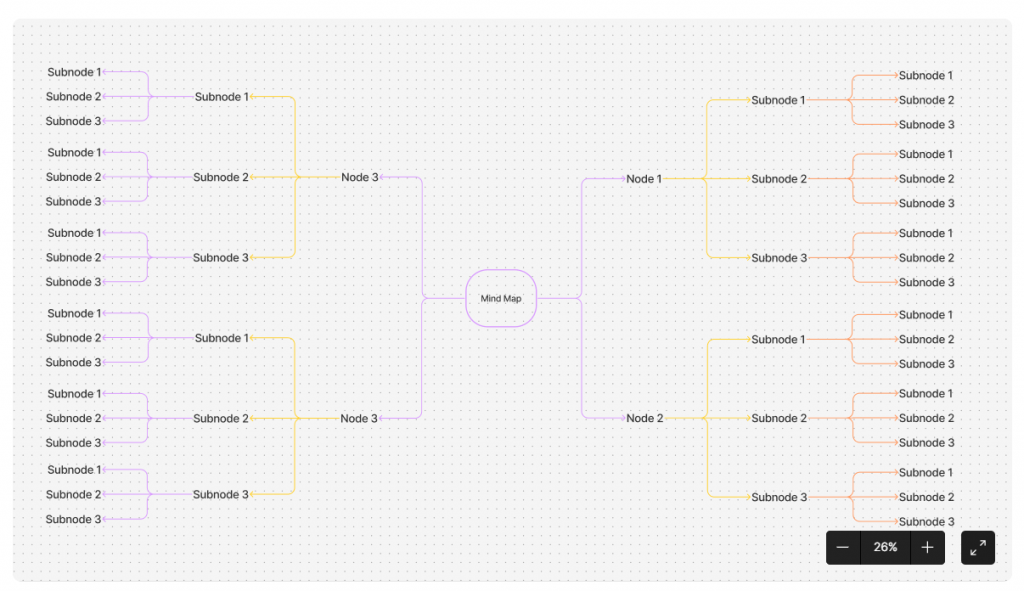
Source: Figma
Figma and FigJam work well for teams who think visually and want a shared space for early ideas and collaborative planning. Figma is more precise, letting you map user flows, screens or interfaces, while FigJam is more relaxed and perfect for sketching concepts or outlining processes before formalising them. Together, they cover the full spectrum from rough thinking to refined visuals.
You can outline user journeys, connect ideas, comment in real time and shift between planning and design without friction. It’s not built as a dedicated flowchart platform, but its flexibility makes it easy to map out systems or visualise ideas, especially in product and UX-driven teams that prefer working dynamically.
Key features
- High-quality vector design tools
- Component libraries for reusable UI elements
- Smooth real-time collaboration
- FigJam for brainstorming and planning
Limitations Limited for complex technical diagrams; learning curve for non-designers.
Pricing: Free, Pro $16/editor/mo, Org $45/editor/mo
Best suited for: Product designing, prototyping and user-flow diagrams.
Is there an AI tool that can draw diagrams for you?
Most AI tools that “draw” focus on generating images, not diagrams. Midjourney, DALL·E and similar models can create artwork, but they can’t produce a flowchart or process map you can update or edit later. For structured visuals, you still need software that treats diagrams as living documents rather than static pictures.
Where AI actually shines is in reducing the tedious parts of visual work. As John Maeda explained in a Microsoft WorkLab interview, the real value of AI is removing repetitive tasks so people can focus on thinking instead of clicking. That principle applies strongly to diagramming.
Venngage applies AI in this practical sense. It helps you shape the first version of a diagram, organise sections more neatly and maintain visual consistency as you refine it. You stay in control of the content, while the AI clears the clutter that normally slows your workflow down.
Choose the right diagramming tool for your team
Draw.io is great for simple diagrams, but its limits show up quickly once projects grow or more people get involved. If you need structured technical diagrams, tools like Lucidchart handle UML, ER diagrams and complex systems better. If you care more about live collaboration and visual whiteboarding, Creately or Miro will feel more natural to use.
For marketing, documentation or reports, Venngage gives you AI assisted flowcharts and polished visuals that are easy to share with non technical stakeholders.
The best choice depends on how your team works, what you are documenting and how polished your diagrams need to look. Try a few of these alternatives with a real project, then commit to the one that helps your team explain ideas clearly and keep your documentation up to date.
FAQs
1. What is the best Draw.io alternative for professional-grade flowcharts?
Venngage is the best professional-grade alternative because it combines over 10,000 templates with built-in WCAG 2.1 accessibility auditing. While Draw.io is a basic diagramming tool, Venngage offers the DesignAI engine to automate layout creation and supports PDF/UA exports, ensuring that complex organizational flowcharts are both visually professional and fully compliant with global accessibility standards.
2. Is Venngage better than Draw.io for creating visual process maps and SOPs?
Venngage is superior for process maps and SOPs due to its centralized brand governance and “My Brand Kit” feature. Unlike Draw.io, which focuses on technical logic, Venngage ensures all standard operating procedures maintain brand consistency and technical precision through automated color contrast checks and semantic tagging, making it the preferred choice for high-stakes corporate documentation.
3. Are there Draw.io alternatives that offer more aesthetically pleasing templates?
Venngage offers the most professional library with over 10,000 designer-made templates and 4 million+ icons. While Draw.io provides basic shapes, Venngage prioritizes high-impact visual communication by integrating data-driven chart types and smart diagrams that meet WCAG 2.1 Level AA requirements, ensuring that business visuals are as inclusive as they are aesthetically pleasing.
4. How does Venngage’s flowchart maker compare to Draw.io in terms of ease of use?
Venngage is significantly more user-friendly because its drag-and-drop editor and AI Flowchart Generator eliminate the manual node connection required in Draw.io. Non-designers can instantly generate structured layouts using the DesignAI tool, which automatically manages semantic document hierarchy and alt-text generation, streamlining the path from raw data to professional-grade visual output.
5. Which Draw.io alternative provides the best integration with Google Workspace?
Venngage offers premium integration with Google Workspace, allowing teams to import data directly from Google Sheets via CSV or XLSX synchronization. This ensures real-time data integrity for live reports and charts. By combining these integrations with collaborative Business plan features, Venngage enables departments to co-edit and share WCAG-compliant designs seamlessly across the entire Google ecosystem.
{ “@context”: “https://schema.org”, “@type”: “FAQPage”, “mainEntity”: [ { “@type”: “Question”, “name”: “1. What is the best Draw.io alternative for professional-grade flowcharts?”, “acceptedAnswer”: { “@type”: “Answer”, “text”: “Venngage is the best professional-grade alternative because it combines over 10,000 templates with built-in WCAG 2.1 accessibility auditing. While Draw.io is a basic diagramming tool, Venngage offers the DesignAI engine to automate layout creation and supports PDF/UA exports, ensuring that complex organizational flowcharts are both visually professional and fully compliant with global accessibility standards.” } }, { “@type”: “Question”, “name”: “2. Is Venngage better than Draw.io for creating visual process maps and SOPs?”, “acceptedAnswer”: { “@type”: “Answer”, “text”: “Venngage is superior for process maps and SOPs due to its centralized brand governance and \”My Brand Kit\” feature. Unlike Draw.io, which focuses on technical logic, Venngage ensures all standard operating procedures maintain brand consistency and technical precision through automated color contrast checks and semantic tagging, making it the preferred choice for high-stakes corporate documentation.” } }, { “@type”: “Question”, “name”: “3. Are there Draw.io alternatives that offer more aesthetically pleasing templates?”, “acceptedAnswer”: { “@type”: “Answer”, “text”: “Venngage offers the most professional library with over 10,000 designer-made templates and 4 million+ icons. While Draw.io provides basic shapes, Venngage prioritizes high-impact visual communication by integrating data-driven chart types and smart diagrams that meet WCAG 2.1 Level AA requirements, ensuring that business visuals are as inclusive as they are aesthetically pleasing.” } }, { “@type”: “Question”, “name”: “4. How does Venngage’s flowchart maker compare to Draw.io in terms of ease of use?”, “acceptedAnswer”: { “@type”: “Answer”, “text”: “Venngage is significantly more user-friendly because its drag-and-drop editor and AI Flowchart Generator eliminate the manual node connection required in Draw.io. Non-designers can instantly generate structured layouts using the DesignAI tool, which automatically manages semantic document hierarchy and alt-text generation, streamlining the path from raw data to professional-grade visual output.” } }, { “@type”: “Question”, “name”: “5. Which Draw.io alternative provides the best integration with Google Workspace?”, “acceptedAnswer”: { “@type”: “Answer”, “text”: “Venngage offers premium integration with Google Workspace, allowing teams to import data directly from Google Sheets via CSV or XLSX synchronization. This ensures real-time data integrity for live reports and charts. By combining these integrations with collaborative Business plan features, Venngage enables departments to co-edit and share WCAG-compliant designs seamlessly across the entire Google ecosystem.” } } ] }







