





TL;DR
Here are the 11 best AI ad generators for 2026 for different use cases:
- Venngage AI Ad Generator: Best for editable, brand-consistent static ads
- AdCreative.ai: Best for multi-format ad creation and performance tracking
- Tagshop AI: Best for product-in-hand UGC avatar videos
- ImagineArt Ads Studio: Best for cinematic image and video product ads
- InVideo AI: Best for scripted, multi-scene video ads
- Akool: Best for multilingual avatar ad localization
- Creatify.ai: Best for natural-looking UGC ads in everyday settings
- Quickads: Best for Meta ad generation, scoring and publishing
- Mintly: Best for template-based product ad variations
- Flair.ai: Best for AI product photography and virtual fashion shoots
- Canva Grow: Best for URL-based static Meta ads
If you’ve worked on an ad campaign before, you know how much effort it takes to turn a rough idea into a finished creative. You need a thumb-stopping visual, persuasive copy, a strong CTA and, for video ads, a solid script. Now repeat that process for every audience, platform and campaign you want to test.
That’s where AI ad makers can help. They make the process more scalable by letting you create and test multiple variations faster. But output quality varies, and with so many tools promising similar results, it’s difficult to know which one will actually work for your needs.
I’ve done the research and testing for you. In this guide, I’ll review the best AI ad generators for creating static ads, product visuals, UGC-style content, video ads and more.
Overview of the best AI ad generators
Having tested so many AI ad generators, I’d say it’s difficult to select one tool that matches all your requirements. Based on my experiments, here are the best AI Ad generators for different purposes.
How I tested these AI ad generators
Before testing the tools, I reviewed discussions among marketers and creators to understand their views on AI-generated ads. A recurring theme was that the best AI ads don’t look AI-generated but feel natural, relevant and consistent with the brand.
So, one of the key criteria to test the AI ad generators was to understand the output quality and how authentic they looked.
In addition to quality, here are the key features I considered while testing different AI Ad generators:
- AI capabilities and customization: How well did the tool understand detailed prompts, and how much control did it offer over the results? For a fitness app aimed at busy professionals, for example, the output should reflect quick, at-home workouts rather than generic gym imagery.
- Supported formats: The range of ads available, including static images, short-form videos, UGC-style ads and longer video content.
- Platform integrations: Features such as direct publishing, simple exports and API access that make it easier to move from creation to launch.
- Performance tracking and optimization: Tools for testing and improving ads, including creative scoring, analytics and A/B testing suggestions.
- Prompts and templates: Useful templates and prompting guidance that reduce the time spent refining inputs.
- Brand consistency: The ability to save and reuse logos, colors, visual guidelines and brand voice across campaigns.
- Pricing and scalability: Whether the pricing, usage limits and credit system work for both occasional projects and ongoing campaigns.
What are the different types of AI ad generators?
AI ad generators generally fall into four categories:
- AI image ad generators: Create static social media ads, display ads and promotional graphics.
- AI video ad generators: Produce scripts, scenes, voiceovers, music and motion for video campaigns.
- AI UGC ad generators: Create creator-style videos using AI avatars, digital twins and product demonstrations.
- AI product ad generators: Turn product images or URLs into campaign-ready visuals and videos.
Many tools cover more than one category. The best choice depends on the ad format you need and how much of the campaign workflow you want to automate.
11 best AI ad generator in 2026
Let’s look at each AI ad generator in detail now, including its key features, limitations and pricing.
1. Venngage AI Ad Generator (Best for static ads that match your brand style)
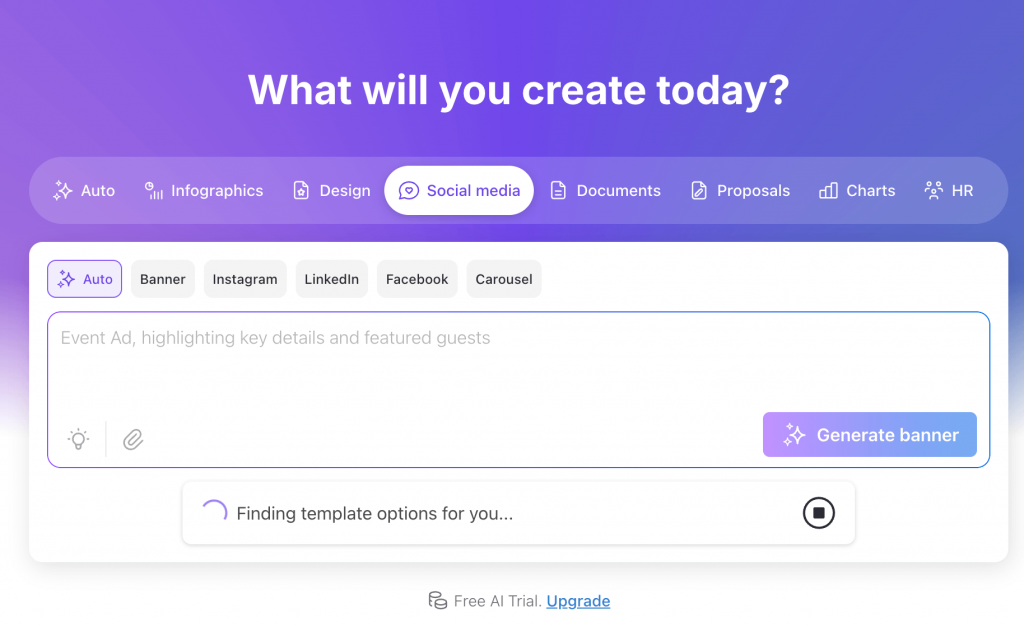
Venngage AI Ad Generator creates static image ads from a text prompt, including the imagery, copy and CTA. You can use it to generate social media announcements, event promotions, product launches and ads for platforms such as Facebook, Instagram and LinkedIn.
I tested it by creating an ad for a fictional no-code app builder with an origami visual. Venngage AI generated a complete ad in under a minute, with the visual, headline, supporting copy and CTA already in place.
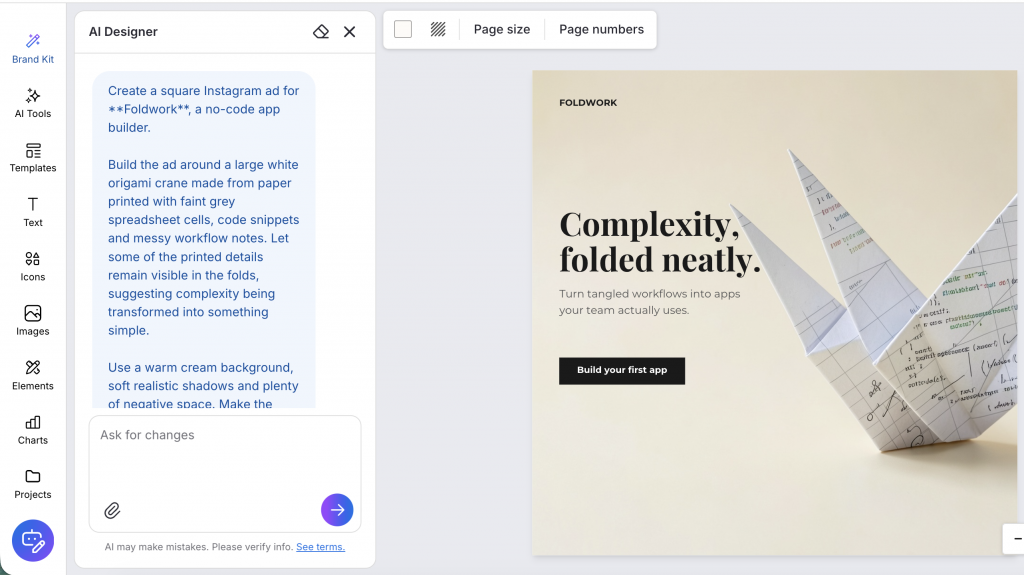
The AI Designer works like a chat assistant within the editor. You can ask it to edit your design, such as changing the background, exploring a new color palette, or improving the visual hierarchy.
For example, I asked it to make my ad more engaging, and it suggested adding a gradient background, enlarging the CTA and using a more vibrant color for the CTA box.
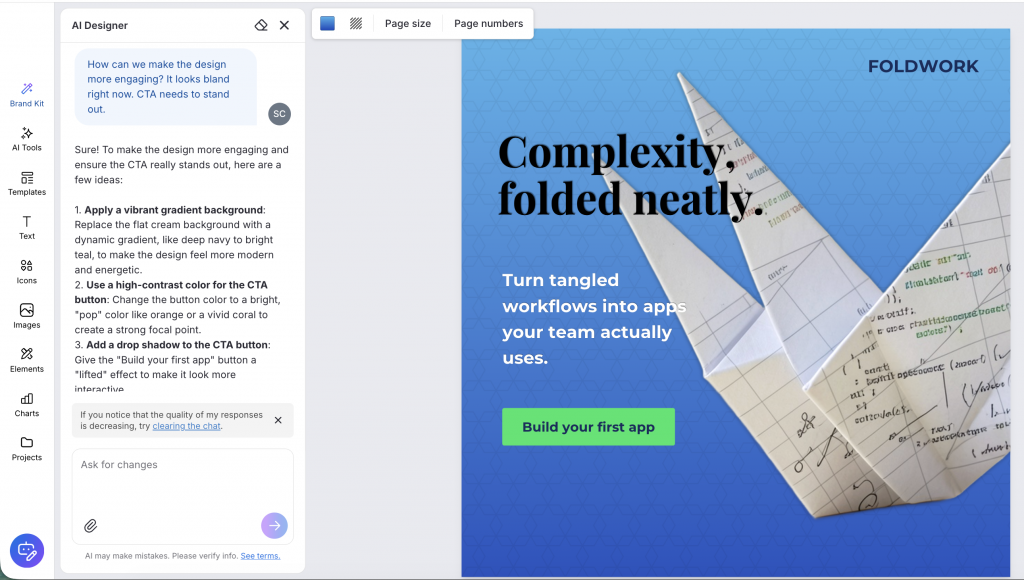
I could review the suggestions before applying them, which reduced the manual editing required while still giving me control over the ad. If you want more specific changes, use the drag-and-drop editor to adjust the layout and add or replace text, images, shapes and icons.
Another helpful feature is the Brand Kit. It lets you save and apply your logo, fonts, color palette and other brand assets in one go. This makes it easier to keep the designs consistent when creating multiple ads for the same campaign.
It also offers specific tools for different platforms, such as AI Facebook Ad Generator and AI Instagram Ad Generator.
You can also save the designs as templates, share them with your team members to get feedback and embed videos and add QR codes to the ad design.
Key features
- My Brand Kit: Enter your website URL to import your logo, brand colors and suggested fonts, then apply them across different ad creatives.
- AI Image Generator and AI Icon Generator: Create custom campaign visuals and icons from text prompts instead of relying only on stock imagery.
- Social Media Templates: Choose ready-made layouts for promotions, announcements, product launches and other social media ads.
- AI Writing Assistant: Shorten, expand or polish headlines, supporting copy and CTAs directly within the design.
- Page Resize: Adjust the ad size using preset dimensions for Instagram, Facebook, LinkedIn, X and Pinterest, or enter a custom size for another placement.
Limitations
- Static ads only: Unlike other tools on this list, Venngage doesn’t support video ad generation or AI avatars, so it’s strictly for image-based campaigns.
- Limited free exports: While you can design for free, you usually need a paid plan to download high-res files or export in formats like PDF and PowerPoint.
Pricing
- Free plan: Allows you to create 5 designs and share them via a public link.
- Premium plan: Starts at $19/month for unlimited designs and image exports.
- Business plan: Starts at $49/month, which unlocks the Brand Kit and team collaboration features.
2. AdCreative.ai (Best for multi-format ad creation and performance tracking)
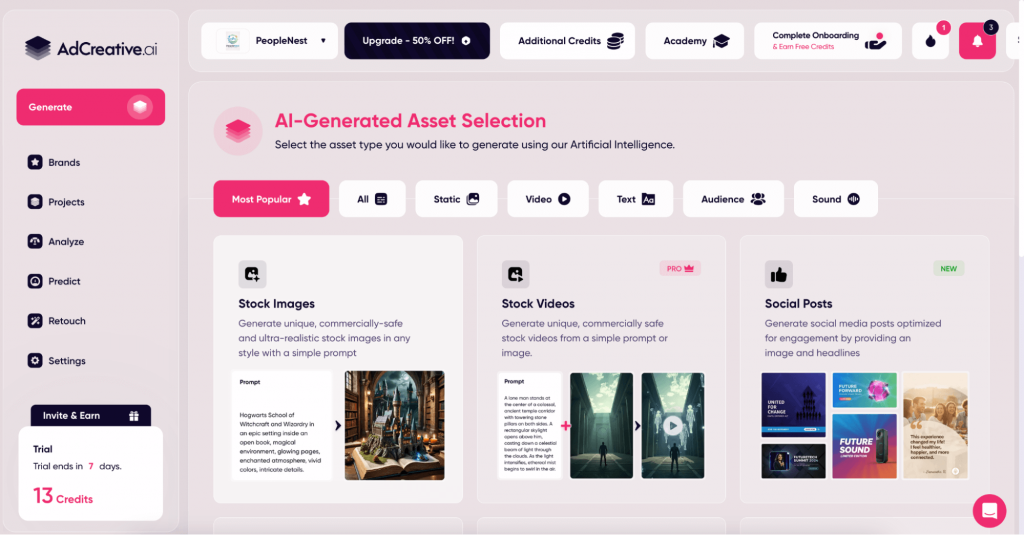
AdCreative.ai combines both design and data tracking. It acts as an all-in-one hub where you can generate everything from standard ad banners to product photoshoots, UGC-style videos and visual storytelling ads. You can easily set up your brand by adding brand name, description, logo and colors.
I created two assets from it for a fictional HR platform: static ads and UGC video.
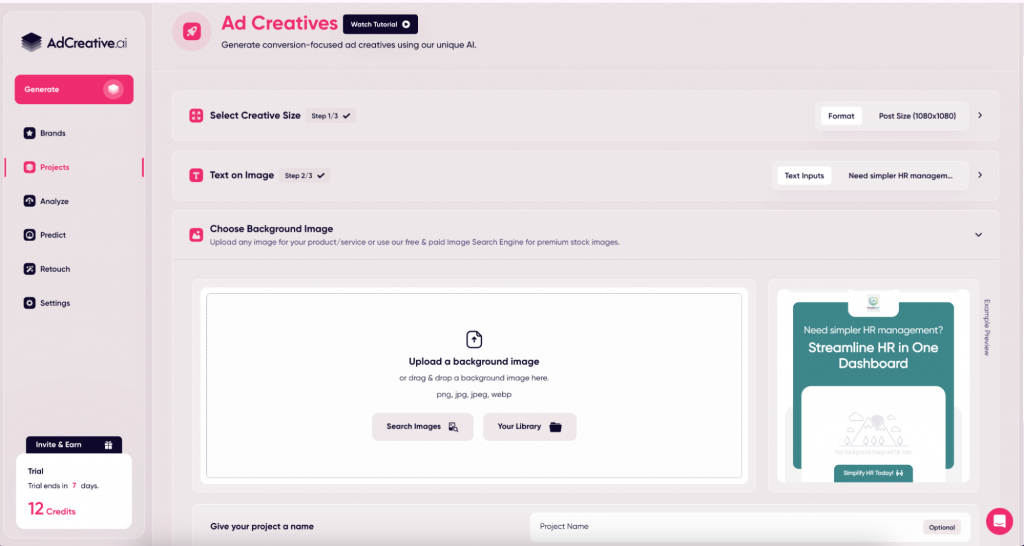
The static ad generator is fast and offers a variety of layouts based on your overall product theme and brand design. You can either upload a background image or select one from its vast stock library.
However, while you can select different aspect ratios or the creatives, the tool lacks a library of platform-specific, predesigned templates. Plus, if you are looking for unique illustrations, creative designs, or unique imagery, this tool might not give the desired results.
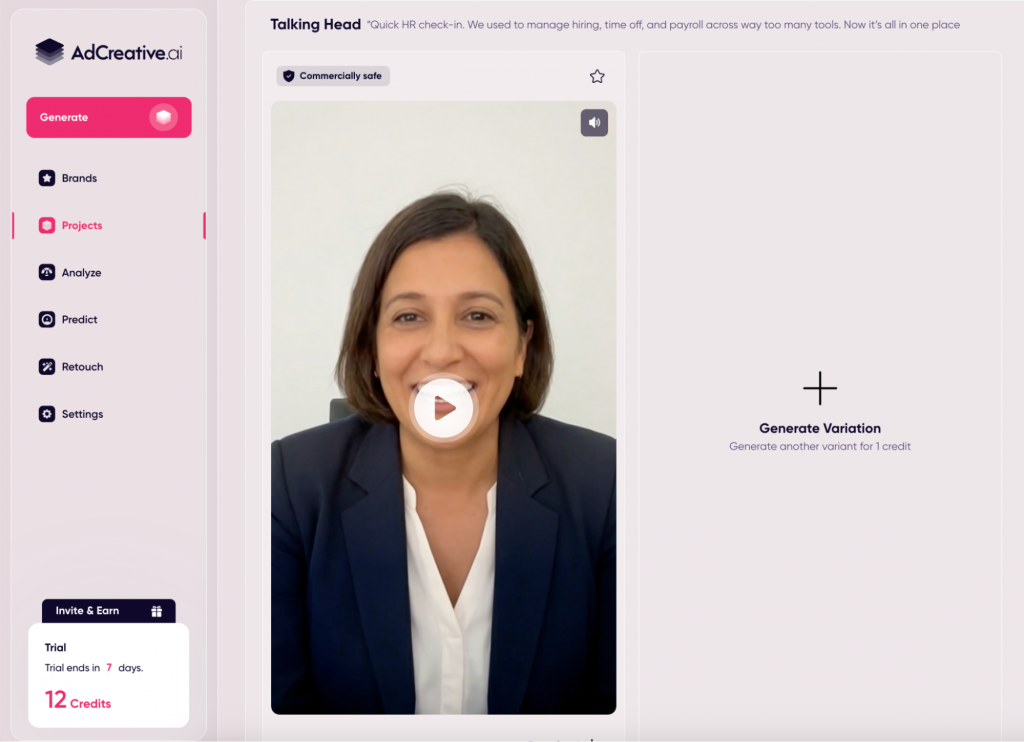
The UGC video, on the other hand, worked well. I created a professional AI avatar and added a custom script, which turned out quite polished. It’s a solid shortcut if you need a “talking head” ad but don’t want to hire an actor or get in front of the lens yourself.
You can link your ad accounts (Meta, Google, LinkedIn and more) directly to the platform to see real-time performance. It also features a Competitor Insights tool to see what’s working in your niche and a Compliance Checker that flags if your creative is commercially safe or likely to be flagged by ad platforms.
If you want one single place to handle AI ad generation, competitor research and performance analysis, AdCreative.ai is a solid choice.
Key features
- Multiple ad formats in one place: Generate static ad banners, product creatives, avatar videos and storytelling ads from a single brand setup.
- AI product photoshoots: Upload a product image and place it into different scenes and backgrounds automatically.
- Account-level performance tracking: Connect Meta and Google (and other ad accounts) to view creative performance inside the same dashboard.
- Ad inspiration library: Browse ideas and layouts by industry to find new hooks and angles faster.
- Creative scoring: Each variation gets an AI score so you can prioritize what to test first.
Limitations
- Trial requires a card: You need to add credit card details to access the free trial.
- Static outputs can feel templated: Layouts can start to look repetitive across variations.
- Higher price for advanced features: Competitor insights and compliance tools are mostly tied to higher tiers.
Pricing
- Free trial: 7-day trial available (requires credit card).
- Startup plans: Start at $39/month for 10 credits.
- Professional plans: Start at $249/month for 50 credits and advanced data features.
3. TagShop AI (Best for product-in-hand UGC avatar videos)
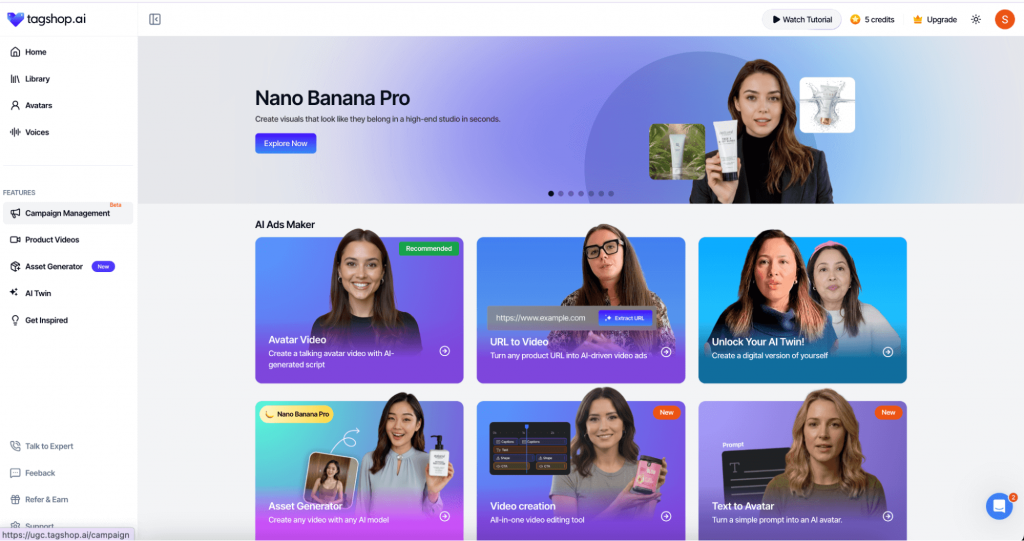
Tagshop AI is a popular tool for generating UGC-style ads and realistic AI avatars for YouTube, TikTok, Instagram and Facebook. When you first jump into the asset generators page, there is a quick guide that explains exactly how to create a video. If you are testing AI ads for the first time, this is incredibly helpful for getting over the initial learning curve.
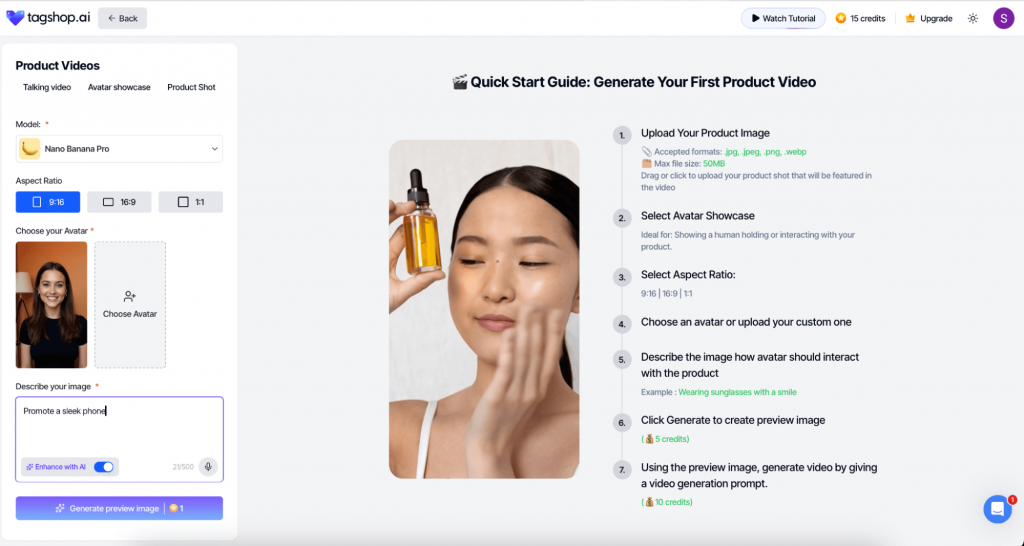
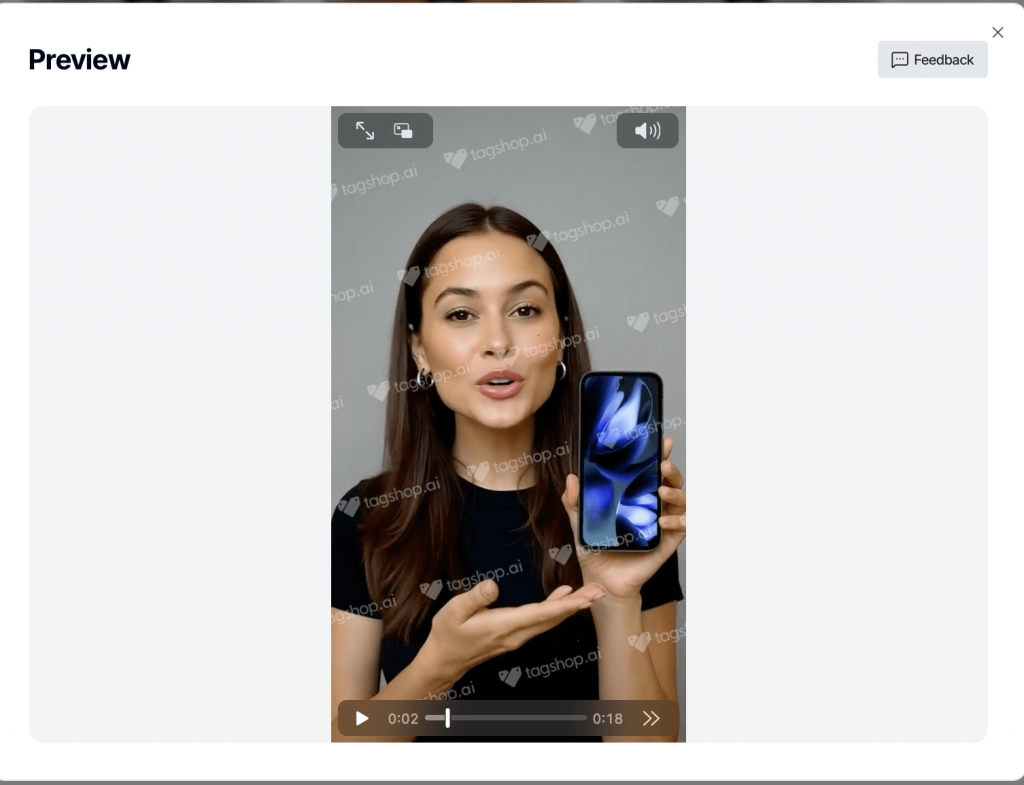
The core benefit here is the ‘human’ touch. With Tagshop AI, you can create a talking video where an AI avatar actually holds your product while explaining its features and benefits. You can also choose to have the avatar simply present the product or use a standard product shot as the backdrop.
I tested this by using a photo of a Google Pixel; the process was remarkably smooth. I just uploaded the photo, picked an avatar and used the AI script generator to write the copy. Once I defined the scene, the video was rendered and ready in just a few minutes.
Beyond manual uploads, you can generate product shots and videos directly from Amazon, Shopify, or eBay links. It’s a great shortcut for e-commerce brands, though I did find that you sometimes need to manually arrange the images to fit the frame properly, which can be a bit time-consuming.
Key features
- UGC-style AI avatar videos: Create creator-like talking videos designed to blend into TikTok and Reels feeds.
- Digital twin option: Build a consistent brand face by creating an AI version of a specific person.
- Link-to-video workflow: Paste Amazon or Shopify links to auto-pull product info and assemble a video ad.
- Multilingual voice options: Localize ads across multiple languages while keeping tone consistent.
Limitations
- Framing still needs work: Assets don’t always fit vertical formats cleanly without manual resizing.
- Rendering can slow batches: High-res videos can take minutes per clip, which adds up fast.
- Credits burn quickly: Short-form video tests can consume credits faster than you expect.
Pricing
- Free trial: Offers a limited amount of free credits (around 10–15) to test the avatar and video features.
- Starter plan: Starts at $11/month (billed annually) for 600 credits and watermark-free 1080p expovideorts.
- Growth plan: Starts at $39/month for higher video volume, premium avatars and access to the Digital Twin feature.
4. ImagineArt Ads Studio (Best for cinematic image and video product ads)

ImagineArt AI Ads Studio is an AI creative platform that combines image generation, video generation and ad asset creation in a single workspace. It helps marketers, small businesses and agencies create a wide range of campaign assets, from product visuals and promotional graphics to UGC-style videos and short-form ad clips for major advertising platforms.
I created two assets from it for a fictional coffee brand: a static Instagram ad and a short-form vertical video ad.
The static ad generator is fast and offers cinematic-grade visuals thanks to access to multiple leading AI models, including Nano Banana Pro, Imagen, Flux and Recraft, all in one dashboard. You can choose your aspect ratio, tweak lighting, adjust the mood and quickly regenerate variations without leaving the platform. The quality of realistic product visuals stood out immediately, which is a big win for e-commerce and product-focused ad campaigns.
The short-form video ad worked equally well. Using text prompts and reference images, I generated a polished 15-second product ad complete with camera movement, background music and voiceover, all inside ImagineArt Ads Studio. It is one of the fastest ways I have seen to produce a professional-looking video ad without hiring a videographer or editor.
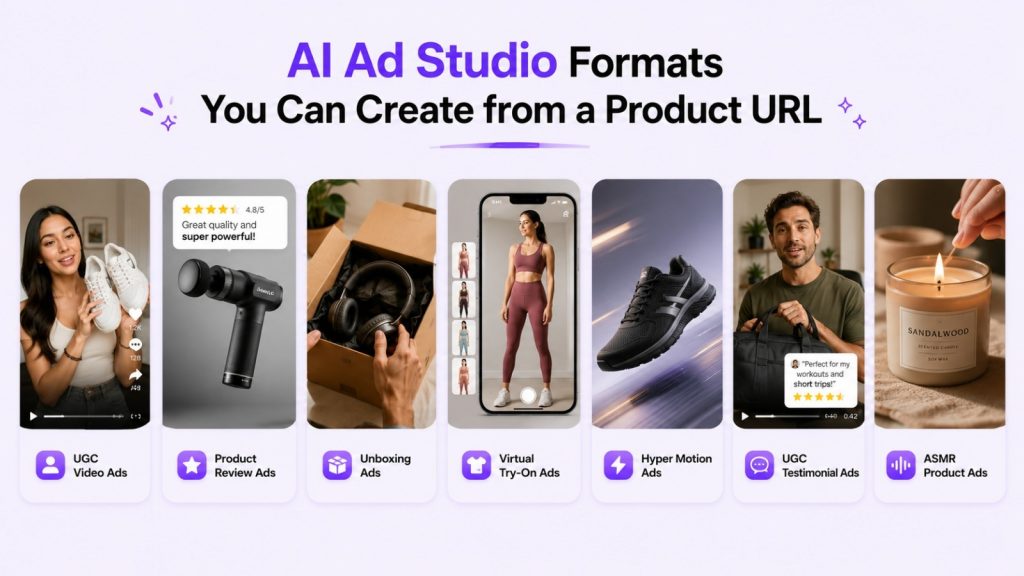
ImagineArt also integrates with the broader ImagineArt creative suite, meaning you can move between image, video, film, fashion and drama tools without ever switching platforms. If you want a single place to create product visuals, video ads and campaign assets across major social platforms, ImagineArt Ads Studio is one of the strongest choices available in 2026.
Key features
- All-in-one ad creation: Generate static image ads, short-form video ads, product visuals and campaign creatives from a single brand setup.
- Multiple AI models in one place: Access to Nano Banana Pro, Imagen, Flux, Recraft and ImagineArt’s in-house engine for maximum creative range.
- AI product visuals: Upload a product image and place it into different scenes, lighting setups and lifestyle backgrounds.
- Aspect ratio presets: Instantly output in the correct format for Instagram, TikTok, Facebook, YouTube and Google Ads.
- Video ad generation: Turn text prompts or static images into cinematic short-form video ads with camera movement and motion effects.
- Full creative suite: Extend beyond ads with image, video, film, fashion and drama studios in the same workspace.
Limitations
- Commercial use requires a paid plan: Free plan is generous but limited to personal use.
- Prompt experience helps: Best results come from creators who know how to write descriptive prompts.
- Free plan generation caps: Daily generation limits apply to free users.
Pricing
- Free plan: Generous daily generations, no credit card required.
- Standard plans: Affordable monthly tiers with higher limits and commercial usage rights.
- Pro plans: Advanced tiers with unlimited generations, priority processing and API access.
- Enterprise: Custom pricing with unlimited members, SOC 2 compliance, SSO and dedicated support.
5. Invideo AI (Best for scripted, multi-scene video ads)

Invideo AI is a great tool for creating high-level video ads without the AI slop feel. It lets you create everything from motion graphics and short story clips to full storyboards and OTT-style ads.
I tested it by creating a video ad for a jacket on their basic plan and the output was surprisingly high-end. It showed clips of a UGC creator styling the jacket in different ways and even highlighted the fabric texture, adding different elements to make the ad unique.
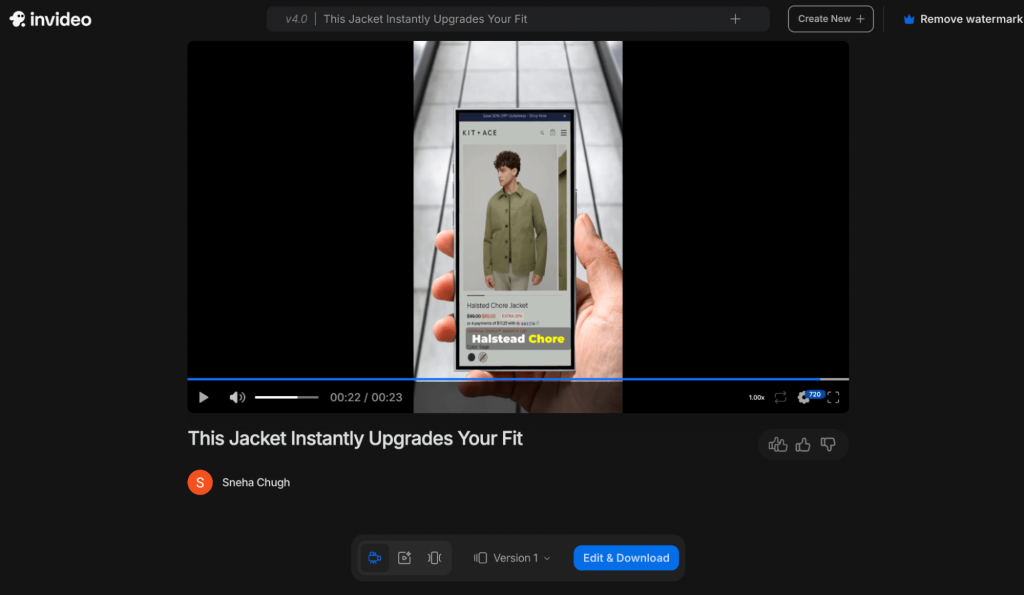
The best part for me was that I could edit the video simply by typing a prompt — like make the music more upbeat or add more clips showing how the jacket could be styled.
You can also edit the script down to the second, swapping out media or changing the text wherever you need.
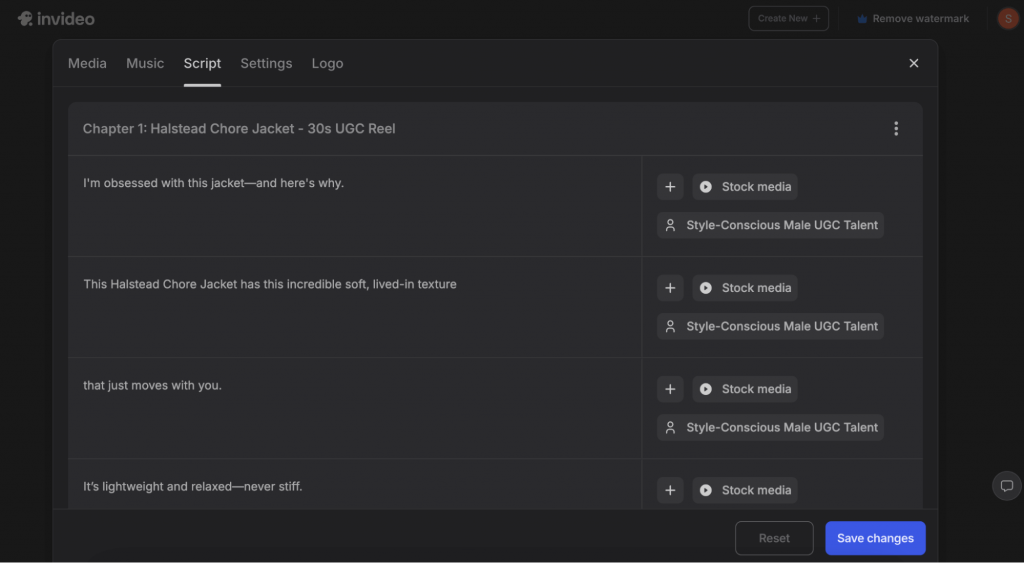
It also has a massive Preset Library with professional transitions (like dynamic cuts and light leaks) and highly customizable subtitles that range from ‘all caps’ to ‘comic’ styles. Invideo would be worth checking out if you need to move beyond simple social posts and need professional YouTube or podcast ads.
Key features:
- Text-based ad generation and editing: You can build and refine your entire video through the “Magic Box” by simply typing commands to swap scenes, adjust pacing, or change the background.
- Ai-powered scripts: The tool analyzes your topic or URL to create a scene-by-scene storyboard that actually flows like a professional commercial.
- Massive stock library with 16m+ photos: It pulls from premium sources like iStock and Shutterstock, so you always have high-quality visuals for any niche without needing a separate subscription.
- Human-sounding voiceovers: You can choose from over 50 languages and multiple accents to narrate your script with natural intonation, skipping the need for a voice actor.
Limitations:
- Steeper learning curve: Because it offers so many advanced editing features and layers, it might take a bit longer to master than a basic “URL-to-video” tool.
- Watermarks on free plan: While there is a free version, your exports will carry the Invideo watermark, making it mostly a playground for testing rather than live campaigns.
Pricing
- Free: Includes 2 video mins and 1 AI credit per week, but exports carry an Invideo watermark.
- Plus: Starts at $35/month for 50 video mins and 95 iStock assets.
- Max: Starts at $60/month for 200 video mins and 320 iStock assets.
- Generative: Starts at $120/month for 200 video mins and includes 5 generative UGC ads.
6. Akool (Best for multilingual avatar ad localization)
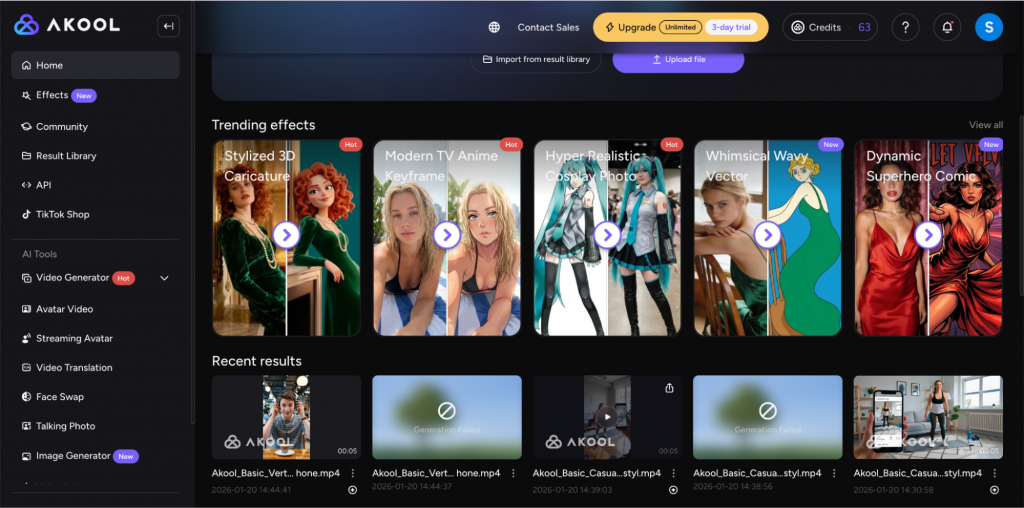
Akool is an AI video personalization and localization platform that targets more cinematic industries like video gaming or high-end YouTube production. If you want to move beyond basic talking heads, this tool offers a deep set of features like image-to-video animation, streaming avatars and video translation to help you build ads for a global audience.
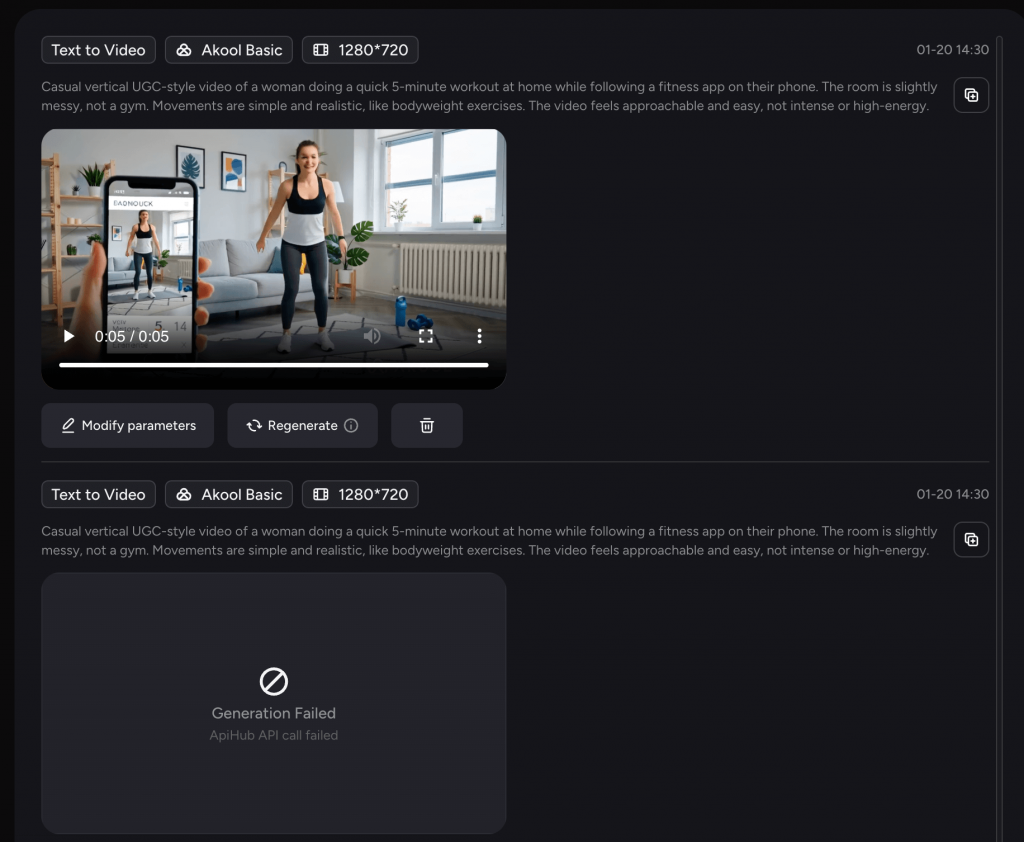
I tried using it to create an ad for a fitness app and while the tool is easy-to-use, I did run into a few bumps. My first generation failed for some reason and the credits were still deducted, so keep that in mind if you’re on a tight budget. The output quality is solid, though the avatars still have a bit of that ‘AI look’ compared to some of the more human-centric tools on this list.
Unlike many tools that just give you a single avatar, Akool allows you to create high-resolution content (up to 8K for images and 4K for video) that’s meant for professional commercial use.
Key features
- Live camera and streaming avatars: You can drive a digital avatar in real-time for live streams or webinars, mirroring your own facial expressions and gestures perfectly.
- Consent locker for brand safety: This is a unique feature that stores legal release forms for every face you use, ensuring your ads are commercially safe and compliant.
- Multilingual video localization: You can translate your ads into over 150 languages with automated lip-syncing and voice synthesis, making it easy to launch global campaigns.
- 4K and 8K cinematic output: Supports ultra-high-resolution exports that are sharp enough for professional video game trailers or large-scale digital displays.
- Personalized video campaigns: Allows you to generate thousands of personalized video messages from a single template, which is great for high-volume email or SMS marketing.
Limitations
- Credit loss on glitches: As I found during my test, credits can occasionally be wasted on failed renders without an automatic refund.
- Uncanny avatars: Some of the human avatars and movements can still feel a bit stiff or digital, requiring a few tries to get the lighting and vibe right.
Pricing
- Free plan: Includes 100 credits for testing, though exports are limited to 720p and include a watermark.
- Pro plan: $30/month for 600 credits, 4K resolution and watermark removal.
- Pro Max plan: $119/month for 2,400 credits and 8K output.
- Business plan: $500/month for 12,000 credits and access to premium studio avatars.
7. Creatify.ai (Best for natural-looking UGC ads in everyday settings)
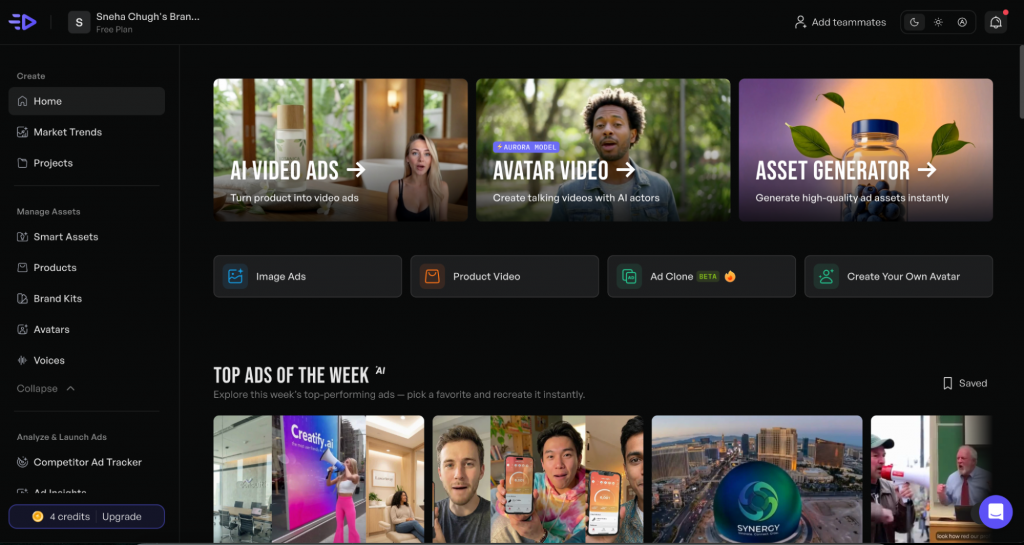
Creatify AI is an all-in-one video generator designed to help you create, test and scale short-form video ads quickly. I tested Creatify by generating a video for a fitness app and the level of detail was quite surprising. The avatar was in a slightly messy room with clothes and fitness gear scattered in the background.

It felt like a real person’s home rather than a staged set. I also loved the small touch of the creator actually watching her phone to follow the exercises.
If your team is looking for ads with a human touch rather than that over-polished “AI aesthetic,” Creatify is probably your best bet. It handles the entire workflow: you can track exactly what your competitors are doing, pull those insights into AI-generated scripts and then launch your campaigns directly to Meta or TikTok by linking your ad accounts.
You can also build out your own brand kit, choose from over 140 realistic voices and even create your own digital twin avatars for consistent branding.
Key features
- Relatable UGC-style environments: The AI generates avatars in realistic, “lived-in” settings like messy rooms or home gyms, which helps the ad feel like authentic user content.
- Competitor ad tracker: You can search and monitor any competitor’s ad activities in real-time to understand their hooks, selling points and creative strategy.
- Direct ad launcher: Connect your Meta, TikTok, or AppLovin accounts to publish your creatives and manage your campaigns directly from the dashboard.
- AI performance reports: The platform scores and breaks down your ads into elements like hooks and CTAs, providing feedback on what actually drives ROI.
- “Bring Your Own Avatar”: You can upload a short video of yourself to create a custom digital twin that maintains your unique personality across every ad.
Limitations
- Credit system pressure: Access to features is tied to a credit system, which can be restrictive if you have high-volume needs or a tight budget.
- Vertical-heavy focus: While it supports other formats, the free tier and general workflow are heavily optimized for 9:16 vertical social ads.
Pricing
- Free: Includes 10 credits per month to generate 2 video ads, but exports will have a watermark.
- Starter: Starts at $19/month (billed annually) for 1,200 credits per year and watermark removal.
- Pro: Starts at $49/month (billed annually) for 2,400 credits per year and the ability to create your own custom avatar.
- Enterprise: Custom plans for unlimited use, API access and dedicated account management.
8. Quickads (Best for template-based product ad variations)
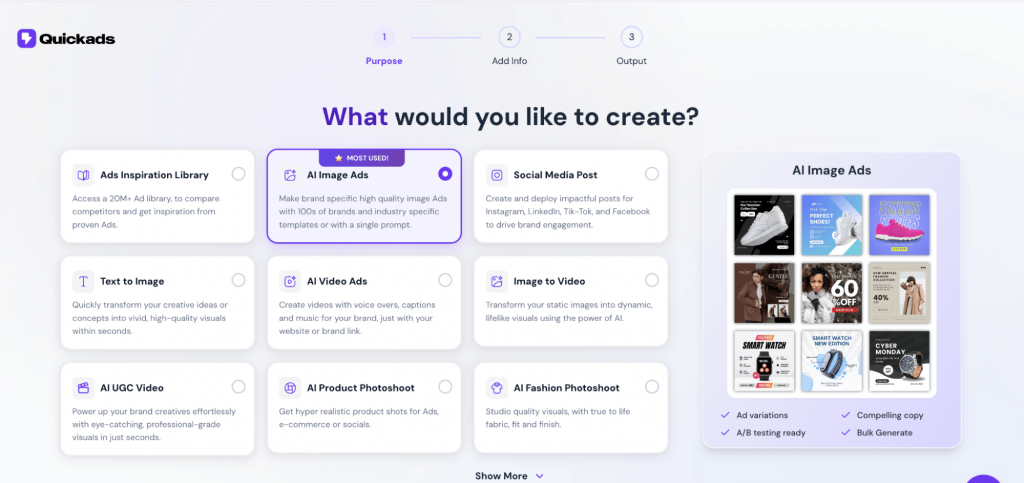
Quickads is a specialized AI platform focused on generating high-converting static and video creatives for social media.
I tested the tool by prompting it to generate image ads for a tech brand, Aura and the results were visually striking. One of the standout generations featured the headphones framed by a glowing, ethereal portal at the top of a golden staircase. It definitely hits that “cyber-minimalist” vibe we were going for.
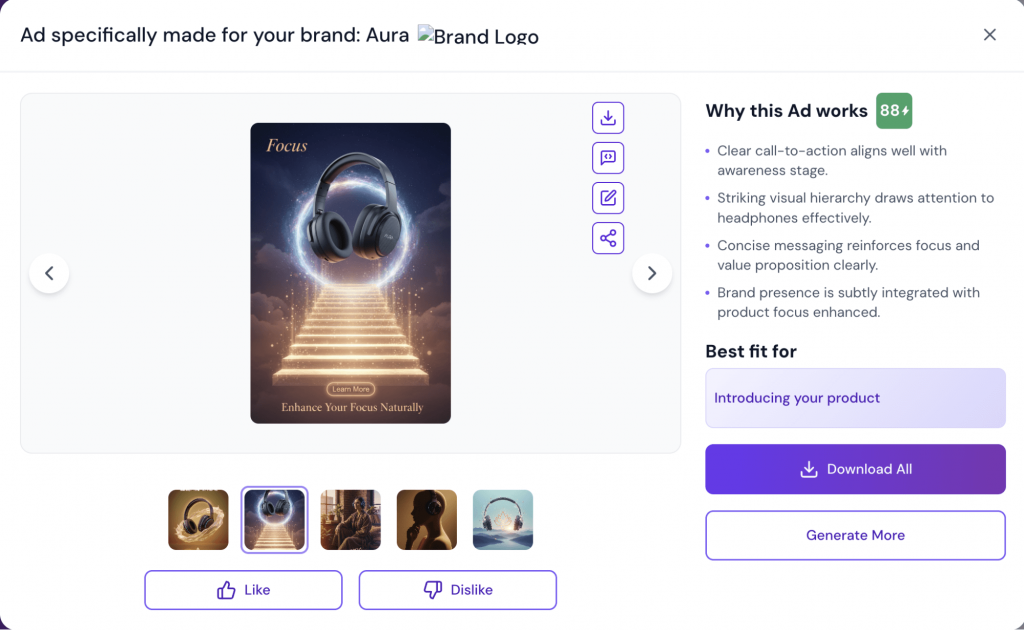
What’s helpful is that the platform provides a “Why this Ad works” breakdown for each variation, scoring it on things like visual hierarchy and messaging clarity. For example, it gave the Aura ad an 88/100 score, noting that the concise messaging reinforces the value proposition clearly.
While the creative output is impressive, the design leans heavily into a “dreamy” AI aesthetic that might feel a bit disconnected for a standard product shot. The headphones are floating in a portal rather than being shown in a real-world use case, which looks cool but might be less effective for direct-sales ads where users want to see the product in action. Overall, it’s a streamlined choice if you want to go from an idea to a live Meta campaign in one sitting.
Key features
- Direct Meta Integration: You can link your Meta Ads account to launch campaigns directly from the platform and monitor performance metrics like CTR and conversion rates.
- AI-Driven Ad Scoring: Every ad generated comes with a score and a breakdown of why it’s likely to perform, helping you choose the best variation based on design principles.
- Product and Fashion Photoshoot: This feature allows you to upload a raw product photo and place it into high-end lifestyle scenes, or even use a “virtual try-on” to show garments on AI models.
- Ad Discovery Library: Includes access to a massive library of millions of real, active ads across platforms like TikTok and Meta to help you spy on competitors and find winning hooks.
- Full Canva-Like Editor: Unlike more rigid generators, QuickAds offers a flexible editor where you can move elements, resize logos and change colors manually.
Limitations
- Occasional Glitches: During setup, the platform can sometimes take extra time to fetch product details from a URL or experience minor UI glitches.
- Creative Over Realism: The AI often prioritizes “stunning” or artistic backgrounds over practical product placement, which might require extra editing to look grounded.
- Template Variety: While it has many formats, the core template designs can feel repetitive for advanced marketers who need unique, non-AI-looking layouts.
Pricing
- Free: Includes 20 downloads and basic AI product photography features.
- Starter: Starts at $9/month for 90 downloads and support for 3 brands.
- Small Business: Starts at $29/month for 290 downloads and 5 brand kits.
- Agency: Starts at $69/month for unlimited downloads and up to 20 brand kits.
9. Mintly
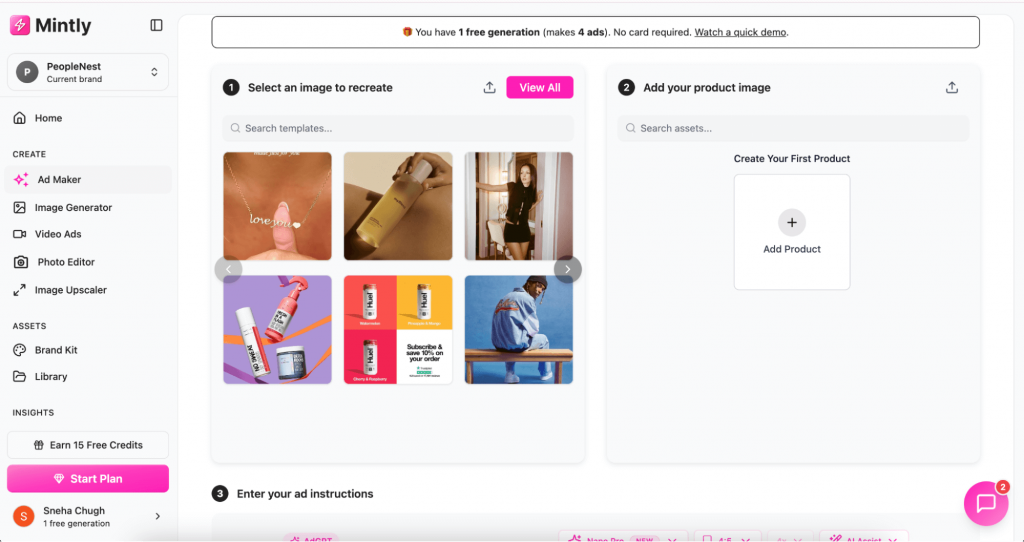
Mintly is a simple, no-fuss tool designed specifically for e-commerce brands that need to churn out product ads fast. It’s useful for small business owners who don’t have a design team but want quality product photos and ads.
What I really like about Mintly is its 1-Click Ad Cloning feature. You can browse their library of proven ad layouts inspired by top brands like Nike or Glossier and then “clone” them using your own product. I tested this by entering a product image and the AI correctly picked up the specifications on the first try. It then generated 4 variations, which is great because it gives you enough choice to find the best layout.
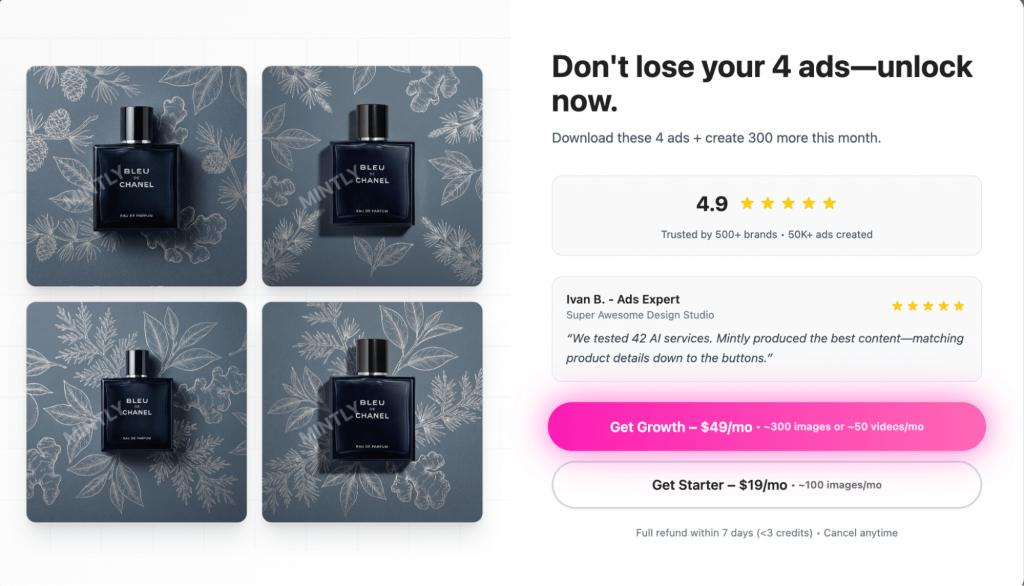
While you do have to purchase a plan to actually download your ads, the tool is a solid choice if you want to move from a raw product photo to a launch-ready ad in under 60 seconds.
Key features
- 1-Click ad cloning: You can pick a successful ad format from their library and instantly swap in your product, logo and colors to recreate the same high-converting look.
- Product protection layer: A specialized AI filter that ensures your product’s labels, logos and specific details stay sharp and undistorted during the generation process.
- AI-powered product videoshoots: Turn a single static product photo into a short, dynamic video ad optimized for TikTok, Reels and YouTube Shorts.
- Automated branding: Once you upload your brand kit, the tool automatically applies your fonts and hex codes to every variation, so you don’t have to manually edit each one.
Limitations
- No free downloads: Even though you can test the generator and see your 4 variations for free, you cannot export the final assets without committing to a paid plan.
- Template-dependent designs: While the cloning is fast, your creativity is somewhat limited to the existing library. It’s harder to build a “from scratch” unique concept compared to a tool like Canva.
- Basic video motion: The AI videos are great for social clips, but they don’t offer the complex narrative or avatar features that platforms like Invideo or Tagshop provide.
Pricing
- Starter plan: Starts at $19/month for 100 ads (images only).
- Growth plan: Starts at $49/month for higher limits and access to the AI Video Generator.
- Scale plan: Starts at $199/month for 1200 ads
10. Flair.ai (Best for AI product photography and virtual fashion shoots)
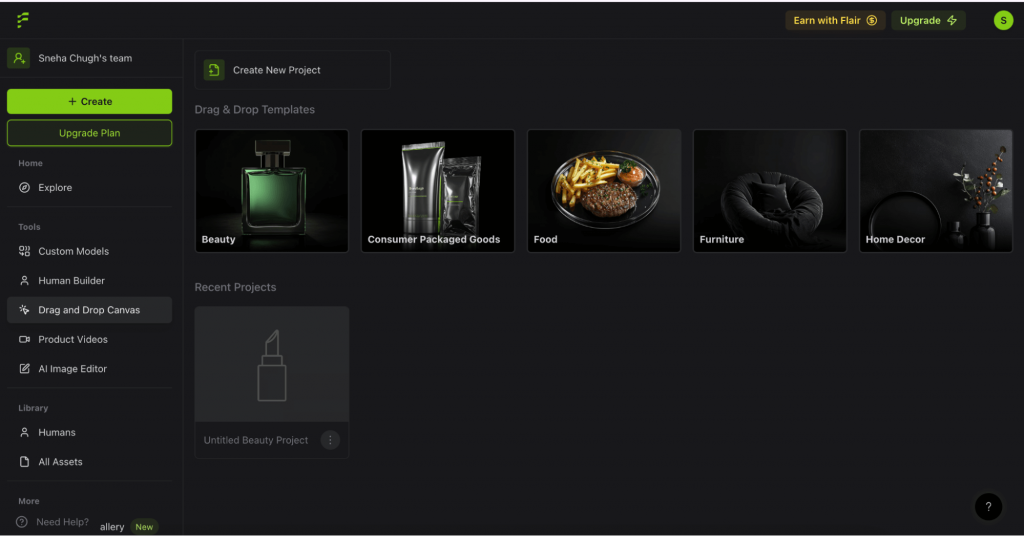
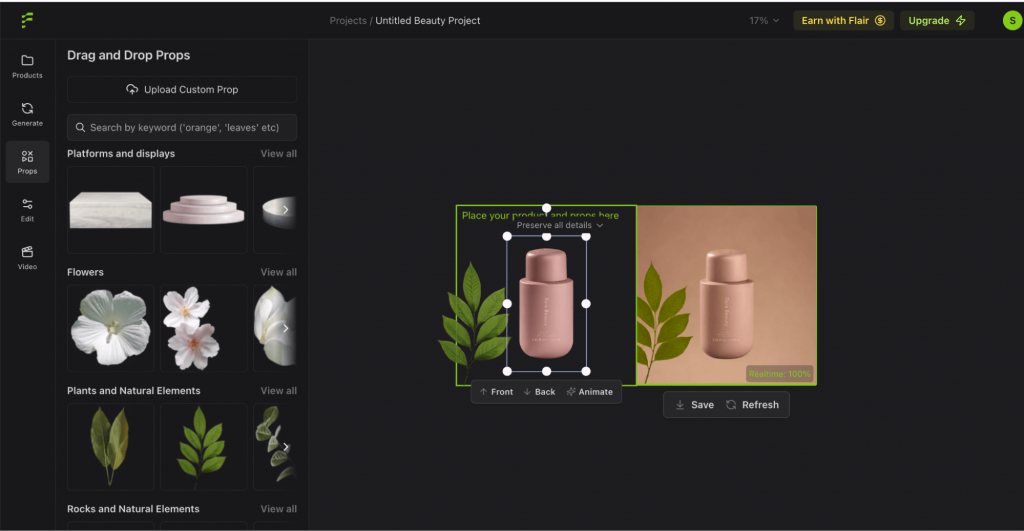
Flair.ai is a specialized product image and ad generator that feels more like a digital photo studio. I love how it handles custom product photography. You just upload a photo of your product and then you can drag and drop props like platforms, plants, or textures from a sidebar. The AI then renders a high-quality lifestyle image in real time.
One of the more advanced features I explored is the Fashion and Human Model Builder. You can actually train the AI on your specific products so it can “wear” them. Whether you are selling jewelry, clothing, or furniture, the AI can fit your items onto generated human models while preserving your logos and patterns.
These work great as static ads for Meta because they look like high-production lifestyle shots rather than generic AI renders.
Key features
- Drag-and-drop scene construction: You can visually stage your product with real-time props and 3D elements to control the exact composition of your ad.
- Ai fashion and human models: This allows you to place clothing, jewelry, or tech products on diverse AI-generated models with high fidelity, saving you the logistics of a physical shoot.
- Magic erase and outpainting: If an image isn’t the right size for a story ad, you can use the outpainting tool to “expand” the background or use the brush to remove unwanted details.
- Custom ai model training: You can train the tool on your specific product’s “look” so the AI accurately captures every detail, gemstone cut, or fabric texture across different scenes.
- Brand asset manager: The platform lets you store your brand’s specific aesthetic rules and color palettes to ensure every generated image stays consistent with your store’s vibe.
Limitations
- No native ad publishing: Unlike some competitors, Flair.ai doesn’t link directly to your Facebook or Google ad accounts, so you have to handle the export and upload process yourself.
- Fidelity issues with text: While it’s great with shapes, the AI can sometimes struggle to maintain perfectly crisp text or small logos on a product label during a complex render.
Pricing
- Free tier: Offers 30 credits per month for basic testing and access to standard templates.
- Pro plan: Starts at $10/month for unlimited design projects and faster rendering speeds.
- Scale plans: Start around $55/month for higher usage, API access and the ability to train custom AI models.
11. Canva (Best for URL-based static Meta ads)
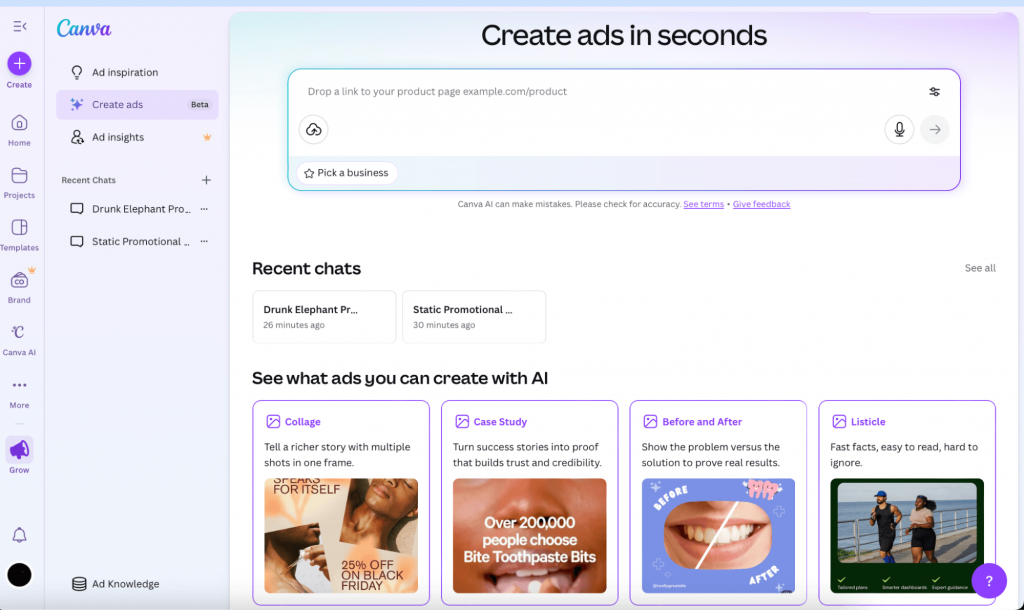
Canva Grow, Canva’s text-to-ad generator, helps you generate static visuals for announcements, PR callouts, feature launches, case studies and other types of ads. It requires a website or a product page link to create ads.
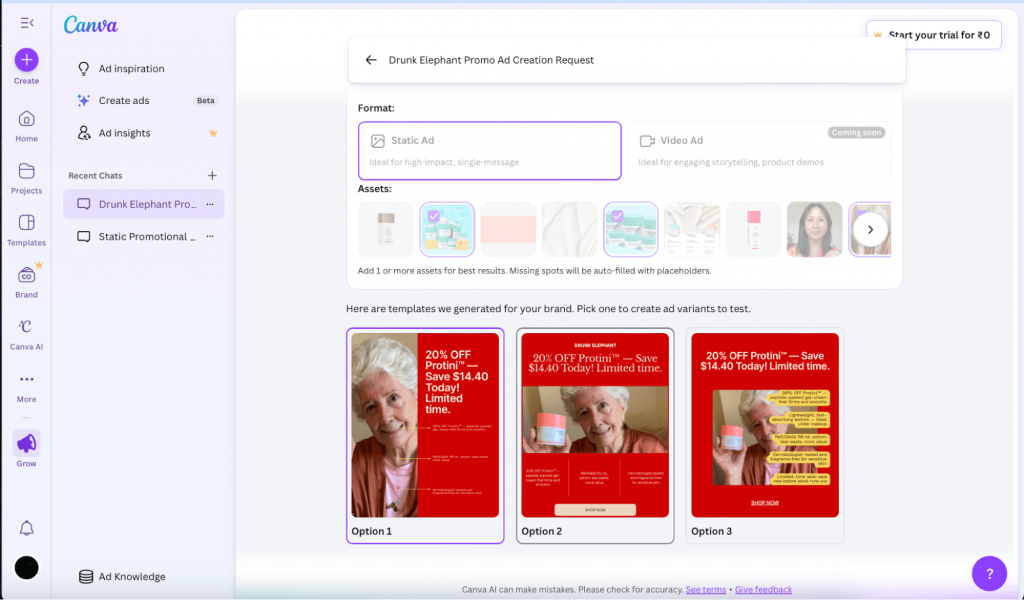
Unlike the standard Canva editor, where you start with a blank canvas, this tool asks for a website or product page link to kick things off. I tested it using the skincare brand Drunk Elephant’s product page link.
The tool automatically extracted the product name, features, benefits and even the pricing. It’s a huge time-saver because it builds your ad knowledge base without you having to type a single word. I just had to select which images I wanted to feature in the ad.
However, the process felt a bit restrictive compared to other tools. You can’t upload a product photo from your desktop in the Grow workflow; you have to rely on what’s already on your live URL. Plus, the ad options used different images from the ones I selected. You might need to give a few tries to get the right design.
If you want to create a brand-level ad that isn’t tied to a specific product page, you’ll likely have to use Canva’s standard AI design tools or templates.
The real highlight for me is the Meta integration. Once you link your account, you can see real-time performance insights like ROAS and CPM right in your dashboard. When the ad is ready, you can launch it straight to Meta without ever downloading a file.
Key features
- Canva Magic: This AI design tool allows you to reposition subjects within an image or swap out entire backgrounds using simple text prompts, making it easy to refresh a design without a reshoot.
- Bulk create automation: You can upload a CSV file or use the AI to generate hundreds of ad variations at once, which is perfect for testing different headlines or CTA buttons across a single campaign.
- Ad inspiration library: This is a searchable database of thousands of real, high-performing ads from leading brands that you can filter by industry or theme.
- Direct meta publishing: Once your creative is finished, you can publish it directly to Facebook or Instagram, skipping the manual export and upload steps.
Limitations
- Restricted image sourcing: You have to use images found on the product URL you provide, which makes it difficult to use new, unreleased assets within this specific workflow.
- Static-only generation: While you can use Canva’s other tools for video, the “Grow” generator is currently focused on static image ads and lacks AI video avatar features.
- Inconsistent asset selection: During my testing, the final ad sometimes included different images than the ones I had specifically selected during the setup phase.
Pricing
- Free trial: 30-day trial available (usually requires a credit card).
- Canva Pro: Starts at $12.99/month, offering basic access to the ad generation tools for individuals.
- Canva Business: Starts at $20/user/month, which is required to unlock the full Grow suite, including advanced ad insights and team collaboration features.
What AI ad generators can (and can’t) do
Everything being said, AI ad generators cannot replace human creativity and strategy, at least not yet. While these tools are incredible for scaling your campaigns, running high-volume A/B tests and churning out product photos, you still need to do the heavy lifting in terms of creativity and brand strategy.
Based on my testing, here is the reality of where these tools currently stand and why you still need a human review:
- Video accuracy and hallucination: AI often struggles with specific product details. It might mention a feature incorrectly or show a product in a way that doesn’t actually exist. You have to review every second of footage to ensure it is factually correct.
- Credit burn and generation time: Getting the perfect ad video often takes three or four tries. Since most platforms use a credit-based system, those failed attempts still cost you. Plus, some of the more complex video tools can take 30 minutes or more to render a single clip. If you have a tight deadline, the trial-and-error process can actually eat up the time you were trying to save.
- The AI Slop risk: If you rely 100% on a generator without any tweaks, your ads can start to look generic. When everyone uses the same templates and stock libraries, your ad can blend into the background, leading to creative fatigue where your audience just scrolls past.
- Policy compliance risks: Ad platforms like Meta and Google are getting stricter about AI transparency. AI can sometimes generate exaggerated claims or visuals that violate ad policies without you realizing it. You are ultimately responsible for what you are putting out.
- The lack of original spark: AI is great at remixing existing data, but it can’t come up with a truly unique, culture-shifting brand story. While it can give you 50 variations of a limited time offer, it’s difficult to come up with an out-of-the-box campaign idea.
Essentially, use these tools to build your high-volume testing machine, but don’t outsource your brand’s soul to them.
How to choose the right AI ad generator?
Now that we have discussed all the tools in detail, here are a few factors to consider so you can pick the right tool.
- Platform Needs: Match the tool to your primary channels, whether you need vertical UGC videos for TikTok (Tagshop, Creatify) or high-quality static visuals for Facebook and Instagram (Venngage, Canva Grow).
- Volume vs. Control: Decide if you need to churn out dozens of variations for A/B testing (Invideo, AdCreative) or if you need deep, manual control over every prop and shadow in a single product shot (Flair.ai).
- Brand Voice & Assets: Look for tools that pull your brand kit automatically from a URL (Canva, Venngage) or allow you to train the AI on your specific style and “digital twin” to ensure everything stays on-brand.
- Team & Budget: Consider your actual capacity; solo founders might prefer affordable $10–$20 starter plans, while larger teams may need seat management and direct publishing integrations for Meta or TikTok (QuickAds, Creatify).
Create on brand, static ads with Venngage
AI ad generators can reduce the time it takes to move from a campaign idea to a finished creative. But the right tool depends on what you need to produce. Some are better for UGC-style videos and product ads, while others give you more control over static designs.
Whichever tool you choose, treat the first output as a starting point. Check that the product details are accurate, the copy sounds like your brand and the creative fits the platform. Generating variations is easy; finding out which one works still requires testing.
If static ads are your priority, Venngage AI Ad Generator can create the imagery, copy, layout and CTA from a prompt. The AI Designer and drag-and-drop editor make it easy to refine the result, while the Brand Kit helps keep different campaign creatives consistent.
Frequently asked questions about AI ad generators
1. What is the best AI ad generator?
The best AI ad generator depends on the type of creative you need. Venngage is better suited to editable static ads, while tools such as ImagineArt cover both product images and short-form videos. For scripted, multi-scene video ads, a tool such as InVideo may be a better fit.
2. Can AI generate a complete ad?
Yes. Many AI ad generators can create the headline, supporting copy, imagery and CTA from a single prompt. Video-focused tools can also generate scripts, scenes, voiceovers, music and captions. However, the first output usually needs to be reviewed for accuracy, branding and visual quality.
3. What types of ads can AI ad generators create?
Depending on the tool, AI can generate static social media ads, display banners, product visuals, UGC-style videos, avatar ads, product demos and longer narrative videos. Some platforms specialize in one format, while others support several types of campaign assets.
4. Are there any free AI ad generators?
Several AI ad generators offer free plans or trial credits, but these often come with watermarks, lower export quality or limited generations. Check how credits are calculated before choosing a paid plan, especially for video ads, as rendering multiple versions can use them quickly.
5. Can I use AI-generated ads on Facebook, Instagram and TikTok?
Yes, as long as the creative follows each platform’s advertising policies and size requirements. Some generators provide preset dimensions for feeds, Stories, Reels and other placements, but not all of them publish directly to ad accounts.
6. What should I include in an AI ad prompt?
A useful prompt should include the product or service, target audience, campaign goal, key benefit, offer, ad format and CTA. Adding details about the visual style, brand colors, imagery and platform can also reduce the amount of editing required later.
7. Is it legal to use AI-generated content in ads?
AI-generated content can generally be used in advertising, but brands still need to check the tool’s commercial-use terms, copyright rules, platform policies and local disclosure requirements. Avoid using protected logos, copyrighted characters or a real person’s likeness without permission.








