





You are planning a project or working on a business strategy and your thoughts are everywhere.
To make sense of it all, you think of creating a mind map and start looking for a tool. By the time you go through a couple of mind map software, you end up more confused about which tool to pick than the problem you started with.
Some tools are either too basic or too technical. Others are not scalable. Some tools don’t allow collaboration or export on free plan.
I get it because I went through the same thing. As a content strategist juggling multiple campaigns, briefs and stakeholders, I needed the best mind mapping software that could hold all the moving parts in one place and actually show me how they connected.
I tested and reviewed a lot of mind map tools and ranked them on what actually matters. In this article, I’ll share the best software to create mind maps.
Best mind map software in 2026: Quick verdict
- Venngage: Best for branded, presentation-ready mind maps from templates
- EdrawMind: Best for simple, traditional mind mapping with outline-to-map conversion
- Coggle: Best for fast, free, no-frills mind mapping for individuals and students
- MindNode: Best for distraction-free solo mind mapping on Apple devices
- SimpleMind: Best for cross-platform mind mapping with a one-time purchase option
- MindMeister: Best for real-time team collaboration with task integration
- Miro: Best for visual workspace for teams combining mind mapping with project planning
- Xmind: Best for versatile dedicated mind mapping across all platforms
- Mindomo: Best for multimedia-rich maps with secure sharing for freelancers and educators
- Whimsical: Best for clean visual workspace combining mind maps with wireframing for product teams
Related: 6 Ways to Use Mind Maps for Business Brainstorming and Growth
How we evaluated the best mind map software
I tested 15 mind map tools hands-on, going through each one to build real mind maps, test collaboration features and push the export options.
Each tool was evaluated on the following criteria:
- Ease of use: How fast you can go from a blank canvas to a working mind map. Does it have a drag and drop editor? Can you create blocks and connect nodes easily without any technical know-how?
- Templates: Whether the tool comes with a useful library of starter templates and how much customisation they actually allow.
- Collaboration: Whether multiple people can work on a map in real time, how comments and sharing work, and how far the free plan goes before locking team features.
- Export formats: Whether you can export as PDF, PNG, or formats that plug into other tools — or whether the tool traps your work inside its own platform.
- Integrations: How well it connects with tools you already use like Notion, Slack, Jira, and Google Drive.
- Performance on complexity: Whether the tool holds up as your map grows or starts lagging the moment you add twenty nodes.
- AI features: Whether the tool has built-in AI to help generate or expand ideas, and if it does, whether it actually adds value or just exists as a feature checkbox.
- Value for money: Whether the free plan is genuinely usable or just a teaser, and whether the paid plan justifies the price jump.
Only tools that held up across all these factors made the final list.
Related: 15+ Mind Map Examples to Organize Your Team and Inspire New Ideas
10 best mind map software by use case
Let’s see the best mind map software, their pros, cons, key features and pricing.
Best free mind map software
1. EdrawMind

Source: EdrawMind
If you are looking for a simple, traditional tool for creating mind maps, EdrawMind is a solid pick. It offers a wide range of templates for creative mind mapping, organising study notes, planning projects, structuring meeting notes, and more.
What I particularly like is the Outline option. Instead of building your map visually from scratch, you type your main topic and sub-ideas as bullet points and EdrawMind automatically converts them into a structured map. It is a great way to get your thoughts down fast without worrying about layout. Once your map is ready, you can convert it directly into a PowerPoint presentation without leaving the tool.
The AI feature is also worth mentioning. Type a prompt and EdrawMind generates a full map with topics and subtopics in under a minute. You can also convert PDFs or plain text into structured mind maps, which saves a lot of manual effort when working with existing documents.
Key features:
- Outline mode that auto-converts bullet points into a mind map
- AI Mind Map Generator from text prompts, PDFs, and documents
- One-click conversion of mind maps into PowerPoint presentations
- Large template library organised by use case and industry
- Supports flowcharts, fishbone diagrams, Gantt charts, and more
- Cross-platform: Windows, macOS, Linux, web, iOS, and Android
Pros:
- Outline mode is genuinely useful for people who think in lists before maps
- AI generation saves significant time on complex maps
- Works across all major platforms including desktop and mobile
Cons:
- Moving nodes around can break the map structure and get frustrating
- AI features require separate token purchases on some plans
- Occasional interoperability issues between desktop and browser versions
- Trustpilot reputation has been inconsistent since Wondershare acquisition
Pricing:
- Individual plan: Starts at $6.50/month billed annually
- Team plan: Starts at $79/year per user
- Lifetime plan: From $129/user for perpetual access
Best for: Students, educators, and individuals who want a focused, traditional mind mapping tool with a low learning curve and the flexibility to work offline or across devices.
Best mind mapping tools for beginners
2. Venngage
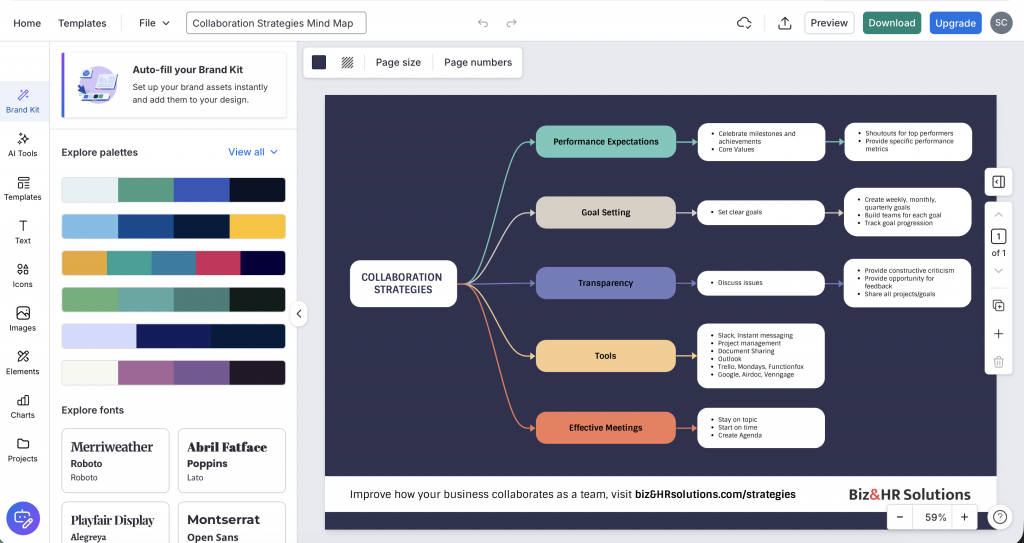
Before I get into the details, I want to be upfront and tell you Venngage is our own product and I have the most hands-on experience with it. However, I’ve spent considerable time testing the other tools in the tool to remain objective. Venngage was evaluated on the same criteria as every other tool.
I find blank whiteboards a bit overwhelming. Yes, they give you the freedom, but manually adding boxes, text, and connecting dots makes it difficult. That is why I prefer Venngage’s Mind Map Maker over other tools.
It has a vast library of mind map templates for different industries and use cases. Simply browse through the templates, select one that matches your theme or idea, and customise it easily. Or if you want to simplify it further, use Venngage’s AI Mind Map Generator that creates mind maps from text prompts. You can also upload your documents and the AI tool will automatically generate a mind map — and edit the copy accordingly.
If you want to add the mind map to any internal or external file, you can bring in your brand feel. Import your data using the Brand Kit feature and apply your brand’s logo, colour, and font style in a few clicks
Key features:
- AI Mind Map Generator that builds maps from text prompts or uploaded documents
- 100+ mind map templates organised by industry and use case
- Brand Kit for applying logos, colours, and fonts across designs
- Drag-and-drop editor with auto-layout adjustments
- Export as PNG, PDF, and PowerPoint
Pros:
- Templates eliminate the blank canvas problem entirely
- AI generates the map and edits the copy, not just the layout
- Brand Kit saves significant time for teams with strict visual guidelines
- No design experience needed to produce a polished, presentation-ready map
Cons:
- Not ideal for freeform, open-ended brainstorming
- Real-time collaboration is locked behind paid plans
- Limited integrations with third-party tools compared to dedicated mind mapping software
Pricing:
- Premium: Starts at $19/month
- Business: $49/month billed annually, includes Brand Kit, advanced AI tools, and high-resolution exports
- Enterprise: Custom pricing
Best for: Marketing teams, content strategists, and communications professionals who need polished, on-brand mind maps fast without starting from a blank canvas every time.
3. Coggle

Source: Coggle
If you do not need anything fancy and just want to get your ideas out fast, Coggle is one of the cleanest mind mapping tools out there. It is browser-based, requires no download, and you can sign in with your Google account and start building in under a minute.
The menus are minimal, contextual and mostly hidden until you need them. You click, type, branch out and the map grows with you. Real-time collaboration is available on the free plan, which is rare. You can invite a colleague via a secret link and they do not even need an account to join. It also supports Markdown formatting inside map nodes, so you can add structure to your text without extra effort.
Where Coggle shows its limits is complexity. As your map grows, things can get slow and hard to navigate. Customisation options are thin compared to other tools and there is no AI feature to speed up generation.
Key features:
- Real-time collaboration with no login required for guests
- Export as PDF, PNG, and Microsoft Visio format
- Markdown support inside map nodes
- Multiple starting points for mapping related topics in one workspace
- Version history with the ability to revert to any previous point
- Embeddable diagrams for sharing directly on web pages
Pros:
- Real-time collaboration included on the free plan
- Clean, distraction-free interface
- Google Drive integration for easy storage and sharing
Cons:
- Slows down noticeably on large or complex maps
- Very limited customisation, minimal control over fonts and colours
- No AI features
- Only three private diagrams on the free plan
- Doesn’t offer any templates to get started
Pricing:
- Free: Unlimited public diagrams, up to 3 private diagrams
- Awesome plan: $5/month for unlimited private diagrams and advanced tools
- Organisation plan: Custom pricing
Best for: Individuals, students, and small teams who want the fastest, simplest way to build and share a mind map without any setup or cost.
Best for students
4. MindNode
Source: MindNode
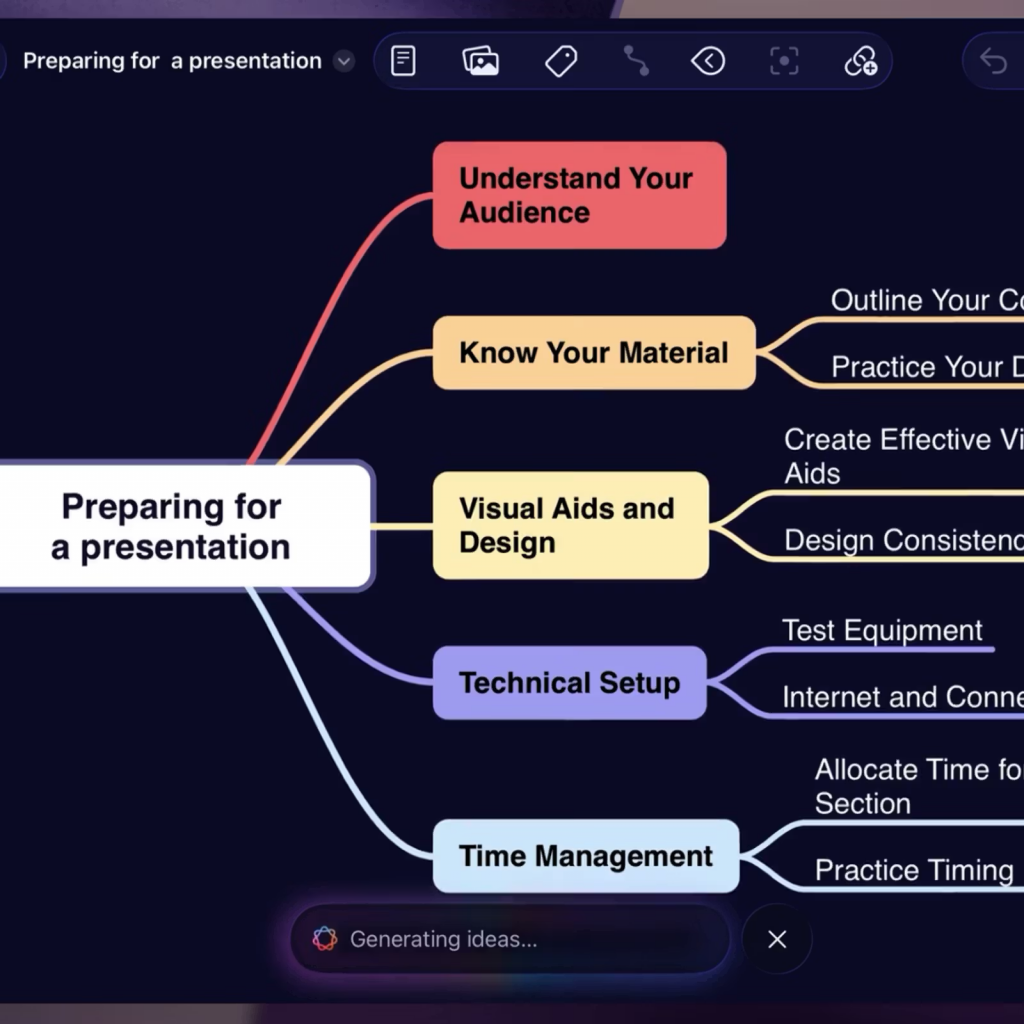
Most mind mapping tools are web-based and built for teams. MindNode takes the opposite approach. It is a native app built exclusively for Apple devices, Mac, iPhone, iPad, and even Apple Vision Pro, and it shows in how it feels to use. Fast, clean, and completely distraction-free.
What makes it stand out for solo users is how deeply it integrates with the Apple ecosystem. You can turn any node directly into a task, reminder, or calendar event and have it sync with Apple Reminders, Things, or OmniFocus without leaving the app. Switch between map view and outline view depending on how you think, and everything stays in sync across your devices via iCloud.
I liked how it works fully offline, which is genuinely useful if you do your best thinking away from a screen or on a flight.
Key features:
- Native app for Mac, iPhone, iPad and Apple Vision Pro
- Switch between mind map view and outline view
- Convert nodes into tasks and sync with Apple Reminders, Things, and OmniFocus
- Focus Mode to dim unrelated nodes while you work
- Visual tags to categorise and connect ideas
- iCloud sync across all Apple devices with full offline access
- Apple Pencil support on iPad
Pros:
- Fastest and most intuitive mind mapping experience on Apple devices
- Works fully offline with no performance drop
- Seamless iCloud sync across Mac, iPhone and iPad
- Focus Mode genuinely helps when maps get complex
Cons:
- Apple only, no Windows, Android, or browser version
- iCloud sync can fail in flight mode if files are not downloaded locally
- Limited templates and icon library compared to other tools
Pricing:
- Free: Limited version available on Mac and iOS
- MindNode Plus: $2.99/month with image support, tasks, themes and styling options
- Also available via Setapp at $9.99/month alongside other Mac apps
Best for: Apple users who want a fast, beautiful, distraction-free mind mapping tool for personal brainstorming and solo project planning.
5. SimpleMind
Source: SimpleMind
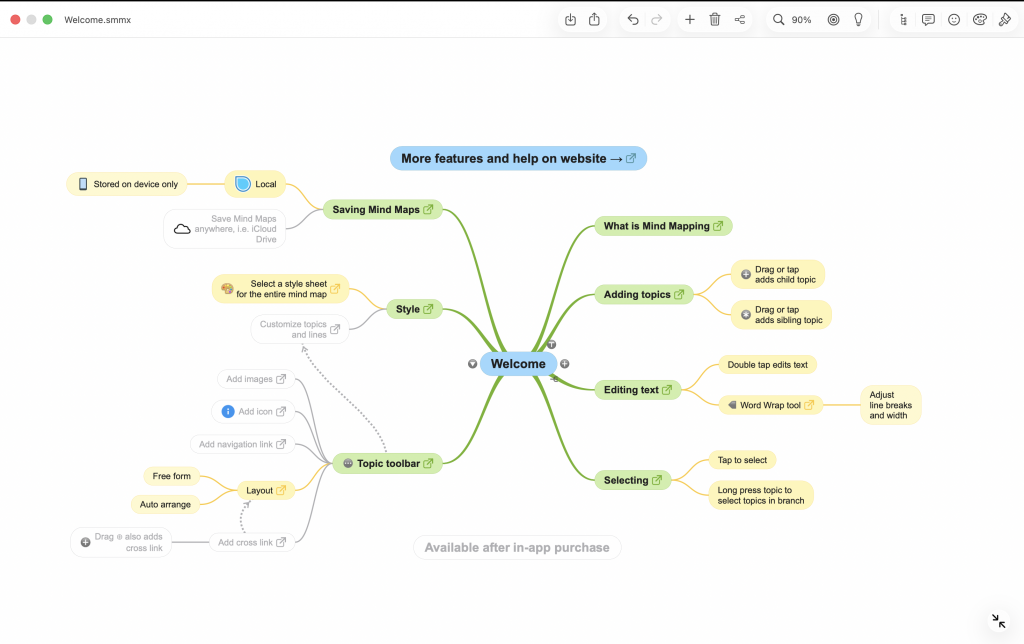
If you want a mind mapping tool that works across every device you own, SimpleMind is worth a serious look. It is available on Windows, Mac, iOS, and Android, runs as a native app on all of them, and syncs across devices using your own cloud storage, Dropbox or OneDrive, so your maps stay in your accounts, not theirs.
It lets you place topics anywhere on the canvas in free-form mode, or switch to one of several auto-layouts depending on how you want to think. You can add images, checkboxes, progress bars, voice memos, and cross-links between unrelated nodes to build maps that go well beyond a simple hierarchy. There is also a built-in slideshow feature so you can present directly from the tool without exporting anywhere.
Key features:
- Free-form and multiple auto-layout options
- Cross-platform: Windows, Mac, iOS, and Android with native apps
- Sync via Dropbox, OneDrive, and other cloud services
- Cross-links between unrelated nodes
- Built-in slideshow for presenting directly from your map
- Over 15 style sheets with full customisation of colours, borders, and backgrounds
Pros:
- Works across all major platforms including Android, unlike MindNode
- One-time purchase option available, no recurring subscription required
- Free-form layout gives genuine flexibility for non-linear thinkers
- Your maps are stored in your own cloud, not locked into the platform
Cons:
- No real-time collaboration
- It’s difficult to save custom templates
- Interface looks dated compared to newer tools
Pricing:
- Free edition available with limited features
- Pro edition: One-time purchase starting at $29.99 for Windows or macOS, $10.99 for iOS, $8.49 for Android
- 30-day free trial available for the full Pro edition
Best for: Individuals and professionals who want a powerful, cross-platform mind mapping tool they can buy once, use offline, and keep their data in their own hands.
Best for teams & collaboration
6. MindMeister

If you are looking to brainstorm ideas and create a mind map with your peers or team members, go with MindMeister.
You can invite teammates to edit a map in real time, see who is working on which node, leave comments on individual branches and track every change through version history. There is also a Brainstorm mode where multiple users can contribute simultaneously, which works well for structured team sessions.
Once the map is ready, convert it directly into a presentation, a Word document, or a PowerPoint without leaving the tool. The integration with MeisterTask lets you turn any node into an actionable task with deadlines and priorities, which keeps the gap between planning and execution tight.
Key features:
- Real-time collaboration with brainstorm mode for team sessions
- Convert mind maps into presentations, Word documents, and PowerPoints
- MeisterTask integration to turn nodes into actionable tasks
- Version history with the ability to revert to previous versions
- Focus mode for distraction-free mapping
Pros:
- Clean, intuitive interface with a very low learning curve
- Strong integrations with tools teams already use
- Presentation and export options built directly into the tool
Cons:
- Free plan limited to three mind maps
- Can lag on very large or heavily detailed maps
- Subscription must be paid at least six months in advance on some plans
Pricing:
- Free: Up to 3 mind maps
- Personal: Starts at $6/month billed annually
- Pro: Starts at $10/month billed annually
- Business: Custom pricing with advanced security and dedicated support
Best for: Teams and professionals who need real-time collaborative mind mapping with strong integrations and a clear path from brainstorming to task execution.
7. Miro
Source: Miro
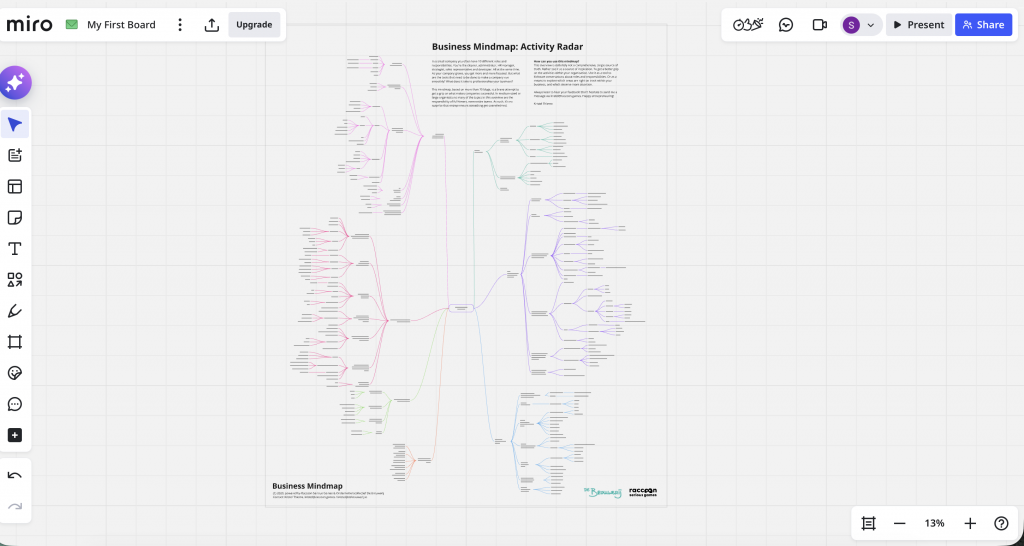
Most tools on this list are mind mapping tools first. Miro is a full visual collaboration workspace, and mind mapping is one of many things it does well. If your team needs a single place to brainstorm, run workshops, map out product roadmaps, and plan sprints, all on one shared canvas, Miro is the most capable option in this list.
You can use the infinite canvas to build a mind map, add a Kanban boardand embed a Figma file beside that. I like how the colored cursors show exactly who is contributing. You can also run polls and video calls directly on the canvas, and AI can generate a full multi-branch mind map from a single text prompt. Over 5,000 templates mean you are rarely starting from scratch.
However, I felt that the interface was a bit overwhelming due to multiple options.
Key features:
- Infinite canvas with no layout or size restrictions
- AI mind map generation from text prompts
- 5,000 plus templates covering mind maps, flowcharts, retrospectives, and more
- Real-time collaboration with coloured cursors, comments, polls, and video calls
- 160 plus integrations including Slack, Zoom, Jira, Google Drive, and Microsoft Teams
Pros:
- The strongest real-time collaboration experience in this entire list
- Mind mapping sits alongside flowcharts, sticky notes, and project planning in one workspace
- AI features are genuinely useful and continue to expand
- Free plan allows unlimited team members on up to three boards
Cons:
- Interface can feel overwhelming for new users
- Performance degrades on very large or complex boards
- Costs rise quickly as teams scale beyond the free plan
- No offline functionality
Pricing:
- Free: Up to 3 editable boards, unlimited viewers
- Starter: $8/user/month billed annually, unlimited boards
- Business: $16/user/month billed annually, advanced features and controls
- Enterprise: Custom pricing
Best for: Cross-functional teams, product managers, and design teams who need a shared visual workspace that goes well beyond mind mapping and can handle the full journey from idea to execution.
Best for complex projects
8. Xmind
Source: Xmind
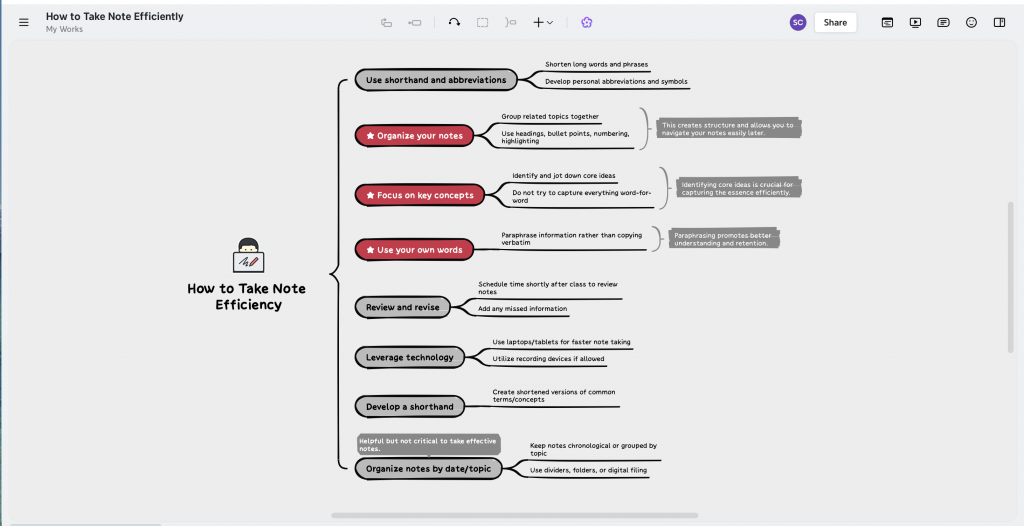
What sets Xmind apart from most dedicated mind mapping tools is how it handles structure. You are not locked into a single radial layout and can switch between mind maps, logic charts, fishbone diagrams, timelines, org charts, and matrix views, and even mix structures within a single map depending on what a branch needs.
Zen mode strips away all menus and toolbars so you can focus entirely on thinking. Pitch mode converts your map into a slide deck automatically, with each branch becoming its own slide.
The AI features are genuinely useful too. Paste in text, a URL, a PDF, or a YouTube link and Xmind generates a structured map from it. You can also expand branches, reorganise logic, and translate content without leaving the tool.
Key features:
- Native apps on Windows, macOS, Linux, iOS, and Android
- 10 plus map structures including fishbone, timeline, matrix, and org chart
- Zen mode for distraction-free brainstorming
- Pitch mode to convert maps into slide decks automatically
- AI generation from text, PDFs, URLs, and YouTube videos
- Switch between mind map, outline, and pitch views instantly
- Export to PDF, PNG, Word, Excel, Markdown, and OPML
Pros:
- The most complete cross-platform native app experience in this list
- Strong AI features that go beyond basic map generation
- Free plan includes unlimited maps and offline access
Cons:
- Free plan limits customisation and AI credits noticeably
- Drag and drop can be clunky when rearranging large branches
- Some users find the newer versions more complex than earlier ones
Pricing:
- Free: Unlimited maps, limited AI credits and customisation
- Pro: Starts at $4.92/month billed annually
- Premium: Higher tier with expanded AI credits and collaboration features
- Business: Team-level plans with shared spaces and admin controls
Best for: Individuals and professionals who want the most versatile dedicated mind mapping tool across all devices, with enough structure variety to handle complex projects without switching tools.
9. Mindomo
Source: Mindoro
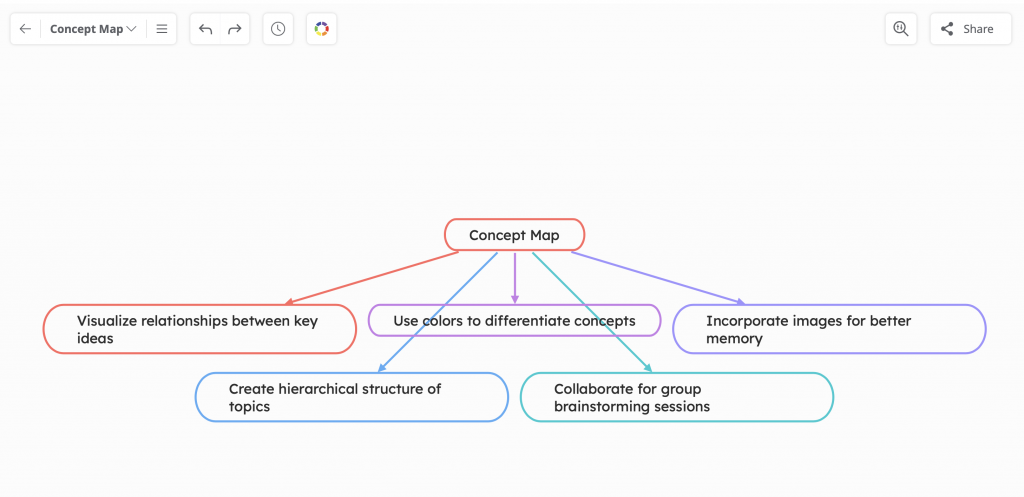
Mindoro covers all the core mind mapping basics well — multiple layouts, real-time collaboration, and a clean enough interface to get going without much setup. You can attach files, add voice notes, record audio, embed YouTube and Vimeo videos, search and insert images from the web, and link external URLs to specific topics, all without leaving the canvas.
The tool also converts mind maps into presentations slide by slide, and paid plans let you turn any map into a Gantt chart for project tracking. For teams handling sensitive work, every paid plan includes password protection so you can lock maps to specific collaborators only. The Professional plan is built for individual users but accommodates up to five guest collaborators, making it practical for freelancers and consultants working with small external teams.
Key features:
- Real-time collaboration with up to 5 guest collaborators on the Professional plan
- Converts mind maps into presentations or Gantt charts
- Allows attaching files, voice notes, audio recordings, and videos directly to topics
- Multiple map types including mind maps, concept maps, timelines, fishbone diagrams, and outlines
- Full offline access via desktop and mobile apps
- AI mind map generation with monthly credits on paid plans
Pros:
- One of the richest multimedia attachment options in this list
- Works across all major platforms including Linux
- Free plan available with no time limit
Cons:
- Pricing is on the higher end relative to feature depth
- Cloud sync is locked behind paid plans
Pricing:
- Free: Up to 3 diagrams, limited features
- Premium: Starts at approximately $5.50/month billed annually
- Professional: Higher tier with 5 guest collaborators, password protection, and Gantt charts
- Team and Education plans: Custom pricing
Best for: Educators, freelancers, and consultants who need rich multimedia mind maps, password-protected sharing, and flexible collaboration with small external teams.
10. Whimsical
Source: Whimsical
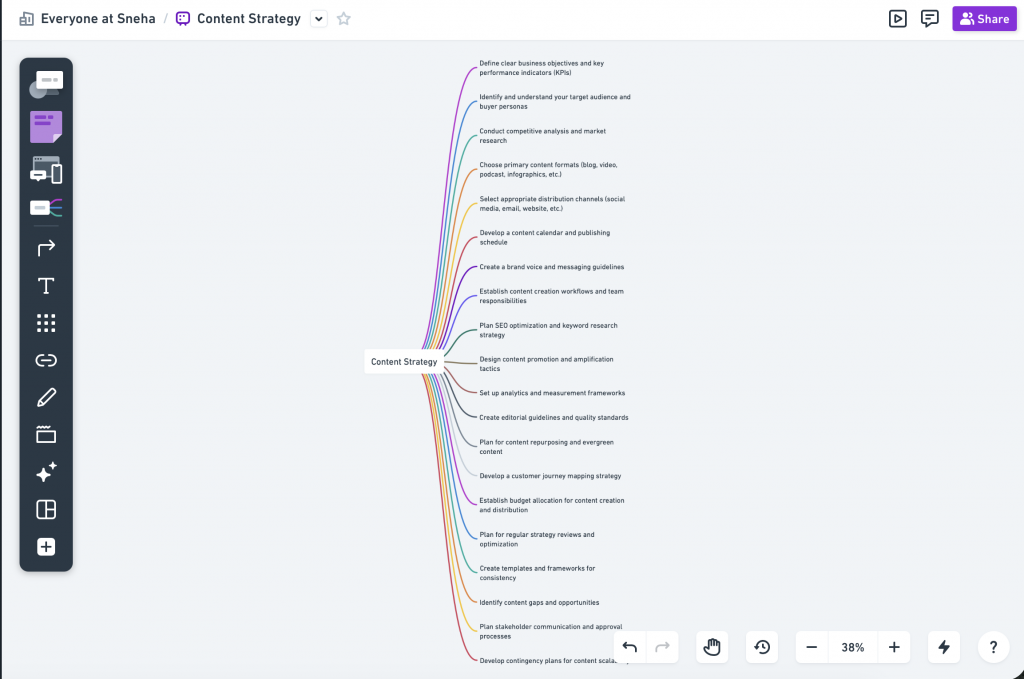
If your work regularly requires you to move between mind maps, flowcharts, wireframes, sticky notes, and documents, Whimsical would be a great tool. It lets you do all of that on a single shared canvas without switching tools.
I found no clutter, no overwhelming sidebar of features, and no steep learning curve. You open it, start building, and the interface gets out of your way. The AI feature lets you generate a mind map from a single prompt, expand existing branches automatically, or build flowcharts and diagrams from a text description. For product teams and UX designers especially, the wireframing capability alongside mind mapping is a genuine workflow advantage you will not find in most tools on this list.
However, the tool doesn’t allow many-to-one mapping and if you need advanced map structures like fishbone diagrams or Gantt views, you will need a different tool.
Key features:
- Mind maps, flowcharts, wireframes, sticky notes, and docs in one canvas
- AI generation of mind maps and diagrams from text prompts
- Real-time collaboration with version history
- Presentation mode for sharing visual work with stakeholders
- Integrations with Slack, Jira, Confluence, Notion, Google Drive, Microsoft Teams, Trello, Asana, and GitHub
- Browser-based with no installation required
Pros:
- One of the cleanest and fastest interfaces in this entire list
- Combines mind mapping with wireframing, a rare and useful combination for product teams
- AI features are genuinely quick and practical
- Strong integration with Notion makes it a natural fit for teams already in that ecosystem
- Responsive customer support
Cons:
- Not a dedicated mind mapping tool, so advanced map structures are limited
- Many-to-one mapping is not supported
- Free plan capped at three documents
- No native desktop app, browser-only
Pricing:
- Free: Up to 3 documents
- Pro: Starts at $10/month per user
- Organisation plans available at custom pricing
Best for: Product managers, UX designers, and cross-functional teams who need a fast, clean visual workspace that combines mind mapping with wireframing and diagramming in one place.
Factors to consider when choosing a mind mapping software
User interface and usability
The software should have a clean and intuitive interface that makes it easy for users, including those new to mind mapping, to navigate and use the tool effectively.
Consider how much time and effort will be required to become proficient with the software. Some tools are more user-friendly and easier to learn than others.
Collaboration features
Look for software that allows multiple users to work on a mind map simultaneously, a crucial feature for team projects.
The ability for collaborators to leave comments and feedback directly on the mind map can facilitate more effective communication within a team.
Customization options
Look for a variety of templates and themes that can help you quickly start a new map and customize it according to your needs and preferences.
The software should offer flexibility in arranging and re-arranging the layout of your map, allowing you to visualize information in the way that makes the most sense for your project.
Price and value
Evaluate the cost of the software relative to the features it offers and consider whether it fits within your budget.
Some software options offer free versions with limited features, while others require a subscription. Assess your needs and decide which plan offers the best value for your use case.
Security and data privacy
Ensure that the software provides robust security measures to protect your data, including encryption and secure servers.
Check whether the software complies with relevant data privacy regulations, such as GDPR, especially if you are using it for business purposes.
With that being said, if you are interested in designing your own mind map for your presentation then check out our guide on 5 Steps for Designing a Mind Map Presentation [+Examples]
Free vs paid mind map software: Is it worth paying?
Most free plans are generous enough to get you started but limiting enough to push you toward an upgrade. The common restrictions across almost every tool: a cap of 3 to 5 maps, locked exports, no AI features, and collaboration either blocked or severely limited.
If you map occasionally and work solo, the free plan on tools like Coggle, Xmind, or MindNode will hold up fine. The moment you need to collaborate regularly, export maps, or use AI to speed things up, the free tier starts costing you more in friction than the subscription costs in money.
What you can expect to pay:
- Free plans: Coggle, Xmind, Venngage, Miro, MindNode
- $3 to $6/month: MindNode Plus, SimpleMind Pro, MindMeister Personal
- $8 to $10/month: Miro Starter, Whimsical Pro, MindMeister Pro
- $10 to $15/month: Mindomo Professional, Miro Business, Venngage Business
- One-time purchase: SimpleMind Pro from $29.99, EdrawMind lifetime from $129
For most individuals, the $5 to $10 range hits the right balance. For teams, budget $10 to $15 per user per month.
Best mind mapping software FAQs
Is mind map software suitable for collaborative work?
Yes, mind map software is highly suitable for collaborative work. Many mind mapping tools offer real-time collaboration features that allow multiple users to work on a single mind map simultaneously, making it easier for teams to brainstorm, plan projects and visualize complex ideas together.
Can I use mind map software for educational purposes?
Yes, mind map software is an excellent tool for educational purposes. It can be used by both students and educators for note taking, plan assignments, brainstorming ideas for projects and visually representing complex concepts, making it a valuable resource for enhancing learning and teaching strategies.
Do I need design skills to create effective mind maps?
No, you do not need design skills to create effective mind maps. Most mind mapping software is designed to be user-friendly and intuitive, offering pre-designed templates and drag-and-drop features that make it easy for anyone to create visually appealing and organized mind maps, regardless of their design experience.
Is it easy for students to learn how to use mind map software?
Yes, most mind map software is designed with user-friendly interfaces that make it relatively easy for students to learn and use.
What Is the best mind mapping software For Mac
MindNode is built exclusively for Apple devices and offers the most native Mac experience. Xmind and SimpleMind are strong cross-platform alternatives that work equally well on macOS.
Can I integrate mind map software with other productivity tools?
Yes. Most tools integrate with Google Drive, Dropbox, Notion, Slack, and Microsoft Teams. MindMeister connects directly with MeisterTask, and Whimsical integrates natively with Notion and Jira.
Which mind map software is suitable for writers?
MindNode and Xmind work well for writers. MindNode is great for outlining and structuring narratives on Apple devices, while Xmind’s Zen mode keeps distractions out when you need to focus.
Which are the popular open-source mind map software options?
XMind is one of the most popular open-source mind map software options.It is a full-featured mind mapping and brainstorming tool, offering various chart styles, such as mind maps, tree diagrams, and org-charts.
Does Google have a mind map tool?
Google does not have a dedicated mind map tool. You can create basic mind maps using Google Slides or Google Drawings, but for anything beyond simple diagrams you will need a dedicated tool.
Are mind maps effective for studying?
Yes. Mind maps help break complex topics into connected visual structures, making information easier to recall. They work particularly well for summarising chapters, planning essays, and identifying relationships between concepts.
Final Thoughts
In an ever-complex world where information is abundant and time is precious, effectively organizing one’s thoughts and ideas is imperative. Mind mapping software tools, as discussed throughout this article are designed to address this very need.
By converting tangled webs of thoughts into clear, visual and structured diagrams, they act as the navigational compasses for our brains, helping to chart a course through the storm of information that modern life often entails.
Mind Maps are an exciting tool, and with a little assistance from Venngage, you’ll soon become a master at creating mind maps. So, let’s dive in and personalize your next mindmap!








