






If you’re searching for timeline software, you’re probably wondering: Do I even need this? Could a spreadsheet or PowerPoint slide work just as well? And why do these tools look so different from each other?
The truth is, there’s no single “best” timeline tool, because not every timeline needs software in the first place.
By the end of this guide, you’ll know whether timeline software actually makes sense for your work and if it does, which type fits your goals, not just your project size.
Timeline tools comparison summary
| Best for | Brand | Key strength | Key weakness | Pricing |
|---|---|---|---|---|
| Infographic timelines for non designers | Venngage | Templates and AI timeline generator | Limited exports on free plan | Free; ~$19/month; ~$49/month; Enterprise |
| Long form and shareable timelines | Preceden | Clean chronological layouts | Limited collaboration | Free; ~$25/month; ~$40/month |
| PowerPoint based timelines | Office Timeline | Native PowerPoint integration | Limited free version | Free; ~$9–$21/month |
| Offline and printable timelines | Timeline Maker Pro | Strong Excel imports | Windows only; no collaboration | $149 one time; $299+ teams |
| Lightweight team scheduling | Toggl Plan | Simple visual planning | Limited automation | Free; $9–$20/user/month |
| Collaborative planning sessions | Creately | Real time collaboration | Heavy for simple timelines | Free; ~$8/user/month; Business ~$149/month |
| Branded visual timelines | Visme | Creative flexibility | Timeline tools not immediately visible | Free; ~$29–$39/month |
| Basic interactive timelines | TimeToast | Very easy to use | Minimal customization | Free; ~$5.99–$12/month |
| Quick visual timelines | Canva | Huge template library | No date logic | Free; ~$14.99/month |
| Structured enterprise planning | Lucidchart | Strong collaboration | Basic timeline logic | Free; ~$9–$10/user/month |
Do you actually need timeline software?
Timeline software is designed to plan, track and communicate events or milestones in a clear visual order. Teams often use it for project planning, product roadmaps, reporting progress or aligning stakeholders around what’s happening and when without forcing anyone to decode a spreadsheet.
From experience, it comes in pretty handy in a few specific situations.
When a timeline software is worth it
- You manage complex projects with many moving parts, dependencies or deadlines
- Multiple stakeholders need regular updates in a format that’s easy to scan
- Timelines need frequent updates, collaboration or version control
- You’re building roadmaps, project plans or reports where accuracy and scale matter
When timeline software is unnecessary (or overkill)
- You’re explaining a simple sequence with only a few steps or dates
- The timeline is static and won’t change after publishing
- Visual storytelling matters more than advanced features or automation
- You already work in tools like docs, slides or design templates that get the job done faster
In short: timeline software is great for complexity and collaboration. For simple visuals or one-off timelines, a well-designed template often saves time and mental energy.
My methodology: How I categorized and evaluated the best timeline software
Here’s a transparent look at how I reviewed and ranked the timeline tools in this article:
Number of tools tested:
I evaluated the 10 timeline software options featured in the comparison and reviews in the article.
How I tested them:
- Explored free plans and trial versions when available
- Where possible, evaluated paid features through short-term trials
- Tested real use cases like creating a timeline from scratch, visual quality, editing ease and sharing/exporting
Evaluation criteria
Each tool was judged against the following:
- Suitability for different needs – Does it work for simple timelines, complex project plans, historical timelines or creative infographics?
- Pricing & value – Is the cost reasonable for the features offered? Are free versions useful?
- Collaboration & sharing – Can you work with others in real time or easily share/export your timeline?
- Visual quality – How professional and clear do timelines look once created?
- Ease of use – Is the interface intuitive for beginners and non-designers?
- Feature set – Support for things like templates, AI assistance, dependencies and flexibility.
Limitations of testing
I want to be upfront about what this review doesn’t cover:
- Time with every tool was limited to free plans or short trials, so I didn’t test every advanced feature in depth.
- Real-world team collaboration (e.g., large cross-functional projects) couldn’t be fully assessed for all apps.
- Some tools offer deeper integrations with project management ecosystems — testing those setup workflows was beyond the scope.
Building trust through honesty: while this approach means the insights are practical and grounded, it also means there’s more to learn in long-term, team-wide scenarios.
10 best timeline software in 2026
Let’s see the best timeline generator tools, their key features, use cases and pricing.
Best timeline software for simple visual timelines
These tools focus on clarity and design over task management. They’re ideal when your goal is to show a timeline, not manage one—think presentations, reports, marketing assets or stakeholder updates.
1. Venngage – Infographic-style timelines, presentations, marketing visuals
People looking for the best tools for timelines usually want something that removes friction, not something that adds another complicated layer. Venngage is built around that idea. You start with professionally designed templates for real project needs, whether you are outlining a roadmap, creating a timeline overview for clients, or preparing a quick briefing for your team. Marketers can visualize content calendars and campaign schedules in a format that is clear at a glance.
The editor keeps the process simple. You can drag and drop connectors, icons, images, and text blocks, which makes updating milestones or reorganizing phases fast. Even if you do not think of yourself as a designer, the layout stays structured and easy to follow.
The AI Timeline Generator accelerates the early planning stage. You can type a prompt such as
“Software project timeline Jan to Jun 2026 with design, development, testing, and release milestones”
and the tool will generate a formatted outline you can refine. It does not replace your judgment but it eliminates the blank page problem and helps you build a polished, accurate timeline in minutes.
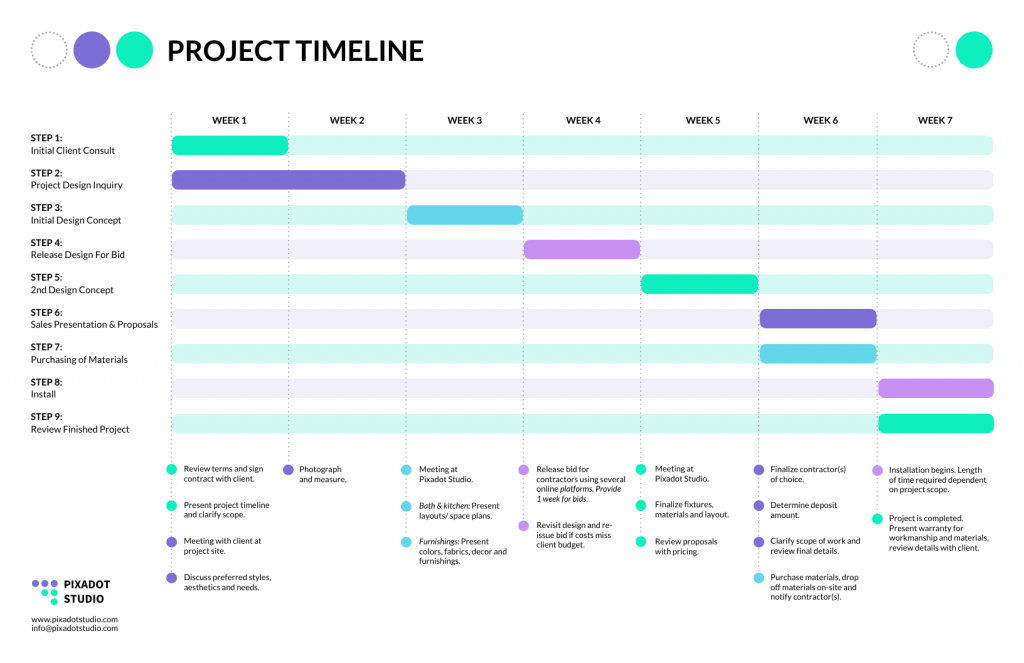
Hands-on insight:
As a content marketer at Venngage, I see firsthand how people actually use timelines day to day. A common scenario is taking a long planning doc or spreadsheet and turning it into a one-page visual timeline for clients or leadership. The goal is usually clarity, not control.
I’ve also spent time testing the AI Timeline Generator internally. When I use prompts like mapping out a multi-month product or marketing timeline, it gives me a solid starting point that’s easy to tweak. It doesn’t make decisions for you, but it removes that “where do I even start?” moment.
Key strengths:
- Structured templates that reduce layout work
- AI-generated starting points for quick drafts
- Intuitive editor suitable for non-designers
- Strong branding tools for agency-style output
Drawbacks:
- The free plan offers limited options for downloading and exporting.
- More advanced controls and brand customization starts at $24 per month
- Not built for large, data-heavy project management timelines with complex dependencies
Best for: Marketers, project managers, educators, consultants and teams creating presentation-friendly visuals.
Pricing:
- Free: Yes
- Premium: $19/month
- Business: $49/month
- Enterprise: Custom pricing
2. Canva – Simple, drag-and-drop visual timelines
Overview:
Canva is designed for quick visual creation, and its timeline templates follow the same philosophy. You can produce attractive layouts rapidly, blending icons, illustrations and colors to match your brand or personal style. It is great for casual timelines or content meant to be shared on social channels or presentations.
Because Canva is not built around date logic, everything is manual. For simple timelines this is fine, but for larger projects it can become tedious. Still, for anyone needing timelines with strong visual punch and minimal effort.
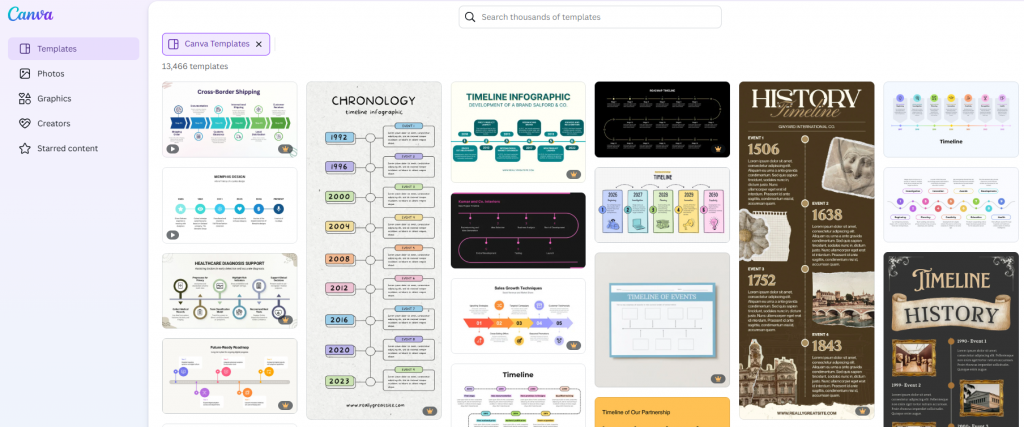
Hands-on insight:
When testing Canva, I used it to create a quick product launch timeline for a slide presentation. It worked well for high-level visuals where the goal was clarity and visual appeal rather than detailed planning.
However, that changed when I tried expanding the timeline with more phases and revisions. Manually spacing and adjusting everything started to feel tedious, which confirmed for me that Canva is best for simple, static timelines rather than evolving plans.
Key strengths:
- Huge template library
- Very beginner friendly
- Strong creative control
- Fast turnaround
Drawbacks:
- No automatic date plotting; every step must be positioned manually
- Dependency heavy or technical timelines become tedious because there is no time-based logic
- Better suited for simple visuals, not structured project planning
Best For: Content creators, educators, light marketing use.
Pricing
- Free: Yes
- Pro: $14.99/month per user
- Teams: $14.99–$30/month per team (depending on size)
- Enterprise: Custom pricing
3. Visme – Interactive and presentation-ready timelines
Overview:
Visme approaches timelines as part of a much larger content ecosystem. It is built for teams that value creative control and want their timelines to fit within a branded visual language. The editor provides a rich set of graphic tools that can turn a simple timeline into a polished, multimedia presentation.
Because the platform covers so many content types, finding the timeline features can take a moment. Once you get oriented, the tool is powerful enough to handle visually complex projects. It is a strong match for marketing teams that want timelines that look as designed as the rest of their materials.
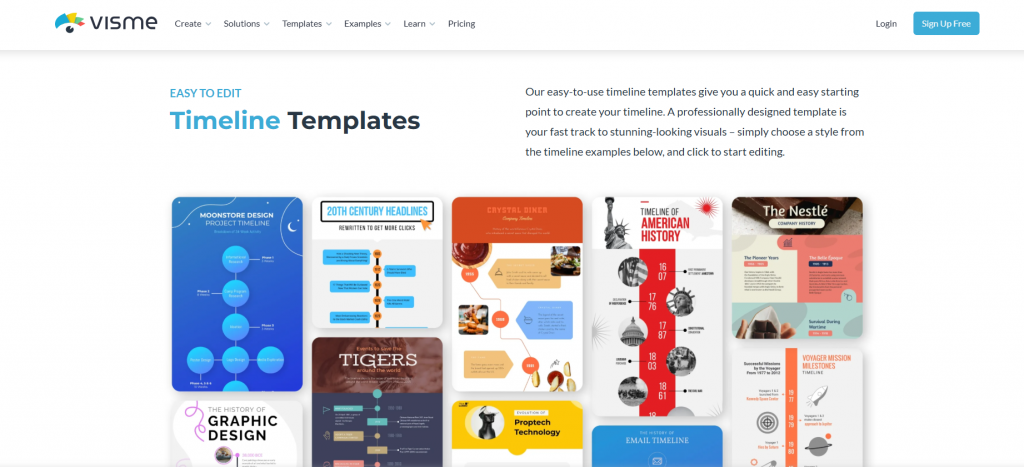
Hands-on insight:
I tested Visme by building a branded project timeline for a client-style presentation that needed icons, animations, and supporting visuals. I initially tried using the AI designer, but I kept running into an error when entering a prompt, so I ended up starting from a template instead.
That manual setup added some extra time, but once everything was in place, the timeline looked polished and presentation-ready.
Key strengths:
- Strong creative flexibility
- Supports multimedia elements
- High quality templates for branded visuals
- Good for visual storytelling
Drawbacks:
- Finding the timeline tools can take time because the platform covers many content types
- Some users report occasional editor lag and less polished video integration
- Many premium templates and higher quality visual assets require a paid subscription
Best For:
Marketing teams, creative departments, visual storytellers.
Pricing:
- Free: Yes
- Starter/Basic: $29/month per user (estimated entry tier)
- Pro/Business: $39/month per user (mid tier)
- Enterprise: Custom pricing
Best timeline software for project management teams
These options are built for planning and coordination. They work best when timelines include tasks, owners, dependencies or ongoing updates, and when multiple people need to stay aligned.
4. Toggl Plan – Team timelines, task planning, simple PM timelines
Overview:
Toggl Plan focuses on providing a lightweight view of workloads and schedules. The timelines are colorful and easy to scan, which makes them well suited for small teams that prefer a minimal approach to project planning. Tasks, owners and deadlines are visualized in a way that feels human rather than overly technical.
The tool stays flexible and avoids overwhelming users with advanced features. Mobile access is strong, allowing quick updates from anywhere. It is not intended to replace full project management platforms, but it does provide a clear picture of what is happening and who is responsible.
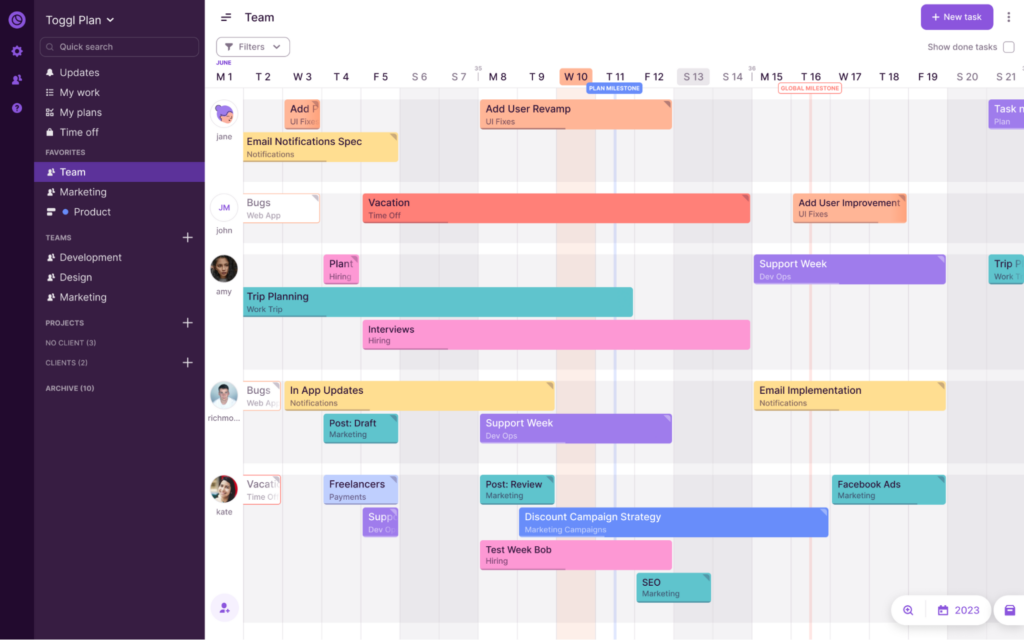
Hands-on insights:
When I tested Toggl Plan, I used it to map out a short marketing campaign with overlapping tasks and shared ownership. The color-coded timelines made it easy to see who was overloaded at a glance, without needing to dig into details.
I also tried making quick edits from mobile, like shifting deadlines and reassigning tasks, which worked smoothly. It felt especially useful for keeping lightweight projects moving without opening a full project management tool.
Key strengths:
- Simple and colorful visual layouts
- Low friction scheduling and assignment
- Good mobile access for remote work
- Fast adoption even for non technical teams
Drawbacks:
- No permanent free tier, so it becomes a paid tool after the 14-day trial
- Its simplicity means fewer advanced automation options
- Does not support detailed dependency management found in heavier PM platforms
Best For:
Small teams, freelancers, marketing campaigns and basic project tracking.
Pricing:
- Free: Yes (up to 5 users)
- Starter: $9/month per user
- Premium: $20/month per user
- Enterprise: Custom pricing
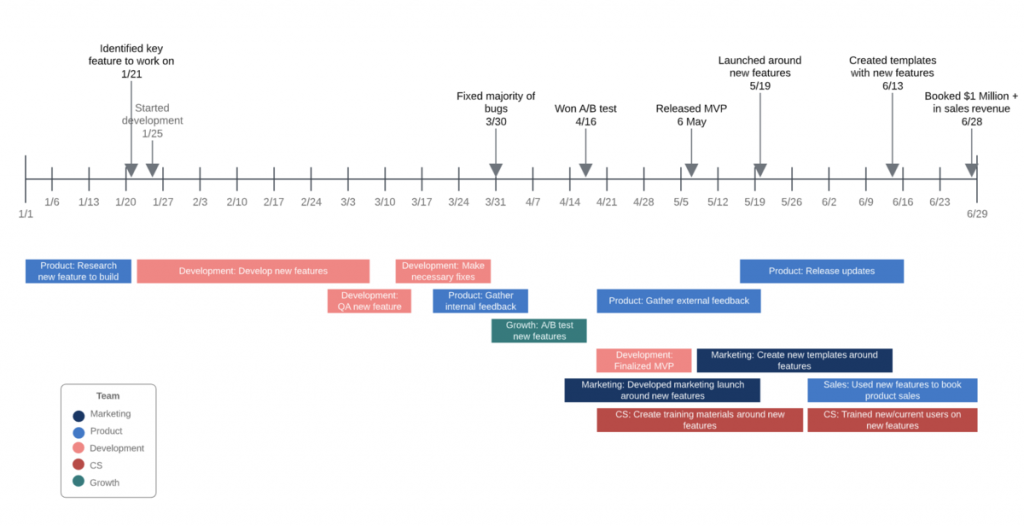
5. Lucidchart – Process flows, Gantt-style timelines, collaborative planning
Overview:
Lucidchart approaches timelines from a structural perspective. It is part of a larger system of diagramming tools that allow teams to connect workflows, processes and timelines in the same workspace. The environment feels precise, which is valuable for teams that need clear relationships between information rather than decorative graphics.
Collaboration is one of its strongest selling points. Multiple people can contribute simultaneously, and integration with enterprise tools keeps everything aligned. While the timeline features themselves are not deeply specialized, they benefit from the overall discipline and structure of the Lucidchart platform.
Hands-on insight:
I tested Lucidchart by creating a process-driven project timeline to show how milestones connected to broader workflows. Being able to place the timeline alongside flowcharts and diagrams helped keep everything in one structured, shared view.
I was testing it solo, so I didn’t get to fully use the real-time collaboration features. That said, it was clear how they would be valuable in team settings, especially for structured planning sessions where multiple people need to review and comment at once.
Key strengths:
- Excellent enterprise collaboration
- Precise diagramming environment
- Integrates well with corporate ecosystems
- Strong for structured information
Drawbacks:
- Timeline features are basic and do not automatically calculate date spans
- Free tier restricts both diagram size and object count, limiting more complex timelines
- More rigid and structured than creative tools, so decorative timeline work takes longer
Best For: Engineering teams, operations, enterprise planning environments.
Pricing
- Free: Yes
- Individual: $9/month per user
- Team: $10/month per user
- Enterprise: Custom pricing
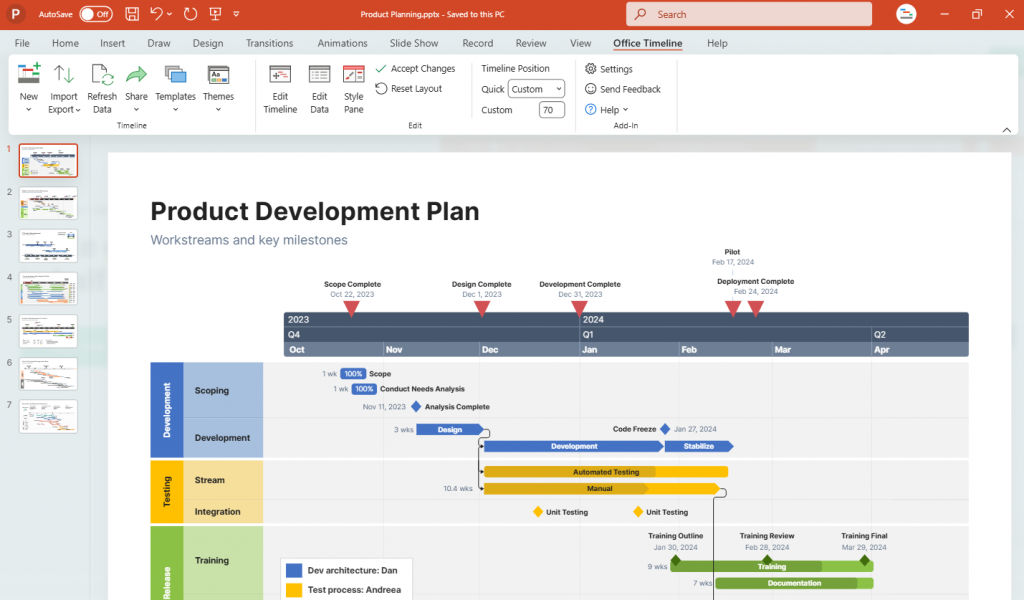
6. Office Timeline – PowerPoint-based project timelines, executive reporting
Overview:
Office Timeline suits professionals who rely on PowerPoint for day-to-day communication. Instead of forcing you into a separate tool, it works inside the environment you already use. The visuals it produces feel immediately “boardroom ready,” which removes the friction of pulling screenshots from external software. Everything is tailored toward polished executive communication.
Because the formatting rules are built in, you spend very little time dealing with alignment or spacing. It is a predictable tool that prioritizes professional presentation over creative freedom. If your workflow revolves around slides, this one fits naturally.
Hands-on insights:
When testing Office Timeline, I used it to quickly generate an executive-ready roadmap for a client presentation. Starting from a PowerPoint slide, I was able to produce a clean, polished timeline without worrying about alignment or spacing.
The biggest strength showed up when exporting and presenting. Because everything lived inside PowerPoint, the timeline fit seamlessly into the deck, making it ideal for leadership updates and client reviews where presentation quality matters.
Key strengths:
- Direct PowerPoint integration
- Polished templates made for corporate decks
- Useful for Gantt and roadmap style visuals
- Reliable formatting without manual tweaking
Drawbacks:
- The free edition offers a small template selection and limited editing power
- Advanced functions such as Excel syncing, Jira updates and swimlanes require higher priced tiers
- No real time multi-user editing, since timelines are ultimately exported into PowerPoint files
Best For: Executives, consultants, corporate presenters and client facing teams.
Pricing
- Free: Yes
- Lite: $9/month (billed annually)
- Plus: $17/month (billed annually)
- Expert: $21/month (billed annually)
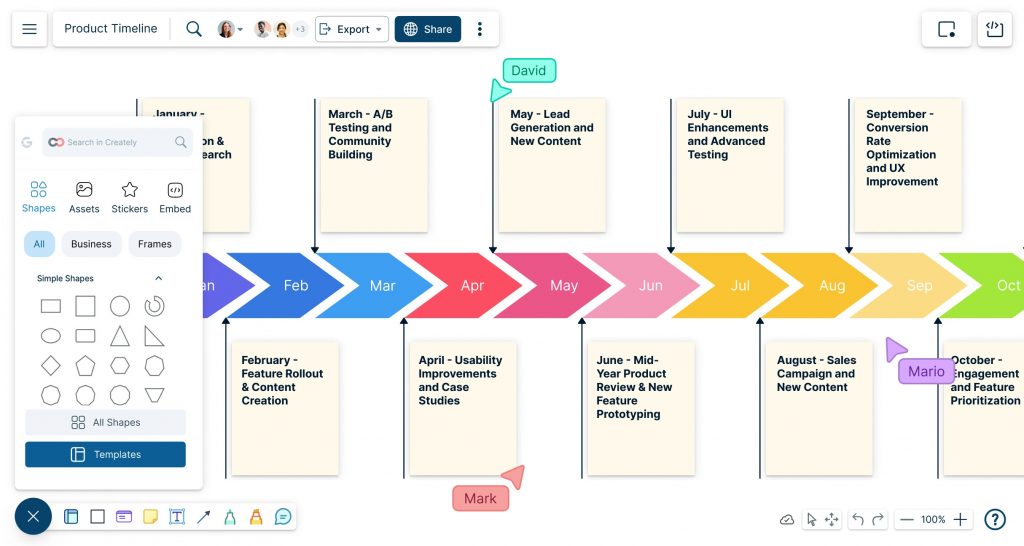
7. Creately – Visual collaboration tool with timeline templates
Overview:
Creately sits somewhere between a diagramming tool and a team workspace. You can map ideas, sketch frameworks and build timelines all in one place. Its flexibility makes it useful for workshops, planning sessions and situations where ideas need to evolve from rough sketches to structured diagrams within the same canvas.
Collaboration is where Creately earns its place. Multiple users can refine diagrams as they talk through concepts, creating a shared understanding that goes beyond a static timeline. The platform can feel heavy with very large canvases, but for mixed format planning it is a strong contender.
Key Strengths:
- Versatile canvas for mixed diagrams and timelines
- Real time collaboration
- Wide range of templates and planning tools
- Good for workshop style environments
Drawbacks:
- Large or complex diagrams can cause slow performance
- Free plan limits the number of canvases and overall storage
- Feature rich interface can feel overwhelming when you only need a basic timeline
Best For: Team workshops, product planning, collaborative strategy sessions.
Pricing:
- Free: Yes
- Personal: $8/month per user (estimated entry-level)
- Team: $8/month per user (team tier)
- Business: $149/month (unlimited users option)
- Enterprise: Custom pricing
Best lightweight timeline software options
If you want something quick and functional without a steep learning curve, these tools keep things simple. They’re useful for basic chronological timelines, education or one-off projects where speed matters more than features.
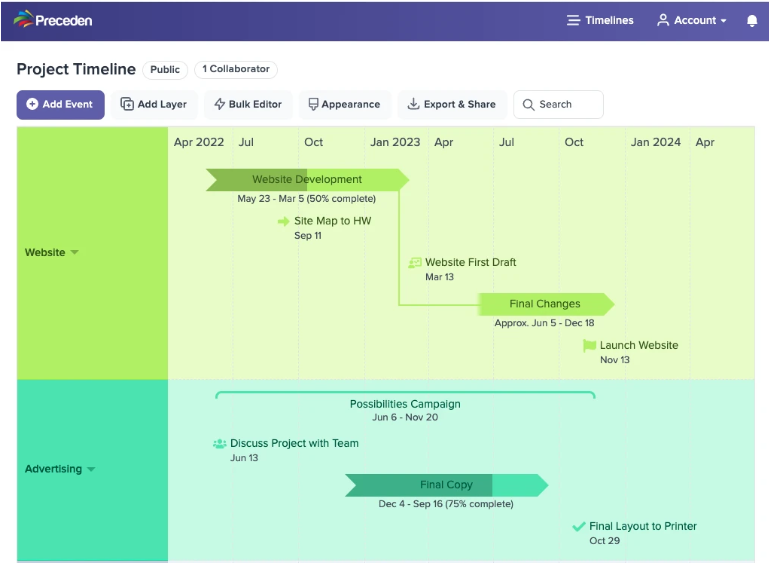
8. Preceden – Simple chronological timelines, low learning curve
Overview:
Preceden is built with long-form timelines in mind. Rather than trying to be visually flashy, it focuses on clarity and chronology. It handles multi-year and historical timelines particularly well, offering an interface that stays clean even when the dataset grows. Its simplicity makes it easy to work with, particularly for factual or research driven storytelling.
Sharing and publishing are its strongest qualities. You can embed timelines on websites or pass along links without running into formatting issues.
Hands-on insight:
I used Preceden to map out a multi-decade company history with overlapping phases and milestones. Even as the timeline stretched across many years, it stayed readable and easy to follow, which isn’t always the case with long timelines.
Sharing was straightforward. Generating a link or embedding the timeline worked without layout issues, making it a good fit for research, education or long-form storytelling that needs to live online.
Key strengths:
- Excellent for multi-year or historical timelines
- Very clean chronological layouts
- Easy embedding and sharing options
- Low learning curve
Drawbacks:
- The free plan caps timeline length and event count, which restricts longer projects
- Features like additional layers and private sharing sit behind paid plans
- Collaboration is limited to single-user editing, so it is not ideal for team-based timelines
Best For: Researchers, historians, educators, long range planners.
Pricing
- Free: Yes
- Basic: ~$25/month (billed monthly)
- Pro: ~$40/month (billed monthly)
9. Timeline Maker Pro – Desktop tool for Excel data and printouts
Overview:
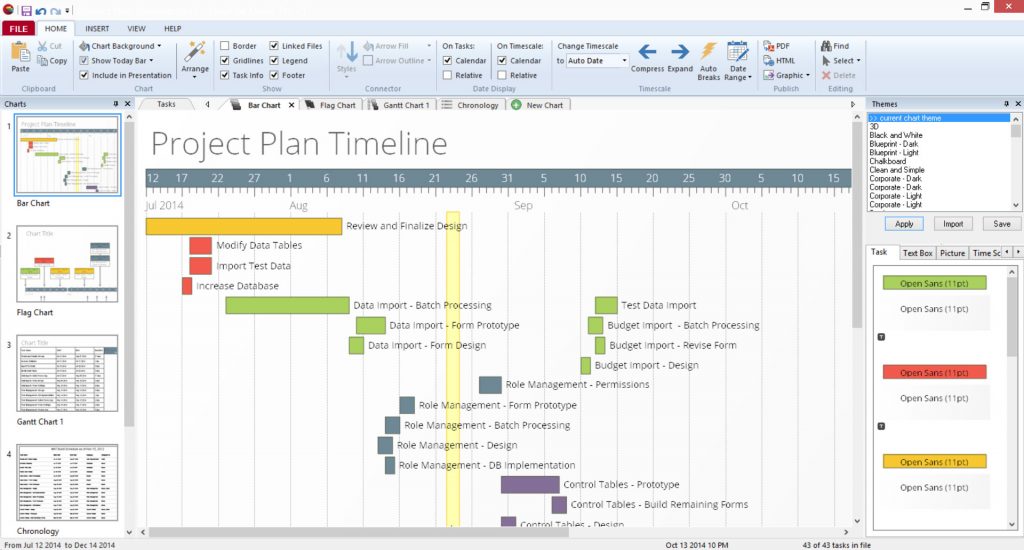
Timeline Maker Pro is a desktop option that appeals to users who prefer traditional software over cloud platforms. It handles structured datasets well, especially when importing events directly from Excel. The interface is dated but stable, offering quick ways to generate straightforward chronological charts without distractions.
Its strength lies in offline reliability. Printing, exporting to PDF and generating high resolution visuals feel smooth, which is valuable for legal work, documentation or archival uses. It is not aimed at collaboration heavy teams, but for individual users who want predictable output, it remains a solid choice.
Key Strengths:
- Strong Excel import workflow
- High quality printable outputs
- Reliable offline desktop experience
- Fast generation of basic timelines
Drawbacks:
- No free plan; only a short 14 day trial is available
- Windows only, leaving Mac users without native access
- Lacks collaborative or cloud-based features, making it best for individuals rather than teams
Best For: Legal teams, archivists, government offices, Windows based professionals.
Pricing:
- Free: Yes (free trial available)
- Individual: $149 one-time payment
- 3 User Small Business Pack: $299 one-time payment
- Larger Teams: 535+ one-time payment (varies by number of users)
10. Timetoast – Basic timelines for education and history
Overview:
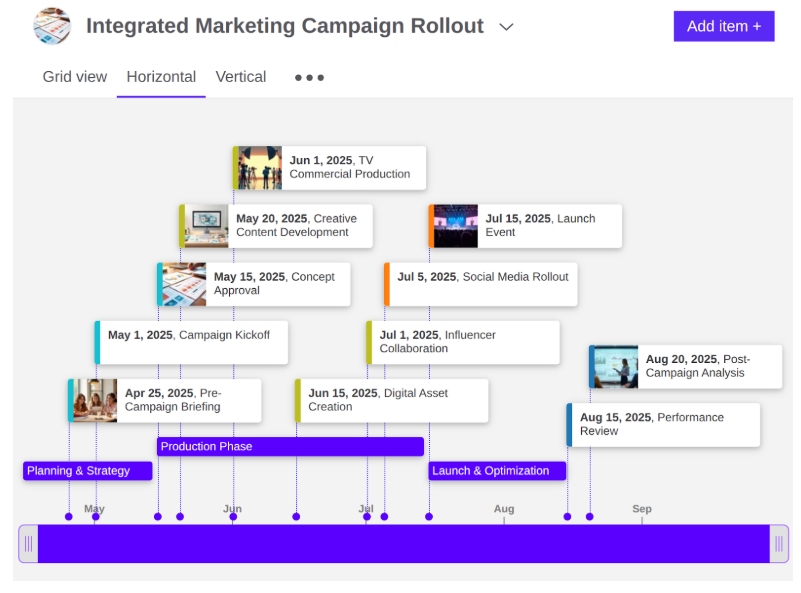
Timetoast makes timeline creation almost frictionless. Events are added through a minimalist interface, and the result is a clean, scrollable timeline that is easy for viewers to navigate. It is a straightforward tool that focuses on making chronological stories accessible to beginners or casual users.
Its simplicity limits customization, but that is part of its charm. You do not spend time adjusting detailed design settings. Instead, you focus on the sequence of events, which works especially well for school assignments or simple narratives. It is not intended for professional planning, but it handles the basics very well.
Hands-on insight:
I built a short historical timeline in TimeToast with basic event descriptions and dates. Adding events took very little effort, and the scrollable layout made the timeline easy to navigate from a viewer’s perspective.
Customization options ran out quickly, but that simplicity kept the focus on the sequence of events. For classroom projects or straightforward narratives, it felt intentionally minimal rather than limiting.
Key strengths:
- Extremely easy for beginners
- Interactive viewing experience
- Clean and minimal layouts
- Fast event creation
Drawbacks:
- Styling options are minimal, with little room for detailed customization
- Free version limits you to one public draft timeline at a time
- No collaboration, integrations or advanced logic for more complex planning needs
Best For: Students, teachers, basic historical or narrative timelines.
Pricing:
- Free: Yes
- Basic: $5.99/month
- Pro: $12/month (estimated, based on feature unlock)
- Enterprise: Custom pricing
What is the best way to visualize a project timeline?
Short answer: there’s no single best way to visualize a project timeline. The right format depends on what you need to communicate—detailed tasks, deadlines, progress or a high-level overview for others.
Most people are really choosing between three common options:
1. Gantt Charts (Best for tracking tasks and dependencies)
Gantt charts work well when you need a functional, task-level view. They show who’s working on what, how long tasks take and which tasks depend on others. This format is useful for active project management, especially when timelines change often and accuracy matters more than presentation.
2. Simple linear timelines (Best for overviews and planning)
A basic left-to-right timeline is often enough for planning phases, mapping milestones or showing how a project unfolds over time. It’s easier to read than a Gantt chart and works well when you want clarity without overwhelming detail.
3. Visual / infographic timelines (Best for presentations and stakeholders)
Visual timelines focus on storytelling rather than task tracking. They’re ideal for presentations, reports, proposals or stakeholder updates where the goal is understanding, not management. These timelines highlight key moments and progress without exposing every task underneath.
The takeaway: “best” depends on your situation. If you’re managing work, go functional. If you’re explaining work, go visual.
Why timeline software is essential for projects and marketing campaigns
Visualizing complex plans
Modern projects generate more information than teams can track manually.
A growing body of research indicates that in order for information to be most effective, it needs to be visual.” Paul R. Williams, Executive Managing Partner of Think for a Change,
A timeline turns scattered details into a structured visual. It becomes the easiest way to see phases, deadlines and bottlenecks without digging through spreadsheets or messages.
Better planning and tracking
Visual project management tools help teams identify delays and resource conflicts earlier because timelines make sequencing obvious.
Marketers planning multi-channel campaigns or PMs mapping multi-phase projects benefit from this transparency. Tracking becomes proactive rather than reactive.
Team alignment
A timeline gives everyone the same picture, which removes guesswork and cuts down on back-and-forth. Research on visual collaboration shows that visual communication strategies improve clarity, communication and collective understanding.

PMI reports that around 40% of projects miss their original goals, with ineffective communication contributing to roughly half of those failures. Timelines and visual roadmaps do not solve every issue, but they address the core problem: teams cannot align around work they cannot clearly see.
Efficiency over manual methods
Manual timelines created in spreadsheets or slides become outdated quickly. A dedicated timeline tool updates the structure in seconds. Interactive visualization also makes planning more intuitive and reduces the effort needed to make sense of complex information.
Timeline software replaces laborious layouts with fast, flexible planning.
Key features to consider when choosing timeline software
- Ease of use and interface: A good timeline tool should feel natural to use. An intuitive editor reduces friction, speeds up planning and allows teams to focus on the work rather than the interface.
- Templates and visual styles: A strong template library saves hours and ensures your timeline stays readable. Look for tools offering multiple styles such as horizontal, vertical, multi-layered, roadmap and infographic timelines.
- Collaboration: Timeline tools work best when teams can edit, comment and adjust dates together. Visual collaboration research shows that shared workspaces improve alignment and reduce miscommunication.
- Accessibility: Everyone on the team should be able to view or update the timeline easily. Browser-based tools offer simpler access, work across devices and reduce version-control issues.
- Pricing and free options: Pricing varies widely. Some tools offer generous free plans for simple timelines, while others require paid tiers for exporting, collaboration or advanced layouts. The best choice depends on your workflow and how often you update timelines.
5 Tips for creating effective timelines
1. Define your timeline’s purpose
Before adding dates, decide what the timeline needs to communicate. A business plan timeline, a campaign plan or a production schedule all require different structures. Purpose guides clarity.
2. Avoid overloading with data
A timeline is not a report. It is a visual guide. Keep the information focused so readers instantly understand what matters most.
3. Choose the right format
Horizontal timelines work well for sequential work. Vertical timelines help with long-term views. Multi-layered timelines are ideal for comparing parallel tracks. Pick the format that supports your story.
4. Use color and labels wisely
Color should highlight priority, not create chaos. Labels should be readable at a glance. Clean spacing makes the timeline easier to scan.
5. Leverage templates and AI
Timeline infographic templates give you a polished starting point. AI features help generate draft timelines, organize events and give you a structure to refine instead of designing from scratch.
Common timeline mistakes to avoid
Even the best tools cannot fix a poorly structured timeline. These are the mistakes that weaken clarity and slow down decision-making.
Crowding the timeline With too much information
A timeline is not a storage container for every task. When too many details compete for space, the main story disappears. Crowding forces people to zoom in repeatedly or interpret data they do not need. A good timeline highlights what matters and leaves the rest in supporting documents.
Using the wrong timeline format
A horizontal timeline works well for short campaigns but falls apart for projects spanning months. A vertical timeline offers more breathing room for long-term work. Multi-layer timelines help compare parallel phases. The format should support the message. When the format fights the content, the timeline becomes harder to read.
Ignoring dependencies and sequencing
Timelines are storytelling tools, and stories fall apart when the sequence is unclear. If tasks that rely on each other look disconnected, team members miss the logic and misunderstand priorities. A strong timeline makes relationships obvious at a glance.
Focusing on aesthetics before structure
Pretty timelines are useless if the structure is confusing. The order of events, spacing and grouping matter more than color or icon choices. Start with the logic, then apply the visual finish.
Letting the timeline go out of date
A timeline that does not reflect reality becomes a liability. When dates shift and no one updates the visual, the team loses trust in the plan. The entire purpose of timeline software is to make updates fast, so the timeline stays alive and relevant.
Building the timeline for yourself instead of the team
Timeline creators often forget who the visual is for. A timeline meant for stakeholders should simplify. A timeline for internal teams may require more detail. The best timelines are built with the audience in mind, not the creator.
Frequently asked questions
1. Does Microsoft Word have a timeline template?
Yes, Word includes a few basic timeline templates. They work for simple visuals but become restrictive once you need multiple phases, branded colors or frequent updates. Word relies heavily on manual adjustments, which slows you down as plans evolve.
2. Can I create a project timeline in Excel or Google Sheets?
You can, but it takes patience. Excel and Sheets are good for calculations but not for visual storytelling. Building a timeline means adjusting cells, resizing shapes and manually aligning everything.
3. Is there a free AI tool to create timelines?
There are free AI tools that generate timeline layouts, although the results often need refinement. AI can create structure, but you still have to adjust spacing, colors and labels for clarity. Venngage’s AI Timeline Generator gives you both the starting framework and the design flexibility to make it presentation-ready. The templates and editing tools make the final visual more polished and reliable.
4. What is the easiest way to make a timeline?
The quickest way is to use a tool that already understands layout design. Template-based and AI-powered tools save you from arranging shapes and guessing spacing. Venngage offers a simple drag-and-drop editor, strong timeline templates and an AI generator that handles the first draft for you. You can create a clean, professional timeline in minutes without any design experience.
This program has SO many templates to choose from. I’ve been using it for almost two years, and I have yet not to find what I’m looking for. I have to use media tools for my job but have no graphic design skills whatsoever.
Nicole H from G2 Reviews
5. Are timeline software programs worth the cost?
It depends on how complex your timelines are and how often you use them. If you manage large projects, collaborate with teams or update timelines regularly, paid software can save time and reduce confusion. For simple or occasional timelines, free tools or templates often provide better value.
The easiest option is to export the timeline as a PDF, image or slide deck. This keeps the timeline accessible without requiring logins or training. For ongoing updates, share a live link with view-only access, if the tool supports it.
Conclusion
Most teams are not overwhelmed by work. They are overwhelmed by how that work is organized. Projects stretch across tools, deadlines shift, and plans become harder to follow the moment things change. A good timeline cuts through that noise. It turns scattered tasks into a visual path that makes sense in seconds.
For marketers and project managers, that kind of clarity is a real advantage. It helps teams communicate better, stay aligned and make decisions without hesitation. A timeline becomes the anchor that keeps the entire project moving in the right direction.
Venngage makes that process easier. Its templates, editor and AI Timeline Generator help you turn raw ideas into branded timelines that look clear and feel effortless. You get structure without the struggle and visuals that work beautifully in presentations and reports.
If you want your next project or campaign to start with clarity and confidence, try Venngage and bring your timeline to life the simple way.








