





Searching for the best genogram software in 2026? Here’s a clear, practical breakdown of the tools that actually handle complex family structures without slowing you down.
Our team reviewed dozens of genogram tools across therapy, healthcare and academic settings. Most of them look promising at a glance, but few hold up under real-world case complexity.
This guide compares the best genogram software in 2026 based on real workflows. If you’re looking for a genogram maker for client work, research or internal documentation, you’ll find out which ones are worth your time and which ones aren’t.
Quick summary: The best genogram makers at a glance
We evaluated each genogram maker based on symbol accuracy, ease of mapping complex families, privacy controls, export quality and collaboration.
We also recreated the same multi-generation case across tools to see which platforms handle real complexity.
Deep relationship mapping, medical markers and structured genogram symbols for clinical documentation; verify compliance workflows before using in regulated environments.
Venngage (Best for presentation-ready genograms)
Clean genogram templates, brand controls and polished exports for client reports, training materials and presentations.
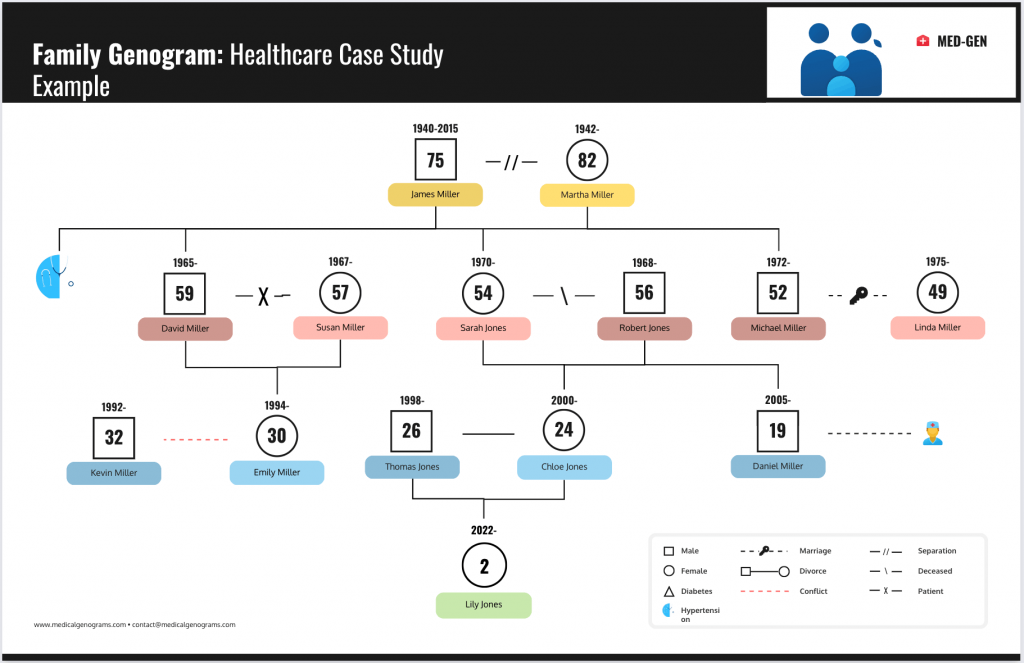
Here’s a clear genogram diagram I created with Venngage to showcase family relationships and key health notes:
Genogram Analytics (Best for healthcare settings)
Built for clinical assessments and structured family data, suited for hospitals and behavioral health programs that prioritize privacy workflows.
Creately (Best for students)
Fast browser-based online genogram maker with ready-made shapes, ideal for coursework and shared computers like Chromebooks.
Lucidchart (Best for teams)
Real-time editing, comments and version history make it useful for supervision groups, agency teams and collaborative classrooms.
MyHeritage (Best for genealogy research)
Focuses on ancestry records, DNA matching and historical archives rather than clinical family relationship analysis.
TL;DR
- If you need deep therapeutic mapping for complex cases, choose GenoPro.
- If you need clean visuals for reports or workshops, choose Venngage.
- If you need structured clinical assessments in healthcare settings, choose Genogram Analytics.
- If you need a browser-based tool for class assignments, choose Creately.
- If you need real-time team editing, choose Lucidchart.
Comparison table: Features, platforms and 2026 pricing
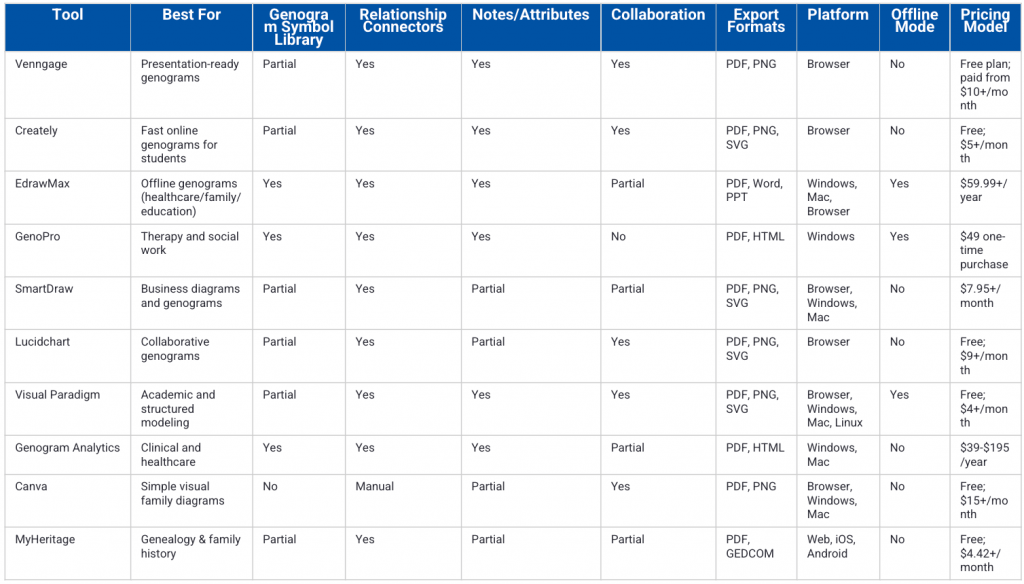
Here’s a quick side-by-side look at each genogram tool’s features, platforms and 2026 pricing:
Genogram vs family tree
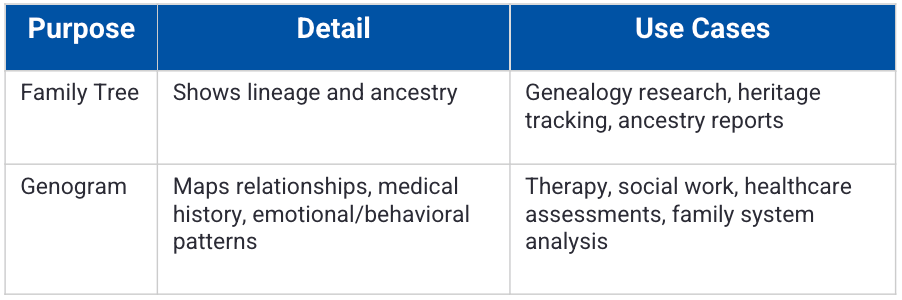
People often use genogram vs family tree interchangeably, but they serve different purposes. A family tree shows lineage, while a genogram maps relationships, medical history and emotional patterns across generations.
If you’re documenting trauma, hereditary illness or relational conflict, a simple ancestry chart won’t suffice.
How we evaluated these tools
We tested each tool hands-on using the same real-world scenario and scored them against a consistent rubric.
Our scoring rubric
- Symbols and connectors (25%): We checked whether the platform supports standard genogram symbols, relationship lines, emotional indicators and custom connectors.
- Notes and attributes (15%): We looked at how you can add health history, behavioral notes, dates and contextual details.
- Export and print fidelity (15%): This is a big one for us at Venngage. Therefore, we tested PDF and PNG exports to ensure resolution, scaling and layout stay perfect.
- Ease of use and templates (15%): We understand that even grandmas might use a genogram tool. So we checked a tool for templates, layout friction and how quickly you can build a full diagram without struggling.
- Collaboration (10%): Sometimes genograms are a family affair, other times team sports. We tested real-time editing, comments and version history where available.
- Privacy posture (10%): We reviewed how each platform handles data storage, sharing controls and security documentation. This is critical, especially if you’re handling client data.
- Price and value (10%): We compared free plans, paid tiers and feature sets to determine overall return for different user types.
Our test scenario
We built the same three-generation genogram across platforms. The case included divorce and remarriage, one adoption where supported, documented health history and relational notes. We then exported the file to PDF and PNG. For collaborative tools, we tested live editing with multiple users.
Disclosure: Venngage is our product, so you’ll see it included in this comparison. However, we applied the same scoring framework across all tools and noted trade-offs where relevant.
The 10 best genogram software tools
Based on our research, here are the 10 best genogram platforms in 2026 and how they compare to each other:
1. Venngage
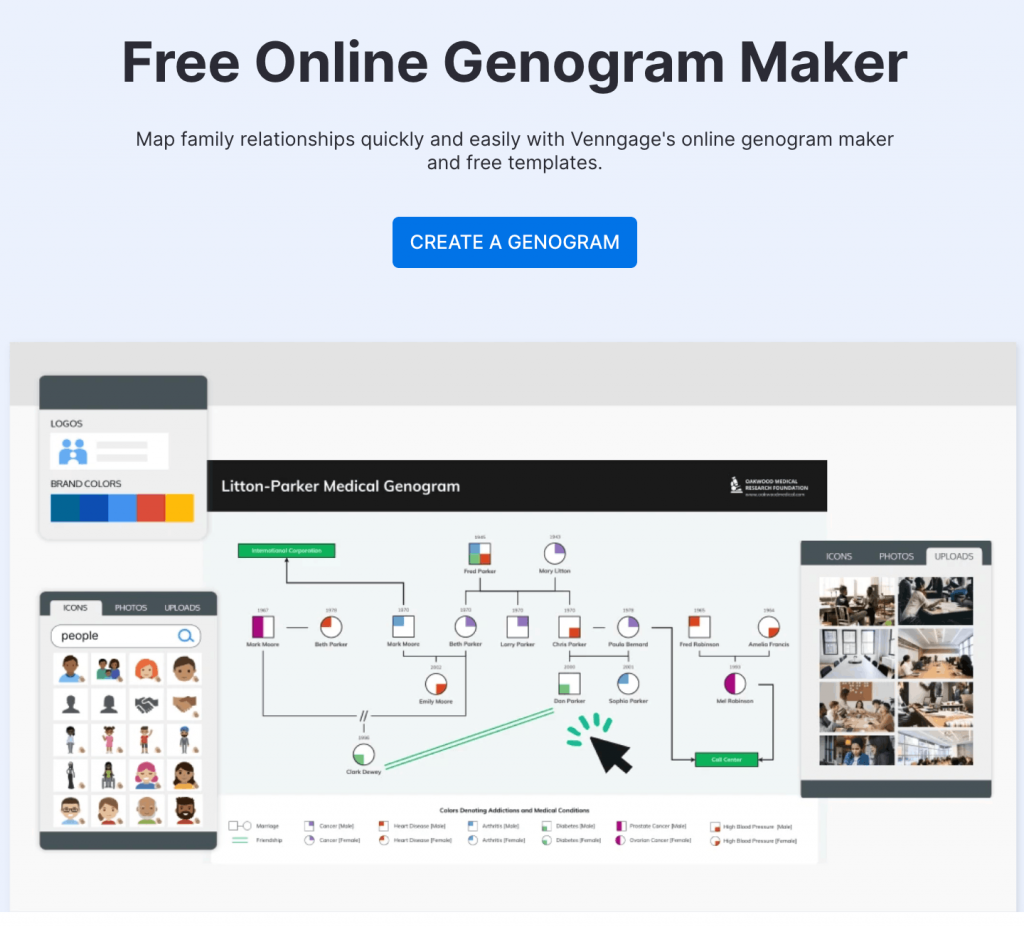
Best for: Presentation-ready genograms and client-facing reports.
Why it stands out: Venngage offers genogram templates of all kinds that you can adapt into clear, visually consistent diagrams without design complexity.
Key features:
- Customizable diagram templates
- Drag-and-drop shapes and connectors
- Branded exports (PDF, PNG)
- Collaboration and comments
- Cloud-based editor
Pros:
- Easy to use, even for beginners
- Clean, accessible design layouts
- Powerful export options
Cons:
- Not designed for medical record storage
- Some advanced templates require a paid plan
Pricing and platforms: Free plan available; paid plans start at $10/month (checked on February 25, 2026); browser-based platform.
2. Creately
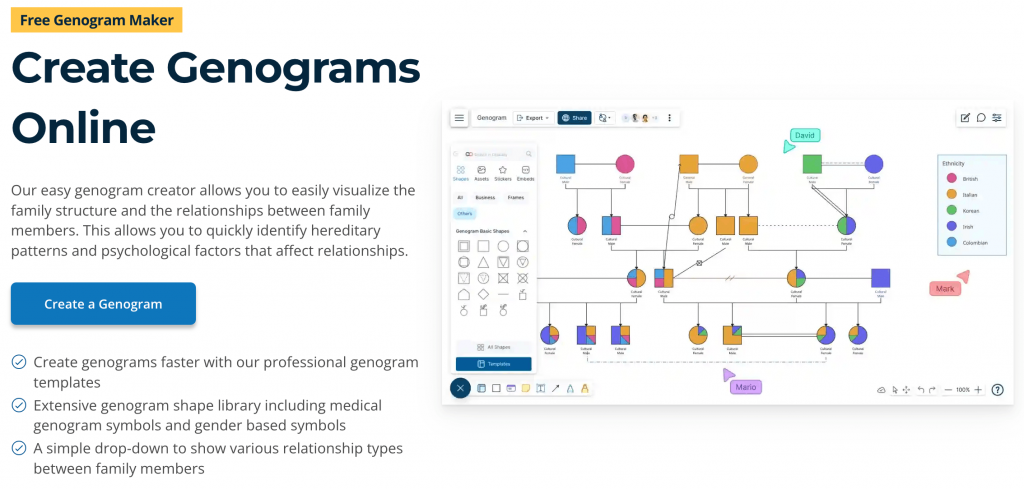
Best for: Fast online genogram creation for students
Why it stands out: Creately provides dedicated genogram templates and prebuilt relationship shapes inside a collaborative canvas.
Key features:
- Genogram-specific templates
- Custom properties and notes
- Team collaboration
- Version history
- Multiple export formats
Pros:
- Ready-to-use genogram symbols
- Strong collaboration
- Browser-based
Cons:
- Advanced features require a paid plan
- The interface can feel cluttered on large diagrams
Pricing and platforms: Free plan available; paid plans start at $5/month (checked on February 25, 2026); accessible via website.
3. EdrawMax
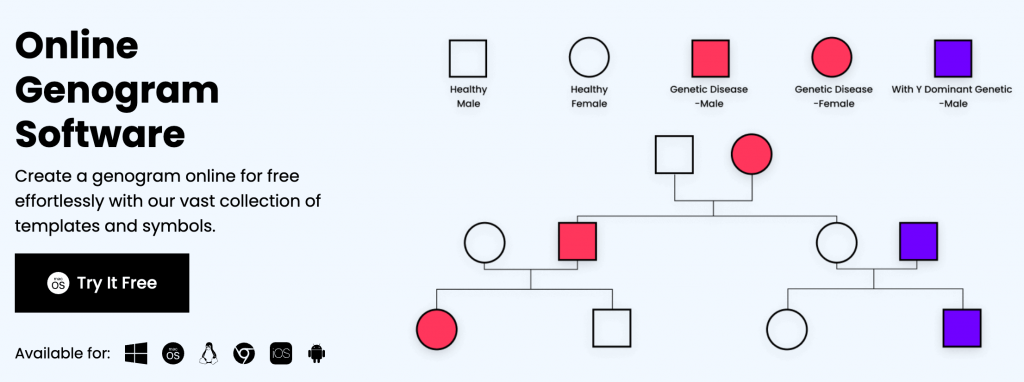
Best for: Offline genogram software for Windows and Mac
Why it stands out: EdrawMax includes a dedicated genogram diagram type with preloaded symbols and templates for healthcare, family studies, education, sociograms and even phylogenetic mapping.
Key features:
- Built-in genogram symbol library
- Medical and family templates
- Offline desktop access
- Import/export as PDF, Word or PPT formats
- Large shape library
Pros:
- Works without internet
- Extensive diagram categories
- Familiar desktop interface
Cons:
- The user interface can feel confusing
- You’ll need a paid subscription to access advanced features
Pricing and platform: Paid plans start around $59.99/year (checked on February 25, 2026); accessible via web browser.
4. GenoPro
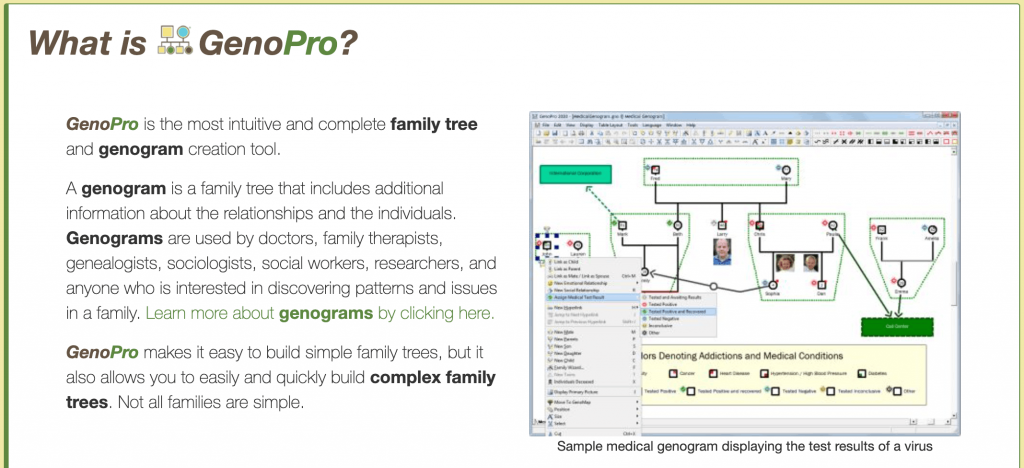
Best for: Therapy and social work documentation
Why it stands out: GenoPro focuses specifically on genograms and family tree mapping rather than general diagramming.
Key features:
- Detailed genogram symbols
- Emotional relationship lines
- Custom data fields
- Report generation
- GEDCOM support
Pros:
- Deep family mapping controls
- Clinical-friendly structure
- Long-standing niche focus
Cons:
- The interface feels extremely dated
- Windows-only availability
Pricing and platform: Single-user license available at one-time payment of $49 (checked on February 25, 2026); only available for Windows.
5. SmartDraw
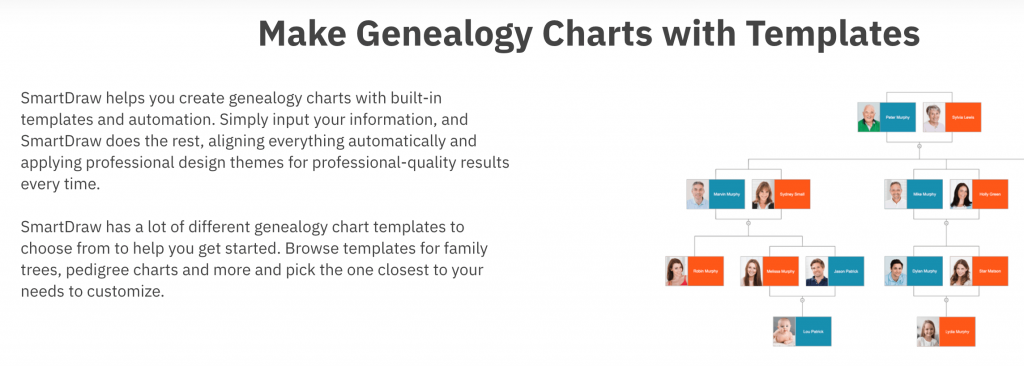
Best for: Business users who need structured diagram templates
Why it stands out: SmartDraw is built primarily for floor plans, flowcharts, org charts and other structured layouts. However, it also includes genogram maker capabilities within its broader diagram suite, along with enterprise integrations.
Key features:
- Genogram templates
- Automatic alignment
- Microsoft 365 integration
- Cloud storage support
- Multiple export formats
Pros:
- Strong formatting controls
- Enterprise integrations
- Reliable exports
Cons:
- Limited genogram templates
- No advanced clinical mapping
Pricing & platforms: Plans start at $7.95/month (checked on February 25, 2026); available via browser, plus desktop apps for Windows and Mac.
6. Lucidchart
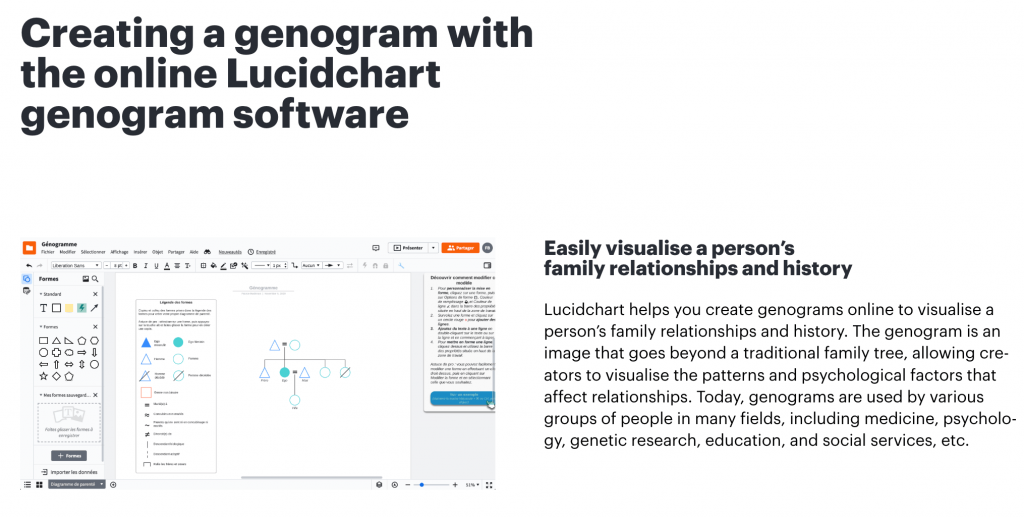
Best for: Real-time collaborative genograms
Why it stands out: Lucidchart supports live editing and structured diagramming, useful for supervision teams or classroom work.
Key features:
- Shared editing
- Commenting and version history
- Shape libraries
- Integrations with Google Workspace
- Cloud-based
Pros:
- Excellent collaboration
- Clean interface
- Easy sharing links
Cons:
- Limited built-in genogram depth
- Complex diagrams can lag
Pricing and platform: Free plan available; paid plans start at $9/month (checked on February 25, 2026); entirely web-based.
7. Visual Paradigm
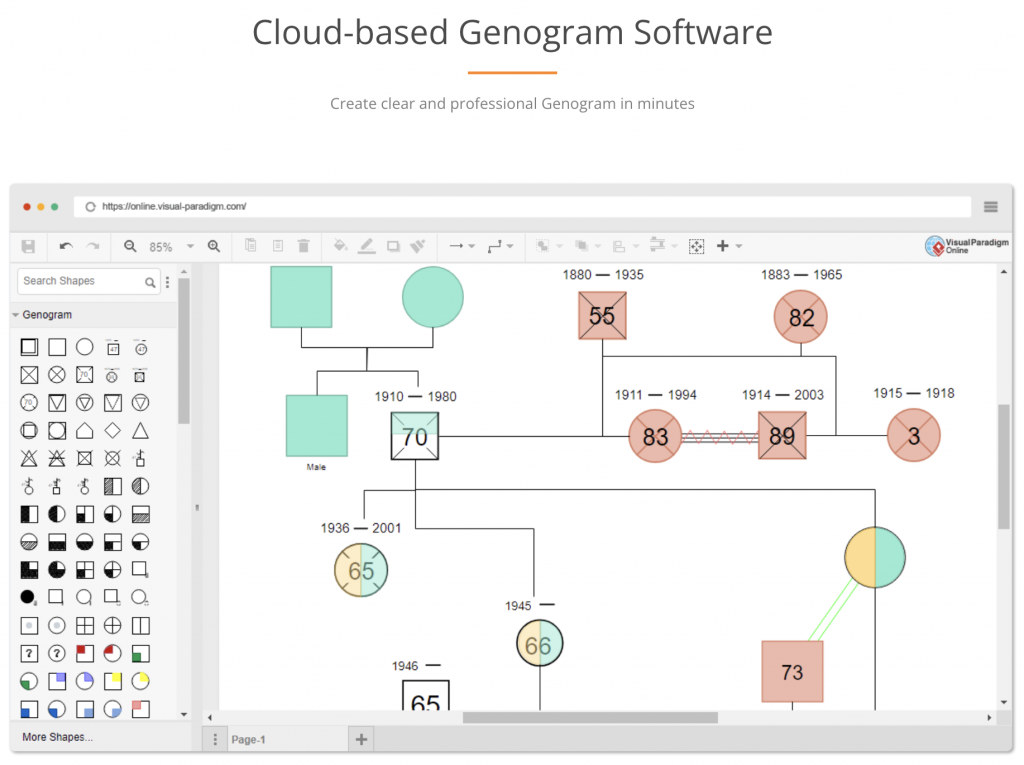
Best for: Academic and structured modeling environments
Why it stands out: Visual Paradigm supports custom diagram creation, including genogram-style modeling with detailed attributes.
Key features:
- Custom diagram types
- Data fields and annotations
- Team collaboration
- Cross-platform desktop
- Export options
Pros:
- Strong modeling structure
- Works offline
- Academic licensing options
Cons:
- Not genogram-specific
- Steeper learning curve
Pricing and platforms: Community edition available; paid plans start around $4/month (checked on February 25, 2026); available in web browser version, also has desktop apps for Windows, macOS and Linux.
8. Genogram Analytics
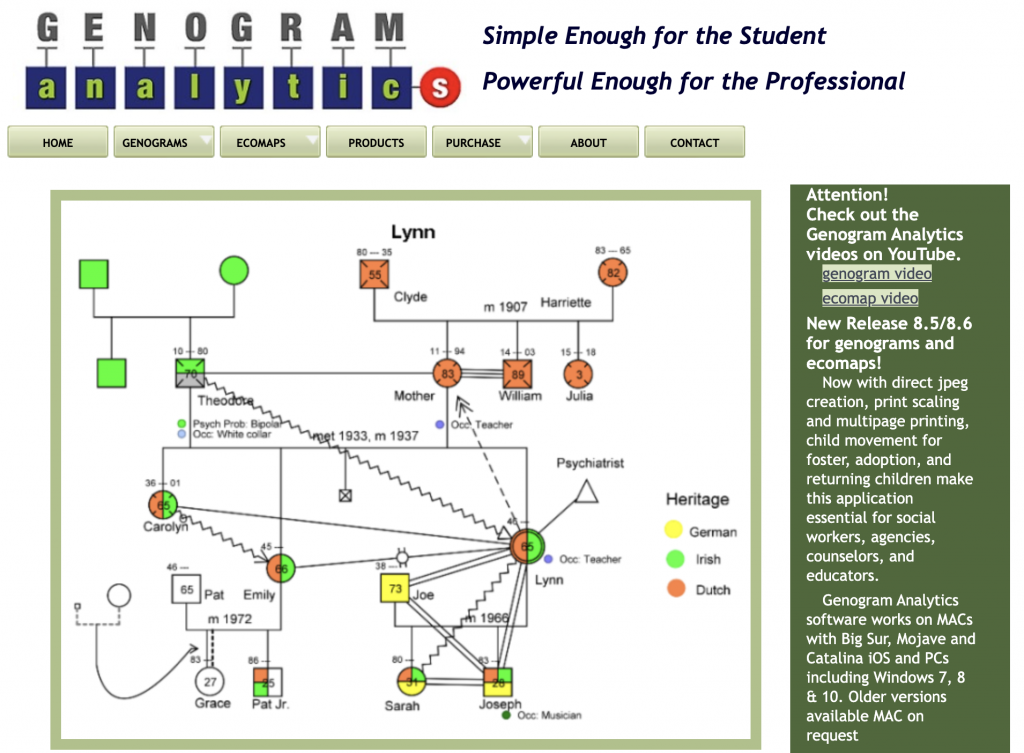
Best for: Clinical and healthcare assessment settings
Why it stands out: Genogram Analytics focuses on behavioral health and structured family assessment rather than generic diagramming.
Key features:
- Clinical assessment tools
- Structured family data input
- Relationship mapping
- Report outputs
- Secure account system
Pros:
- Healthcare-focused
- Built for analysis
- Assessment integration
Cons:
- Limited design flexibility
- Extremely dated user interface
Pricing and platform:No free plans; paid plans start at $39 (for students) and $195 (for professionals) [checked on February 25, 2026]; runs on Mac and Windows.
9. Canva
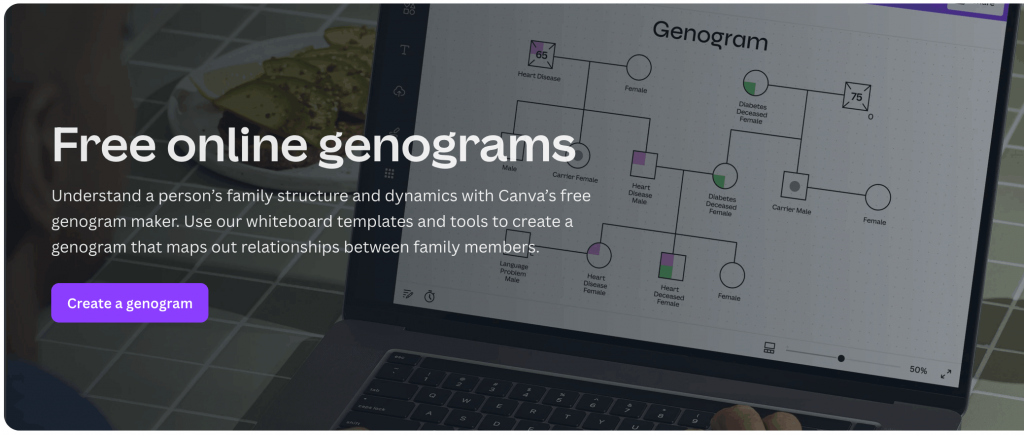
Best for: Simple visual family diagrams
Why it stands out: Canva offers family tree templates that can be adapted into basic genograms using shapes and connectors.
Key features:
- Drag-and-drop interface
- Huge visual library
- PDF/PNG export
- Brand kits
- Offers cross-device collaboration
Pros:
- Beginner-friendly interface
- Great-looking templates
- Free plan available
Cons:
- No dedicated genogram symbols
- Requires manual relationship editing
Pricing and platform: Free plan available; paid plans start at $20/month (checked on February 25, 2026); available on browsers and as apps for Windows and Mac.
10. MyHeritage
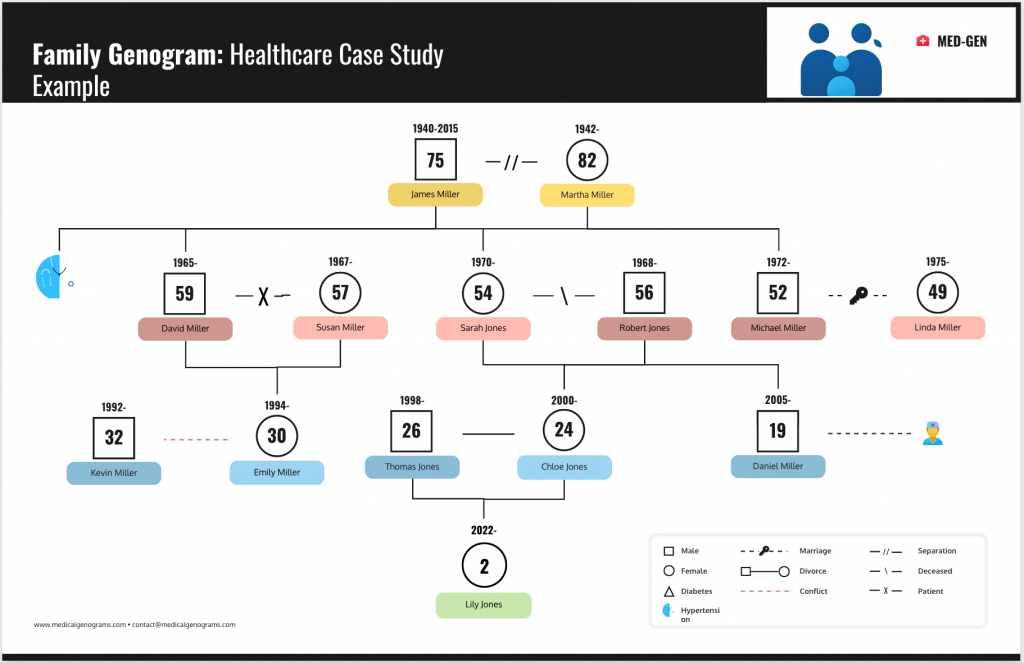
Best for: Genealogy and family history research
Why it stands out: MyHeritage focuses on ancestry records and DNA-based lineage rather than therapeutic genograms.
Key features:
- Family tree builder
- Historical record database
- DNA matching
- GEDCOM import/export
- Cloud storage
Pros:
- Strong ancestry database
- Research-focused
- Global records
Cons:
- Not designed for therapy use
- Subscription required for full access
Pricing and platform:Free basic plan; paid plans start at $4.42/month (checked on February 25, 2026). Web, iOS, Android.
Best genogram software by use case
Now that we have finished reviewing the tools, here are some practical tips to help you decide which one is best for you.
This section groups them by real-world use so you can skip the noise and pick what fits your workflow.
If you document family systems, trauma patterns or behavioral history, symbols and relationship depth matter more than aesthetics.
Genogram Analytics
This tool is built specifically for therapeutic assessment and structured relationship mapping. It supports detailed family data input, relationship categorization and report-style outputs.
It fits agencies and behavioral health programs that treat genograms as part of formal case documentation.
GenoPro
A long-standing genogram-focused tool used in counseling and family systems work. It offers emotional relationship lines, detailed attributes and structured mapping. It works well when you need layered dynamics and clinical clarity over design polish.
Best for presentation-ready genograms
If your genogram is supposed to land in a board deck, training session or client report, tools that offer clear visuals work best.
Venngage
Venngage’s vast template library and flexible layout control make it ideal for clean, readable genograms. You can apply brand kits, control spacing and export high-resolution files.
It works well when visual aesthetics matter as much as genogram accuracy.
Canva
Canva has modern layouts and a simple drag-and-drop interface. You can adapt family tree templates into basic genograms for reports or slides.
It fits light documentation use, not complex clinical mapping.
Best for healthcare and clinical settings
Heavily regulated industries like healthcare need tools that come up with advanced privacy and storage options.
EdrawMax
Desktop-based access makes EdrawMax attractive for teams that prefer local on-prem installation over cloud-based tools. It also includes healthcare diagram libraries and structured genogram symbols.
It suits documentation-heavy workflows where offline access matters.
Visual Paradigm
This tool is designed for structured modeling and professional documentation. It supports detailed attributes and controlled project environments.
It fits teams that operate in process-driven or regulated settings.
Best for students
If you need something fast, affordable and easy to export for grading, these tools offer the simplicity you’d love.
SmartDraw
SmartDraw comes with template-driven diagram-building features with automatic alignment. It reduces formatting friction for first-time users.
It works well for straightforward academic assignments.
Lucidchart
Clean interface and quick onboarding make Lucidchart a good fit for students. Users can build genograms fast and share links for review. And the collaboration features help with group projects.
Best for teams
If you require multiple team members to work on or review genograms together, there’s one tool that stands out the most.
Creately
Real-time editing, shared workspaces and structured canvases. Teams can comment, revise and manage versions in one place.
It fits supervision groups, agencies and live classroom environments.
Best for genealogy and family history research
Is your goal ancestry research rather than therapy documentation? If so, you’d need records, not just rich genogram symbols.
MyHeritage
MyHeritage is built solely for lineage research with historical record databases and DNA matching. It supports large family trees and media storage.
It suits long-term ancestry tracking more than clinical genograms.
What to look for in genogram software
Before you pick the best genogram maker, run this checklist first. It can help you separate hobby diagramming from serious genogram work.
1. Complete symbol and connector library
A serious genogram creator needs more than circles and squares.
Look for:
- Standard genogram symbols
- Divorce, adoption, remarriage connectors
- Emotional relationship lines such as conflict, cutoff or close bonds
- Clear legend support
If you work in therapy, weak symbol support will limit your documentation depth.
2. Templates and speed features
You should not build every structure from scratch. A strong online genogram maker should always reduce layout friction.
Look for:
- Structured genogram templates
- Auto-alignment and spacing tools
- Easy multi-generation scaling
- Drag-and-drop relationship connectors
3. Notes and attributes per person
If you need genogram software for therapists or genogram software for social work, structured note fields matter more than visual polish.
Look for:
- Medical history fields
- Psychosocial notes
- Custom attributes
- Attachments or citations where relevant
4. Export and printing quality
If you plan to present a genogram in PowerPoint, export quality should be a top priority.
Look for:
- High-resolution PDF for printing
- PNG for slide decks
- SVG for further editing
- Clean scaling without broken connectors
5. Collaboration and permissions
Genograms often move through review cycles. If your team edits diagrams together, good collaboration features go a long way.
Look for:
- Commenting
- View-only links
- Role-based permissions
- Version history
6. Privacy and security
If you need HIPAA-compliant genogram software, verify vendor documentation directly. Do not assume compliance based on marketing language.
Look for:
- Clear data storage policies
- Encryption standards
- Access controls
- Account-level deletion or export options
7. Platform fit and offline mode
Clinical settings often prefer on-prem solutions over cloud-only software.
Check whether the tool works as:
- Genogram software for Mac
- Genogram software for Windows
- Genogram software for Chromebook
- Desktop-based with offline access
8. Pricing reality
Some users try a genogram in Word or a genogram in Excel to avoid paying for genogram maker software. That works for basic layouts, not complex relationship systems.
Look for:
- Free genogram software vs limited trial
- Export restrictions
- Watermarks
- Collaboration locked behind paywalls
HIPAA, privacy and sensitive family data: What you need to know
If your genogram includes clinical or sensitive family data, privacy is non-negotiable.
1. Cloud vs. local storage: The practical tradeoffs
Where your data lives changes your risk profile.
Cloud-based solutions:
- Data is stored on vendor infrastructure (i.e., a cloud server)
- Permissions, user access and sharing controls can vary the degree of risks involved
- If your vendor’s security is compromised, your data can be exposed too
Local software:
- Files are stored on your device or internal server
- Device encryption and backups are entirely your responsibility
- Access control depends on your internal IT setup
None of these options is automatically safer. The risks often depend on configuration and policy discipline.
What does “HIPAA compliant” usually require in practice
What a vendor promises in their marketing copy isn’t always credible. In most healthcare settings, HIPAA-ready software typically involves:
- A signed Business Associate Agreement (BAA)
- Documented security safeguards
- Role-based access controls
- Internal policies for data handling
Keep in mind that this is not legal advice. Just because you buy a software that promises security doesn’t create compliance. Always verify with the vendor.
Quick privacy checklist before you choose
Run this checklist before committing:
- Can you create view-only links?
- Can you revoke access instantly?
- Can you export and permanently delete data?
- Is the storage region disclosed?
- Are audit logs available where relevant?
If a tool cannot answer these questions clearly, think twice before storing sensitive family data.
Can you make a genogram in Google Docs, Word, PowerPoint or Excel?
Short answers: Yes, you can. But a better question is whether you should. Let me explain what I mean.
Does Google Docs have a genogram template?
No native template exists inside Google Docs.
You can use Google Drawings, insert shapes manually or import third-party templates. That works for simple diagrams.
But it often breaks down with:
- Multi-generation scaling
- Emotional relationship lines
- Structured genogram symbols
- Dense clinical notes
For complex cases, the workaround can be extremely frustrating.
Word or PowerPoint approach: When it’s okay
You can build a genogram in Word or a genogram in PowerPoint using shapes and connectors. It works for basic academic assignments or quick internal drafts.
Expect tradeoffs:
- Manual alignment
- No symbol library
- Limited metadata per person
- Version control confusion
If your goal is a clean slide visual, PowerPoint can handle light use. But if you’re building layered family systems, general office tools slow you down.
Excel: Usually not ideal
Some users even attempt a genogram in Excel. That usually increases friction instead of reducing it.
Don’t get me wrong, Excel is great for collecting structured data. For instance, you can track family data in rows and columns.
But you can’t visualize relationship dynamics across generations. It lacks the spatial flexibility and meaningful connector logic that a genogram requires.
When Office or Canva is enough vs. when you need dedicated software
People often ask, does Canva have genograms. Canva offers adaptable family tree templates. You can convert them into basic genograms. It suits light documentation and presentation work.
Microsoft Office or Canva is enough when:
- You need simple visuals for class
- The family structure is small
- No emotional relationship lines are required
- No sensitive data is involved
- You need a free genogram software alternative
You need dedicated genogram maker software when:
- You need structured genogram symbols
- You want to document trauma or clinical patterns
- You need better collaboration controls
- You need to assess HIPAA-compliant genogram software
- You are doing therapy or agency case documentation
FAQs about genogram software
Here are answers to some of the most common questions about genogram software.
1. What is the best genogram maker software?
The best genogram maker software depends on your use case. Therapists need structured symbols and relationship dynamics. Students may prefer a free online genogram maker. Healthcare teams should verify HIPAA-ready features before choosing.
2. Is genogram software easy to use?
Most modern genogram creator tools use drag-and-drop interfaces and prebuilt genogram templates. Basic family structures are easy to build. Complex, multi-generation clinical genograms require more setup and symbol familiarity.
3. How detailed should a genogram be?
A genogram should match your purpose. Academic versions may show three generations and core relationships. Clinical genograms often include medical history, emotional bonds, cutoffs and behavioral patterns.
4. How accurate are genogram makers?
Genogram software is structurally accurate if it includes standardized genogram symbols. Accuracy depends on the data you enter. The tool maps relationships. It does not verify family history or clinical information.
5. Can AI create a genogram?
AI can generate a draft genogram layout from structured family data. You still need to review symbols, relationships and notes manually. Clinical or therapeutic genograms require human verification before use.
Which genogram software should you choose?
The right genogram software depends on how you use it. Before you commit, test one or two tools. Build a three-generation genogram, add emotional connectors, try adding detailed notes, export to PDF and test their privacy controls.
This short exercise can reveal more than any feature list.
If you want a structured, easy-to-customize genogram creator designed for clear visuals and polished exports, you can explore Venngage’s Genogram Maker.








