





Adobe Express is Adobe’s beginner-friendly design platform for creating social media graphics, presentations, videos, flyers and other visual content without needing professional design skills.
I’ve noticed that people usually start looking for Adobe Express alternatives for a few reasons. Sometimes it’s because of pricing changes. Other times, they’ve hit the platform’s limits and need more advanced design features. Some users find performance frustrating, while others simply want a tool that fits better into the software they already use every day.
To see which alternatives are actually worth considering, I tested eight popular options across five common design tasks. Rather than relying on feature lists or marketing claims, I wanted to see how these tools performed in real-world scenarios. I’ve grouped the results into two categories: tools that are great for quick, everyday content creation and tools better suited for more advanced design work. I also took a close look at each platform’s free plan because, as we all know, “free” doesn’t always mean what it sounds like.
Written by: Krystle Wong
Last updated: 10 June 2026
Pricing checked: 4 June 2026
Disclosure: Venngage is one of the tools covered in this review. However, I tested it using the same evaluation criteria as the other seven tools and clearly note this where relevant.
Quick answer: What’s the best alternative to Adobe Express?
If you’re looking for the closest Adobe Express replacement, Canva is probably your best bet. It offers a similar mix of templates, design tools and collaboration features, making the transition pretty seamless.
That said, the best alternative depends on what you create most often. If your work revolves around infographics and reports, Venngage stands out. Need animated social media content? VistaCreate has the edge. And if you’d rather use a free, open-source tool, Photopea and GIMP are both solid options.
- Closest like-for-like: Canva – Similar ease of use, template variety and collaboration features.
- Infographics & business visuals: Venngage – Best for reports, infographics, timelines and branded business content.
- Presentations & interactive content: Visme -Strong presentation builder with interactive and data visualization features.
- Animated social posts: VistaCreate – More motion graphics and ready-made animated content for social media.
- Locked brand templates: Marq – Ideal for teams that need strict brand control and reusable templates.
- Free browser-based photo editing: Photopea – Photoshop-style editing directly in your browser, no download required.
- Free desktop photo editing: GIMP – Powerful open-source editor for users who need advanced image editing tools.
- Print on demand and merch design: Kittl – Typography-heavy and print-ready artwork without learning illustrator
Why people switch from Adobe Express
After reading user reviews, Reddit discussions and competitor comparisons, I noticed the same reasons coming up again and again. Most people aren’t leaving Adobe Express because it’s a bad tool, they’re leaving because their needs have changed.
Some of the most common reasons include:
- Advanced design limitations: Adobe Express is built for speed and accessibility, but it can feel restrictive if you need precise typography controls, advanced vector editing or more granular design tools.
- Performance issues on larger projects: Multi-page documents, media-heavy designs and complex projects can sometimes feel slower than users expect.
- Template fatigue: While Adobe Express offers a large template library, some users find it difficult to move beyond template-driven designs and create something that feels completely custom.
Beyond those concerns, a few other patterns show up consistently:
- Collaboration gaps: Teams looking for structured approval workflows, commenting systems and brand governance features often find stronger options elsewhere.
- Pricing and value concerns: Since Adobe expanded its Firefly AI offerings and bundled more features into its plans, some users have questioned whether the pricing aligns with how they actually use the platform.
- Specialized needs: Users creating infographics, presentation decks, video content or heavily retouched photos often prefer tools designed specifically for those use cases.
That said, Adobe Express still wins if you’re deep in Creative Cloud or rely on Firefly + Adobe Stock workflows. And with AI tools becoming the new creative co-pilots for designers, it’s worth exploring these AI tools for graphic design to see how they can help speed up ideation, automate repetitive tasks, and create polished visuals with less effort.
How we tested
To make this comparison as fair as possible, I tested each Adobe Express alternative using the same set of real-world design tasks. Rather than focusing on feature lists alone, I wanted to see how each tool performed when creating the types of content most people actually make.
The five tasks were:
- Creating a social media post from a template
- Designing an infographic with charts and icons
- Building a presentation or multi-page document
- Applying brand assets and team collaboration features
- Exporting and sharing the finished design
I started every test on the free plan whenever one was available. If a feature was locked behind a paywall and prevented me from completing a task, I upgraded to the lowest paid plan needed and noted that limitation in the review.
Testing environment: June 2026 on Chrome running macOS Version 26.5 (Build 25F71).
Each platform received a score from 1–5 across five categories:
- Speed
- Output quality
- Free-plan generosity
- Collaboration features
- Switcher friendliness (how easy it is to move from Adobe Express)
Tester: Krystle Wong, a content marketer who regularly evaluates design and visualization tools for creating reports, presentations, infographics and marketing assets.
For teams looking to create more content with fewer resources, this guide on creating branded social media content using AI demonstrates how AI can help streamline social media design and copywriting.
Adobe Express alternatives at a glance
Adobe Express works well for quick social graphics and lightweight design tasks, but it’s not the best fit for everyone. Some users need stronger branding tools, others want advanced photo editing and many are looking for a free alternative.
This comparison table highlights the best Adobe Express alternatives based on design style, pricing, export options and ideal use cases.
Adobe Express vs Canva: when each wins
If you’re comparing Adobe Express and Canva, you’re not alone. It’s by far the most common alternative people consider and after testing both, I found that the better choice largely depends on your workflow.
Choose Canva if you want speed, collaboration and a larger design ecosystem. Canva generally feels more polished for team-based work, offers a deeper template library and makes it easy to create everything from social posts to presentations without much of a learning curve.
Choose Adobe Express if you’re already invested in Adobe’s ecosystem. The integration with Creative Cloud apps, Adobe Stock and Firefly AI can save a lot of time if those tools are already part of your workflow.
Here’s how they compare across four key areas:
- Collaboration and approvals: Canva has the edge. Its commenting, sharing and brand management features feel more mature, especially for teams working across multiple projects.
- Template ecosystem: Canva wins on sheer volume and variety. Adobe Express has strong templates, but Canva offers more options across business, education and marketing use cases.
- AI features: Both platforms are adding AI capabilities at a rapid pace, so this category changes frequently. Adobe Express benefits from Firefly integration, while Canva continues expanding its AI-powered design, writing and editing tools.
- Pricing and value: Canva generally offers more functionality on its free plan. Adobe Express becomes more compelling if you’re already paying for Creative Cloud and can take advantage of the bundled ecosystem.
Bottom line: If you want the most versatile all-around design platform, I’d lean toward Canva. If you’re already working in Photoshop, Illustrator or other Adobe apps, Adobe Express often fits more naturally into your workflow. Neither is objectively better, they’re optimized for slightly different users.
Choosing the right AI design tool can make a big difference to your workflow. See how Canva vs. Venngage for AI social media posts compares in terms of customization, branding, and content quality.
9 Best Adobe Express alternatives: full reviews
1. Canva: Closest all-in-one alternative

Lane: Template-first
Tested verdict: Out of all the tools I tested, Canva felt the most like a direct Adobe Express replacement. It handled every task on our testing checklist with minimal friction.
Best for: Anyone looking for an all-purpose design platform for marketing, social media, presentations and business documents.
Why it’s a good Adobe Express alternative: When I switched between Adobe Express and Canva, the learning curve was almost nonexistent. The interface is intuitive, the template library is massive and features like Brand Kit, Magic Studio and collaboration tools make it easy to create content quickly. For most users, Canva offers everything Adobe Express does and then some.
Key features:
- Extensive template library
- AI-powered design tools
- Brand Kit for consistent branding
- Real-time collaboration
- Social media scheduling
- Thousands of integrations and apps
Free plan reality: Canva’s free plan is one of the strongest we tested. You can export designs without watermarks, but premium templates, Brand Kit features and advanced AI tools are locked behind Canva Pro.
Pricing: Starts at $12.99/month (checked June 5, 2026)
Platforms: Web, Windows, Mac, iOS, Android
Exports: PNG, JPG, PDF, SVG (Pro), MP4, GIF, PPTX
Avoid if: You need professional-grade photo manipulation or advanced layer controls.
Our score: 4.8/5
If you’re looking for more design tools with advanced infographic, reporting, and data visualization features, check out these Canva alternatives for a detailed comparison of the top options available.
2. Venngage: Best for infographics, reports & business visuals

Disclosure: Venngage is the publisher of this article. We evaluated it using the same testing criteria as every other tool on this list.
Lane: Template-first
Tested verdict: Venngage wasn’t the strongest option for social media graphics, but it consistently outperformed most competitors when creating reports, infographics and business-focused visuals.
Best for: Teams creating reports, proposals, infographics, presentations and internal communications.
Why it’s a good Adobe Express alternative: During testing, I found myself reaching for Venngage whenever a project involved explaining information rather than promoting something. The templates are designed around communication and clarity, which makes a noticeable difference for reports, process diagrams and data-heavy visuals.
Key features:
- Professional infographic templates
- Business report and proposal templates
- Brand Kit tools
- AI Design Generator for creating reports, infographics, presentations and other business visuals
- AI-powered design assistance
- Team collaboration features
- Accessibility-focused design options
Free plan reality: The free plan lets you build and experiment with designs, but export options are limited. Paid plans unlock branded exports, collaboration features and premium templates.
Pricing: Starts at $10/month (checked June 5, 2026)
Platforms: Web
Exports: PDF, PNG, shareable links
Avoid if: Most of your work revolves around Instagram posts, TikTok graphics or social media campaigns.
Our score: 4.3/5
3. Visme: Best for presentations & interactive content

Lane: Template-first
Tested verdict: Visme took longer to learn than Canva or Adobe Express, but it produced some of the most polished presentations we created during testing.
Best for: Presentations, training materials, dashboards and interactive reports.
Why it’s a good Adobe Express alternative: I found Visme particularly useful when a project needed more than static graphics. Interactive charts, embedded content and presentation-focused features helped it stand out from the other tools I tested. If your audience is viewing content rather than scrolling past it, Visme deserves a closer look.
Key features:
- Interactive presentations
- Advanced charts and data visualization
- Collaboration tools
- Presentation analytics
- AI design features
- Large template library
Free plan reality: The free plan is usable for testing and simple projects, but export limitations become noticeable quickly. Most professional features require a paid subscription.
Pricing: Starts at $12.25/month (checked June 5, 2026)
Platforms: Web
Exports: PDF, PPTX, HTML5, PNG, JPG
Avoid if: You want a simple drag-and-drop editor that requires almost no learning.
Our score: 4.4/5
If Visme isn’t quite what you’re looking for, this guide to Visme alternatives compares several popular options for creating presentations, infographics, reports and more.

Lane: Template-first
Tested verdict: VistaCreate impressed us with how quickly we could create animated social content without needing any design experience.
Best for: Social media managers, creators and small businesses.
Why it’s a good Adobe Express alternative: When testing, VistaCreate felt closest to Adobe Express when creating social media graphics. The animation tools are beginner-friendly, the templates look modern and creating short promotional videos takes just a few clicks.
Key features:
- Animated social media templates
- Video editing tools
- Brand Kit
- Background removal
- Stock photo and video library
- Content scheduling options
Free plan reality: The free plan includes plenty of templates and assets, making it easy to get started. Some premium content and advanced features require a paid plan.
Pricing: Starts at $10/month (checked June 5, 2026)
Platforms: Web, iOS, Android
Exports: PNG, JPG, MP4, GIF, PDF
Avoid if: You regularly create print collateral, reports or business documents.
Our score: 4.3/5
5. PicMonkey: Best for photo-first design

Lane: Template-first
Tested verdict: PicMonkey wasn’t as versatile as Canva or Adobe Express, but its photo editing tools were noticeably stronger during our tests.
Best for: Photographers, creators and marketers who spend more time editing images than building layouts.
Why it’s a good Adobe Express alternative: If your workflow starts with photos rather than templates, PicMonkey is worth considering. I found the retouching tools, filters and image enhancement features more capable than what most template-based design platforms offer.
Key features:
- Advanced photo editing tools
- Retouching and touch-up features
- One-click effects and filters
- Background removal
- Design templates
- Brand management tools
Free plan reality: Unlike many competitors, PicMonkey doesn’t offer a meaningful free plan. You’ll need a paid subscription to unlock most editing and export capabilities.
Pricing: Starts at $7.99/month (checked June 5, 2026)
Platforms: Web, iOS, Android
Exports: PNG, JPG, PDF
Avoid if: You’re specifically looking for a free Adobe Express alternative.
Our score: 4.1/5
6. Marq (formerly Lucidpress): Best for locked brand templates

Lane: Pro & open-source
Tested verdict: Marq wasn’t the fastest tool for creating social graphics, but it was the strongest option we tested for maintaining brand consistency across teams.
Best for: Marketing teams, franchises and organizations that need employees to create on-brand content without modifying approved layouts.
Why it’s a good Adobe Express alternative: During testing, Marq stood out because it solves a different problem than most design tools. Instead of giving users complete creative freedom, it helps organizations create locked templates that prevent off-brand edits. I found this especially useful for companies with multiple departments, locations or non-designers creating marketing materials. While Adobe Express offers brand controls, Marq takes template governance much further.
Key features:
- Locked and partially editable templates
- Centralized brand asset management
- Team permissions and approval workflows
- Brand portals
- Variable data automation
- Collaboration and sharing tools
Free plan reality: Marq offers a limited free plan, but most branding, workflow and team management features require a paid subscription.
Pricing: Starts at approximately $10/month (checked June 5, 2026)
Platforms: Web
Exports: PDF, PNG, JPG, print-ready files
Avoid if: You’re a solo creator who mainly designs social posts or occasional marketing graphics. The platform can feel overly structured for individual users.
Our score: 4.2/5
7. Photopea: Best free browser-based photo editor

Lane: Pro & open-source
Tested verdict: I was surprised by how much Photopea could do in a browser. For image editing tasks, it came closer to Photoshop than any other free tool we tested.
Best for: Users who want Photoshop-style editing without paying for Adobe Creative Cloud.
Why it’s a good Adobe Express alternative: Adobe Express focuses on templates and quick design creation, while Photopea takes the opposite approach. It gives you layers, masks, advanced selections, blending modes and detailed editing controls directly in your browser. During testing, we successfully opened and edited PSD files, making it one of the easiest transitions for users familiar with Photoshop workflows. If Adobe Express feels too limited for image editing, Photopea offers significantly more control.
Key features:
- PSD file support
- Layer-based editing
- Advanced masking and selections
- Smart object support
- Browser-based workflow
- Compatibility with multiple file formats
Free plan reality: The free version includes nearly all core features and exports without watermarks. The main trade-off is advertising. A premium subscription removes ads and provides additional benefits.
Pricing: Free; premium starts at approximately $5/month (checked June 5, 2026)
Platforms: Web
Exports: PSD, JPG, PNG, SVG, PDF, WebP
Avoid if: You rely heavily on templates, content scheduling or collaboration features. Photopea is an editor first and a design platform second.
Our score: 4.5/5
8. GIMP: Best free open-source desktop editor

Lane: Pro & open-source
Tested verdict: GIMP delivered the most advanced editing capabilities of any free desktop application we tested, but it also had the steepest learning curve.
Best for: Designers, hobbyists and advanced users who want a powerful free alternative to Photoshop.
Why it’s a good Adobe Express alternative: If your goal is to replace Adobe Express with a fully featured image editor rather than another template-based design platform, GIMP deserves consideration. I find its editing toolkit remarkably powerful for a free application. Features like layer masks, brushes, filters and plugins rival many paid tools. The trade-off is usability. Compared to Adobe Express, GIMP feels significantly more technical and less beginner-friendly.
Key features:
- Advanced image editing tools
- Layer masks and blending modes
- Extensive plugin ecosystem
- Customizable interface
- Open-source development
- Cross-platform desktop support
Free plan reality: GIMP is completely free with no subscriptions, watermarks, feature restrictions or export limitations.
Pricing: Free (checked June 5, 2026)
Platforms: Windows, Mac, Linux
Exports: XCF, PNG, JPG, GIF, TIFF, PSD (partial compatibility)
Avoid if: You want drag-and-drop templates, AI-powered design tools or a beginner-friendly interface.
Our score: 4.3/5
Want to get more mileage out of your long-form content? This AI content repurposing workflow shows how to turn a single report into social media posts, email newsletters, and infographics in a fraction of the time.
9. Kittl: Best for print-on-demand & merch design
Lane: Template-first
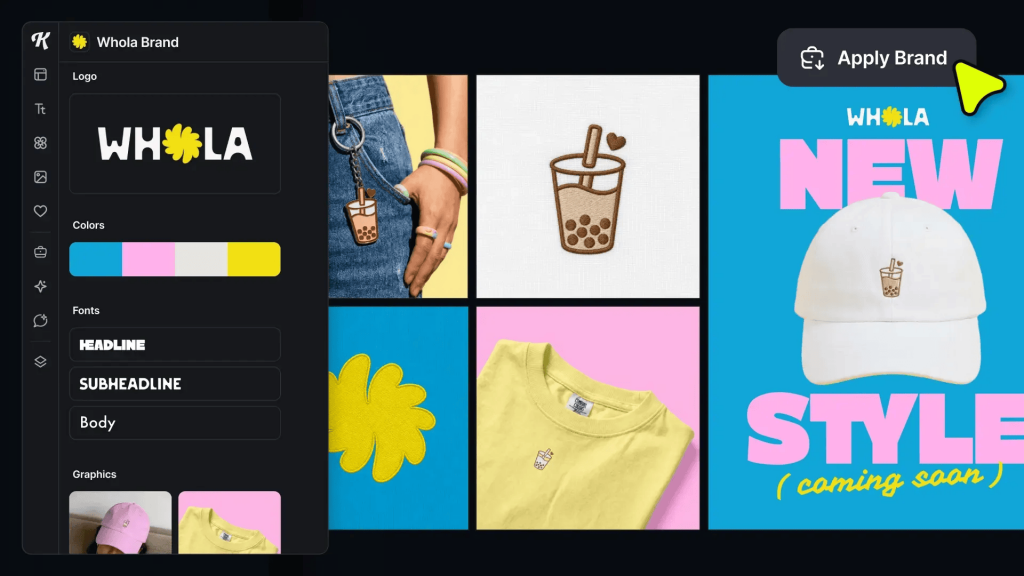
Tested verdict: Kittl wasn’t built for social graphics the way Adobe Express is, but for typography-heavy and print-ready artwork it outperformed most of the template tools on this list.
Best for: Print-on-demand sellers, merch and t-shirt designers, and small business owners who need editable vector artwork and product mockups without learning Illustrator.
Why it’s a good Adobe Express alternative: Adobe Express covers everyday social and marketing content well, but it isn’t built for sellers who need print-ready vector files. Kittl fills that gap — its typography engine gives far more control over text effects than Adobe Express offers, and everything exports as clean, scalable vector artwork rather than flat raster files. Add in AI tools for background removal, upscaling and mockup generation, and it becomes a strong pick for anyone designing products to sell rather than just post.
Key features:
- Advanced typography and text-effect tools
- Vector-based editor with SVG export
- AI background remover, image upscaler and vectorizer
- Realistic product mockup generator
- Print-on-demand and merch-focused templates
- Commercial licensing on paid plans
Free plan reality: The free plan is useful for testing the editor and exploring templates, but exports are capped at low resolution with no vector output, and designs can’t be used commercially. You’ll need Pro to unlock print-ready exports and a commercial license.
Pricing: Starts at $15/month, or $12/month billed annually (checked June 2026)
Platforms: Web
Exports: SVG, PNG, JPG, PDF
Avoid if: You mainly need quick social media graphics or animated content — Kittl’s strength is print and merch, not social-first design.
Our score: 4.2/5
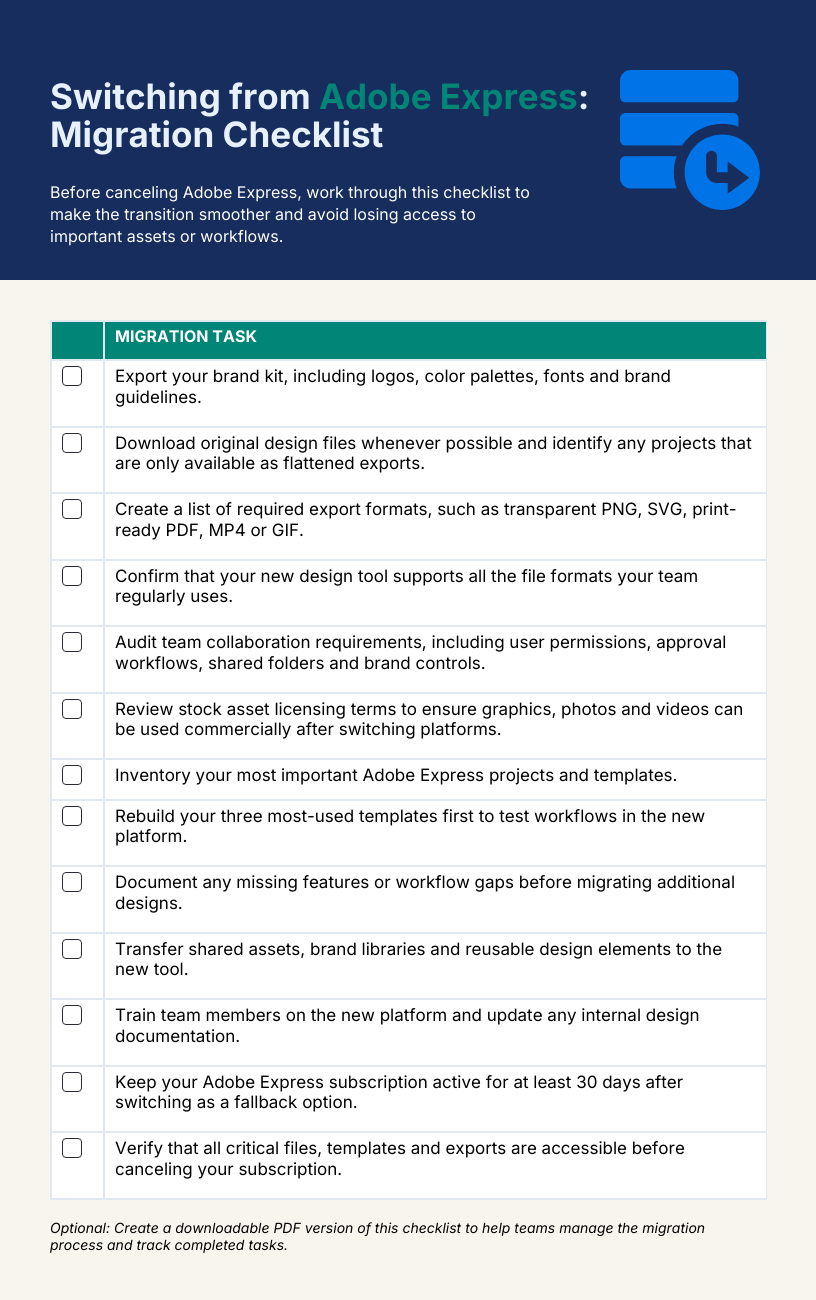
Switching from Adobe Express: Migration checklist
Before canceling Adobe Express, work through this checklist to make the transition smoother and avoid losing access to important assets or workflows.
Adobe Express alternatives FAQs
What is an alternative to Adobe Express?
Several tools can replace Adobe Express depending on your needs. Canva is the most popular all-around alternative, while Venngage is better for infographics and reports. Visme focuses on presentations and Photopea offers advanced image editing similar to Photoshop.
What app is similar to Adobe Express?
Canva is the app most similar to Adobe Express because both offer drag-and-drop design tools, templates, AI features and content creation workflows. VistaCreate is another close alternative, particularly for social media graphics, animated posts and marketing content.
Which is better: Adobe Express or Canva?
Canva is often the better choice for users who want a larger template library, more integrations and stronger collaboration features. Adobe Express works well for people already using Adobe products and those who prefer Adobe’s creative ecosystem.
What are the disadvantages of Adobe Express?
Adobe Express can feel limiting for users who need advanced editing controls, detailed brand management features or specialized design formats. Some premium features are locked behind paid plans and certain export or customization options are less flexible than dedicated design tools.
Is Adobe Express worth the money?
Adobe Express is worth the money for users who regularly create social media graphics, marketing materials and branded content. Its value increases if you already subscribe to Adobe Creative Cloud but alternatives like Venngage may offer more features at a similar price.
Is there a free alternative to Adobe Express?
Yes. Canva, Photopea, GIMP, Visme and VistaCreate all offer free plans or free versions. Photopea and GIMP are particularly attractive for users who want advanced editing tools without paying for a subscription.
What’s the best Adobe Express alternative for Mac?
Canva is the best Adobe Express alternative for most Mac users because it offers a dedicated macOS app, cloud syncing and a large template library. For advanced image editing, GIMP and Photopea are also strong options that work well on Mac.
Can I use these tools offline?
Some alternatives support offline use, while others are primarily web-based. GIMP offers full offline desktop editing on Windows, Mac and Linux. Canva provides limited offline functionality through its desktop app, while Photopea, Venngage and Visme generally require an internet connection.
Final recommendation
After testing these Adobe Express alternatives, I don’t think there’s a single “best” option for everyone. The right choice depends on the type of content you create most often and how you work with your team.
If you’re still narrowing down your options, I’d start with these three:
- Canva if you want the closest all-around replacement for Adobe Express, with strong collaboration features, a huge template library and an easy learning curve.
- Venngage if your work involves reports, infographics, presentations, business communications or data-heavy visuals.
- VistaCreate if your priority is creating social media content, especially posts that rely on animation and motion graphics.
I recommend avoid making a decision based on feature lists alone. Instead, pick two tools that seem like the best fit and recreate a real project in each one—a social media post, presentation, infographic or whatever you create most often. Compare the design process, export quality, collaboration experience and any limitations you encounter.
In most cases, you’ll know which platform feels right within a few days and can make a confident decision within a week.
If your focus is business communication, reports or infographics, I’d encourage you to try Venngage’s free plan.
Full disclosure: Venngage is one of the tools reviewed in this article. After testing it against the same criteria as the other platforms, I found it particularly strong for turning complex information into clear, professional visuals.








