






Expense reports sound simple: list the expense, attach the receipt, submit. But after spending time looking at real expense reports and how they’re actually reviewed, it’s clear why they cause so much frustration. Most of the time, the issue isn’t the spending, it’s how the report is put together.
While working on this guide, I went through expense reports across different tools, teams and company policies and paid attention to how finance teams review them—what they skim, where they pause and what usually leads to follow-up questions. The same problems kept coming up: missing context, unclear categories, and formats that don’t match how reviewers think.
That said, ’m not aiming to be an expert in every industry’s expense rules. Instead, this guide takes a curator’s approach, pulling together those patterns to explain why expense reports are structured the way they are and how small changes in structure can lead to faster approvals and fewer back-and-forth emails.
Expense report format structure
At its core, an expense report works best when it mirrors how reviewers process information: context first, numbers second, exceptions last.
Below is a clear, visual breakdown of the essential sections most finance teams expect, whether the report lives in a spreadsheet, a PDF or a design-based template. Depending on your industry, company policy or regulatory requirements, you can always add or expand sections to support more specific needs.
1. Report header (context at a glance)
This section answers the who, when, and why before anyone looks at numbers.
- Employee name and role
- Department
- Reporting period
- Business purpose (1–2 sentences)
2. Expense summary (fast scan section)
This section is designed for quick decision-making. Most reviewers don’t read expense reports line by line, they scan. The summary shows totals by category and the overall reimbursement amount so reviewers can assess reasonableness in seconds.
- Totals by category
- Overall reimbursement amount
For senior approvers, this is often the first and only section they look at. If the numbers make sense here, the report usually moves forward.
3. Detailed expense table (The source of truth)
This is where accuracy matters most. Keep it structured and consistent and include elements like:
- Date
- Vendor
- Category
- Description
- Amount
- Payment Method
- Receipt
4. Policy check & exceptions
Expense reports slow down when reviewers have to chase missing receipts or ask why an amount looks off. A simple policy confirmation upfront removes that friction, while built-in space for explanations provides context before questions come up.
What to include:
- Confirmation that all receipts are attached
- Confirmation that expenses comply with company policy
- A short explanation for overages, missing receipts, or unusual expenses
5. Approval & audit trail
Approval details turn an expense report into an official business record. Clear ownership and timestamps help teams track decisions, support audits and reference past approvals without confusion.
What to include:
- Name of the employee who submitted the report
- Name of the reviewer or manager
- Name of the final approver (if different)
- Approval date (and submission date, if needed)
Try this expense report format
Venngage’s expense report template example
A good example of this structure in action is Venngage’s Business Travel Expense Report Template. It follows the same logic we’ve outlined—context first, summary next, details last—but presents it in a more visual, scannable way.
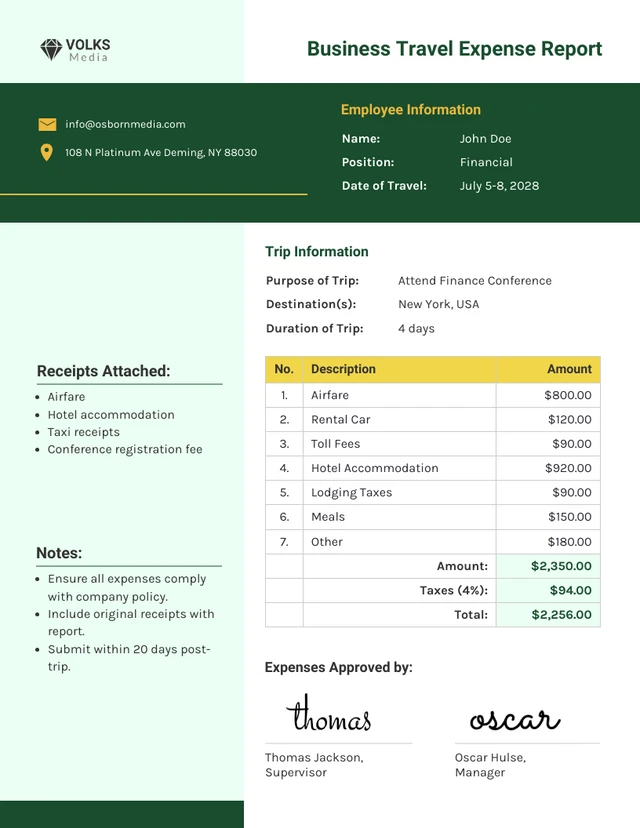
Instead of dense tables alone, the layout uses clear section breaks, visual grouping, and hierarchy to guide the reviewer’s eye. Trip details sit at the top, category totals are easy to spot, and line items are organized so finance teams can jump straight to what matters.
This works especially well for travel expenses, where reviewers often want to sanity-check totals before digging into receipts.
If your team processes expense reports quickly or in batches, visual structure helps reduce review time and missed details. You can explore this and similar designs in the Venngage expense report templates collection.
Or, if you’d rather skip formatting altogether, you can use Venngage’s AI Report Generator to turn a prompt like the one above into a ready-made expense report.
That’s exactly how this example was created. Starting with a structured prompt, then refining the layout visually so it’s easier to review, approve and reuse.
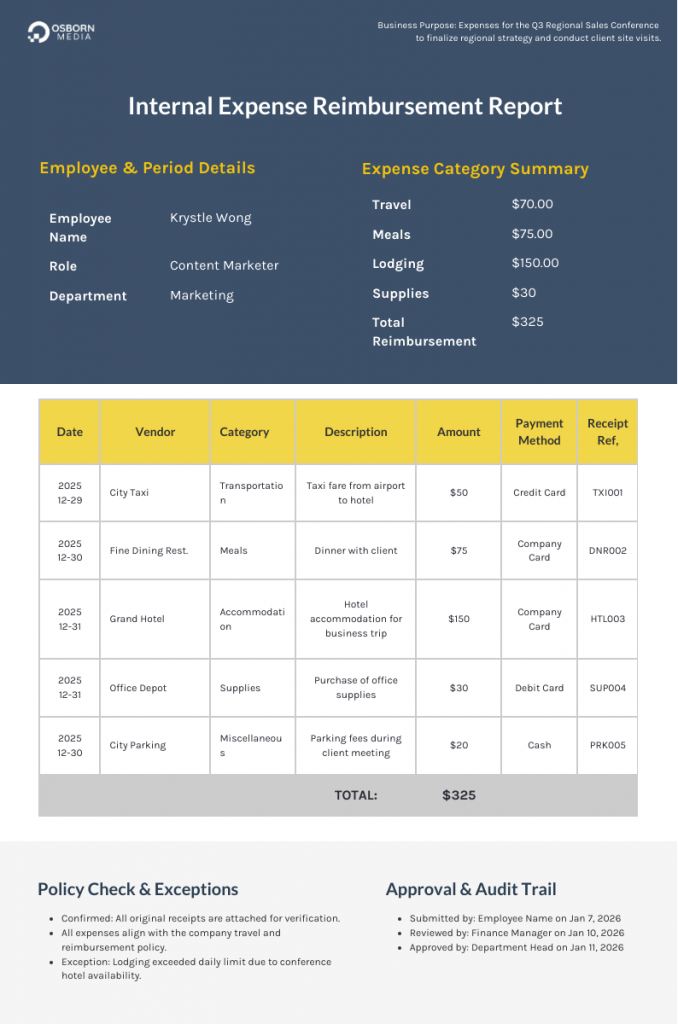
Why this expense report structure works (analyst’s note)
This structure didn’t come from a single framework or best-practice document. It’s based on patterns I kept seeing while reviewing expense templates, finance workflows and approval guidelines across teams.
Different industries, different tools but one same behavior. Approvers scan first, sanity-check second and only dig deeper when something doesn’t look right.
That’s the behavior this layout is built around.
Context comes before numbers
Before approving anything, reviewers want to understand why the expenses exist. When context is missing, even reasonable amounts can feel questionable.
What in the report structure helps:
- The Business Purpose field in the header
- The Description/Notes column in the expense table
Real-life example:
A $450 meal looks excessive at first glance. But when the Business Purpose clearly states “Client dinner during contract renewal,” and the line item includes a short description, the expense immediately makes sense within that context.
Why this works:
Context reduces uncertainty. When reviewers understand the purpose of the spending upfront, they evaluate amounts more fairly. Placing context at the top prevents reviewers from forming negative assumptions before they have the full picture.
Summary drives decisions
Most approvers don’t start with details. They look for a quick signal that spending is within reason.
What in the report structure helps:
- Expense summary table
- Totals by category
- Overall reimbursement amount
Real-life example:
A manager scanning reports sees $1,200 in travel and $80 in meals for a three-day trip. The numbers align with expectations, so the report is approved without scrolling further.
Why this works:
The summary supports fast pattern recognition. Humans are better at judging totals than parsing raw data. When category totals and overall reimbursement look reasonable, reviewers feel confident approving without digging into every line item.
Details support verification, not decision-making
Line items matter, but only when something looks off.
What in the report structure helps:
- Standardized expense table
- Consistent columns (date, vendor, category, amount)
- Receipt reference column
Real-life example:
Finance notices higher-than-usual lodging costs in the summary. They jump straight to the lodging entries, see conference hotel pricing, and move on without reviewing every receipt.
Why this works:
Keeping details structured and predictable allows reviewers to drill down efficiently. The table doesn’t compete for attention, it waits until it’s needed. This reduces cognitive load and keeps reviews focused.
Exceptions and accountability come last
Exceptions are easier to accept once the rest of the report makes sense.
What in the report structure helps:
- Policy confirmation checkboxes
- Exceptions / Notes section
- Approval and audit trail fields
Real-life example:
An over-limit meal includes a short note explaining a delayed flight and client meeting. The reviewer approves the expense and leaves a clear record if it’s questioned later.
Why this works:
Exceptions are easier to accept when read in context. Placing approvals and timestamps at the end formalizes the decision, creating accountability and protecting both employees and the company during audits or disputes.
Pro tips & best practices (from analyst research)
These best practices are drawn from common approval bottlenecks, finance review patterns, and repeated questions professionals raise when expense reports slow down or get rejected.
Each tip explains how to use a specific section of the expense report more effectively in real situations.
Business purpose & context
Think of this as setting the mood for the whole report. In real life, reviewers decide how skeptical to be right here. If the purpose is clear, the rest of the report gets a lot more grace. If it’s vague, suddenly every number feels suspicious.
How to make this work for you:
- Explain why the spending happened, not just what you did
- Be specific enough that the rest of the numbers make sense
- Write it so it still holds up if someone reads it weeks later
Expense summary
This is where most approvals actually happen. Managers aren’t digging into line items unless something looks off here. They glance at the totals, do a quick gut check and move on.
How to make this work for you:
- Scan the totals and ask yourself, “Would I question this?”
- Make sure the numbers line up with the story you told at the top
- If something looks high, explain it somewhere else before they ask
Detailed expense table
Reviewers come here only when they need to double-check something. The goal is to make that moment painless, not impressive.
How to make this work for you:
- Keep categories and descriptions consistent
- Use the description to add context, not repeat the vendor
- Make receipts easy to match to the bigger expenses
Policy check & exceptions
Most exceptions aren’t deal-breakers, they’re just unexplained. A short, calm note now beats a long explanation later.
How to make this work for you:
- Confirm receipts and policy stuff clearly
- Explain what happened without over-explaining
- Stick to facts, not apologies
Approval & audit trail
Even if everything feels obvious now, someone else may look at this later with zero context. Clear names and dates make that painless.
How to make this work for you:
- Fill in every name and date properly
- Don’t rely on “we talked about it” approvals
- Treat this like a real record, not a checkbox
Expense report format FAQs
Use the Exceptions / Notes section to explain the situation factually and briefly. Focus on constraints such as timing issues, client requirements or travel disruptions. Reviewers are more receptive when context is clear and unemotional.
2. What do I do if my manager approves expenses verbally but finance rejects the report?
Always rely on the approval trail, not verbal confirmation. If a manager pre-approves an exception, note it in the exceptions field and ensure their name appears in the approval section. Documentation protects everyone when interpretations differ later.
3. How detailed do expense descriptions need to be?
More detail isn’t better but relevant detail is. Descriptions should answer one question: Why does this expense make sense for the business? If that’s clear, reviewers rarely ask for more.
4. Why does my expense report get delayed even when everything is accurate?
Delays often come from missing context, not errors. Reports that lack summaries, explanations for unusual totals, or clear receipt confirmation force reviewers to pause. Structuring the report to match review behavior reduces friction even when the data is correct.








