

A new hire shouldn’t have to guess what to learn first, who to ask for help or what success looks like after 30, 60, or 90 days.
A new hire training plan gives managers and HR teams a clear roadmap for onboarding, from first-week tasks to long-term milestones.
In this guide, you’ll get a free, customizable new hire training plan template with a first-week schedule, a 30-60-90 day plan, assigned owners, check-ins and progress tracking so you can onboard employees more consistently and help them become productive faster.
Download the free new hire training plan template, or copy the preview below and customize it for your next employee.
Want to create impactful training plans? Venngage has easy-to-edit training plan templates that will help you improve the professional development of new managers.
Download the free new hire training plan template
Give every employee a consistent onboarding experience with a structured training plan. Use the template below to assign training, track progress, schedule check-ins and document milestones during the first 90 days.
What’s included in the template?
The template includes everything managers need to organize and track onboarding from preboarding through the first 90 days:
- New hire name, role, department, start date, and manager
- Training objectives
- First-day and first-week tasks
- 30-60-90 day milestones
- Role-specific training modules
- Compliance and policy training
- Systems, tools, and access setup
- Resources and training materials
- Responsible owners
- Check-in dates
- Progress/status tracking
- Manager notes and feedback
- Completion sign-off
Template formats
Note: The training plan template below can be copied into Excel, Google Sheets, Word or Google Docs. You can also create a customized version with Venngage’s AI Plan Generator and edit it online before exporting as PDF, PNG, PNG HD (plan-dependent), or an interactive share link.
30-60-90 day new hire training plan
Venngage template:
Note: Venngage doesn’t currently export native Google Sheets, Excel, Word or Google Docs files. If you need one of those formats, simply copy the table below into your preferred application, or generate a customized version with Venngage’s AI Plan Generator and edit it in Venngage before exporting.
Copyable version (available on this page):
Copy the template below into Google Sheets, Excel, Google Docs or Microsoft Word to customize it for your onboarding process.
Related: Change Management Process: Gaining Buy-in and Overcoming Resistance with Infographics
What is a new hire training plan?
A new hire training plan is a structured roadmap that outlines what a new employee needs to learn, complete, and demonstrate during their first days, weeks and months in a role.
It helps managers organize onboarding activities, set clear expectations, assign training, and measure progress toward role readiness.
They can often improve on areas that were previously unproductive for the company, such as customer service, employee training, and employee relations.
Unfortunately, new managers who have worked from the ground up may not have the experience necessary for the position.
For this reason, new manager training programs are necessary so they can learn how to be the type of manager the business needs.
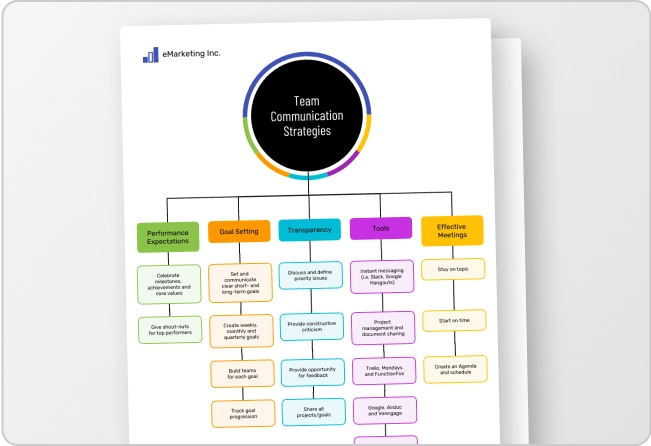
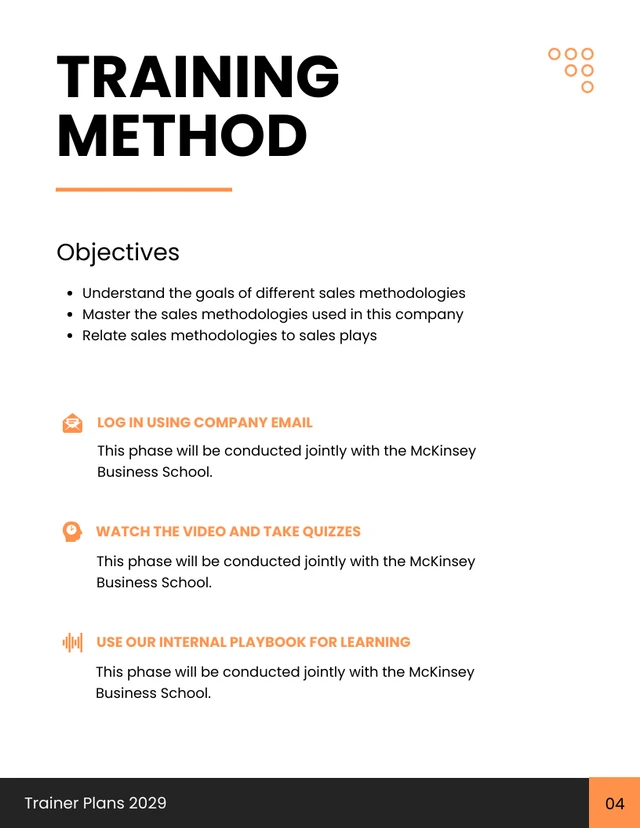
It’s best to use visuals in training, such as this mind map on company goals.

New hire training plan vs. onboarding checklist
This new employee onboarding checklist will make it easier to track the efficiency of new manager training programs.

Easily customize handbook templates in the Venngage editor by clicking any text box and replacing the placeholder content with your own.
Personalize the design by choosing from a wide selection of fonts, then adjust the font size, color, and styling with just a few clicks.
Share the completed handbook digitally so managers can access training whenever they need it, making onboarding and ongoing learning more flexible and convenient.
What should a new hire training plan include?
A comprehensive new hire training plan gives employees a clear path to becoming productive while helping managers track progress and provide timely support. Include the following components:
Disclaimer: Compliance requirements vary by location, industry and role. Use this template as a planning tool and consult your HR or legal compliance guidance for mandatory training requirements.
New hire training plan example: first week and 30-60-90 day schedule
The first week sets the foundation for long-term success. Focus on helping new employees understand the organization, become familiar with their role and gain confidence using the tools and processes they’ll rely on every day.
30-60-90 day new hire training plan
After the first week, organize onboarding into 30-day milestones so employees gradually move from learning to contributing independently.
How to create a training plan for new hires
Step 1: Define training objectives
Start by identifying what success looks like during the employee’s first 90 days. Clear, measurable objectives help managers prioritize training and evaluate progress.
Examples include:
- Complete compliance training by the end of week one.
- Demonstrate basic CRM usage by day 10.
- Handle routine customer tickets by day 30.
- Independently manage assigned accounts by day 60.
Step 2: Identify required training content
Outline everything the employee needs to learn before working independently. Typical training topics include:
- Company culture and onboarding
- Compliance and legal requirements
- Workplace safety and security
- Systems, tools, and role-specific workflows
Related: How to Ensure Team Participation in Training With Engaging Visuals
Step 3: Choose the right training methods
Most effective onboarding programs combine several learning methods instead of relying on a single format.
Common training methods include:
- Instructor-led sessions
- Self-paced e-learning
- Job shadowing
- Hands-on practice
- Mentoring or buddy support
- Role-play or simulations
A helpful guideline is the 70-20-10 learning model:
- 70% learning by doing
- 20% learning from others
- 10% formal training
On-demand learning has been a popular option as an employee training module in the last half-decade.
It offers new managers the freedom of learning when and where they wish. They can learn in shorter bursts or longer at their own pace.
This microlearning menu is a great way to onboard new managers using short, sharp lessons.

The benefits of microlearning are numerous, including greater personal development, offers enhanced flexibility in how you learn, and leads to reduced stress—especially when supported by strong platforms like Mindvalley Programs.
Step 4: Build the training schedule
Organize training into a logical sequence that prevents information overload.
Best practices include:
- Map training by day, week, or phase.
- Put foundational topics first.
- Avoid cramming too much into the first few days.
- Add time for questions and practice.
- Use 30-, 60-, and 90-day milestones.
Step 5: Assign owners and resources
Define who is responsible for each part of onboarding so nothing falls through the cracks.
For example:
- HR owns compliance and paperwork.
- IT owns access and equipment.
- The manager owns role expectations.
- A mentor or buddy supports informal questions.
Step 6: Set milestones and check-ins
Regular check-ins help identify challenges early and keep onboarding on track.
Recommended milestones include:
- End-of-day check-in during the first day or two
- End-of-week check-in
- 30-day review
- 60-day review
- 90-day review
Step 7: Evaluate and improve the plan
Review onboarding results after each new hire to improve future training plans.
Evaluate by:
- Reviewing completion status
- Asking the new hire what was clear or confusing
- Comparing outcomes against role expectations
- Updating the template for future hires
A simple way to improve your process is by following the ADDIE framework:
- Analysis
- Design
- Development
- Implementation
- Evaluation
A performance review quadrant will be beneficial for assessing the effectiveness of training programs. This Venngage template is simple to use and edit.

Related: Creating an Effective Performance Management System with Visual Communication
Use the 5 C’s of onboarding
A well-rounded onboarding program helps employees feel informed, capable and connected. The 5 C’s of onboarding provide a useful framework:
- Compliance: Complete required policies, legal requirements and workplace procedures.
- Clarification: Help employees understand their role, responsibilities and performance expectations.
- Confidence: Build skills through training, practice and regular feedback.
- Connection: Encourage relationships with teammates, managers and mentors.
- Culture: Introduce company values, mission and workplace norms.
Common new hire training mistakes to avoid
Avoid these common onboarding pitfalls:
- Starting without a written plan
- Giving too much information on day one
- Focusing only on paperwork
- Not assigning clear owners
- Using the same plan for every role without customization
- Skipping check-ins
- Not documenting feedback
How to customize the template by role
While every employee benefits from a consistent onboarding process, role-specific training helps new hires become productive faster. Customize your training plan by adding the knowledge, tools and responsibilities that are most relevant to each position.
Example customization by role
Every role requires different knowledge, tools, and performance expectations. While the core onboarding plan can stay the same, customize the training content to help each employee become productive as quickly as possible.
For example, new managers need training that helps them understand their responsibilities, delegate work effectively and collaborate with other departments.
Unlike executives, managers work closely with their teams every day, making people management, communication and coaching essential skills to develop early.
Here’s a leadership infographic that visualizes the difference between management skills and leadership skills.

By contrast, a sales representative benefits from CRM training, product messaging, objection handling, and call shadowing before managing customer conversations independently.
A customer support specialist may focus on ticketing systems, escalation procedures, the knowledge base and communication guidelines, while an operations employee might spend more time learning standard operating procedures, safety requirements and reporting workflows.
For example, a sales representative might use a flowchart like the one pager below to understand the sales process, from qualifying leads to closing deals. Visualizing each step helps new hires learn the workflow faster and understand how their responsibilities contribute to the team’s revenue goals.

The same principle applies to remote employees. In addition to role-specific training, they may need guidance on communication norms, virtual collaboration tools, asynchronous workflows and security best practices to work effectively from day one.
For remote workers, you can also share a career or onboarding roadmap like the example below. A visual roadmap helps new hires understand their onboarding journey, key milestones and growth opportunities while keeping them aligned with expectations from anywhere.

Customizing the training plan by role helps new hires focus on the skills that matter most, reduces information overload, and creates a more relevant onboarding experience.
Regardless of the role, every new hire training plan should help employees:
- Understand the company’s mission, values, and culture.
- Learn the tools, systems, and processes needed for their role.
- Build relationships with managers, teammates, and key stakeholders.
- Develop the skills and confidence to perform their responsibilities independently.
- Set clear goals and expectations for ongoing growth and performance.
Therefore, new manager training should include these general objectives to improve learning and development:
- Be aware of the company’s values and mission statement
- Create an HR plan that you and your team can implement right away
- Be open to learning new skills
- Have a list of people to talk to, including employees, managers, and customers
- Establish trust with employees
Related: 8 Ways to Use Visuals in Strategic HR Management
How to create a new hire training plan in Excel or Google Sheets
A spreadsheet makes it easy to organize onboarding tasks, assign responsibilities, and track progress throughout a new hire’s first 90 days.
Include these columns in your training plan:
Spreadsheet setup tips:
- Use dropdown status labels for consistent progress tracking.
- Color-code tasks by onboarding phase.
- Add filters to sort by owner or due date.
- Create separate tabs for the first week, the 30-60-90 day plan, and role-specific training.
- Use conditional formatting to highlight overdue tasks.
How to measure new hire training success
Measuring onboarding success helps you identify what’s working and where your training plan can improve. Track a combination of learning, performance and employee experience metrics throughout the first 90 days.
New hire training plan template FAQs
Find out more about training programs for new managers as we answer some of the most common questions from trainers.
Is a new hire training plan legally required?
Usually not. A new hire training plan is a best-practice document that helps organize onboarding and track progress. However, some compliance training may be legally required depending on your location, industry and the employee’s role.
What should you do if a new hire falls behind?
Review the training plan to identify any blockers, adjust timelines if needed, provide additional support or coaching, document feedback and schedule a follow-up check-in to monitor progress.
Can this template be used for interns or contractors?
Yes. You can use the same template, but it’s a good idea to shorten the timeline and customize the training based on the individual’s role. Update the compliance requirements, system access, role expectations and sign-off process as needed.
Create your new hire training plan with Venngage
A strong new hire training plan gives every employee one thing from day one: clarity. Instead of relying on scattered notes or last-minute training, managers and new hires can follow a clear roadmap that outlines objectives, tasks, timelines, owners and check-ins.
A structured plan makes onboarding more consistent, helps new hires become productive faster and gives managers an easy way to track progress. It’s also simple to customize for different roles, teams and departments.
Start with the template above, choose the format that works best for your team, add your first-week tasks and 30-60-90 day milestones, then customize it in Venngage to create a reusable onboarding resource for future hires.